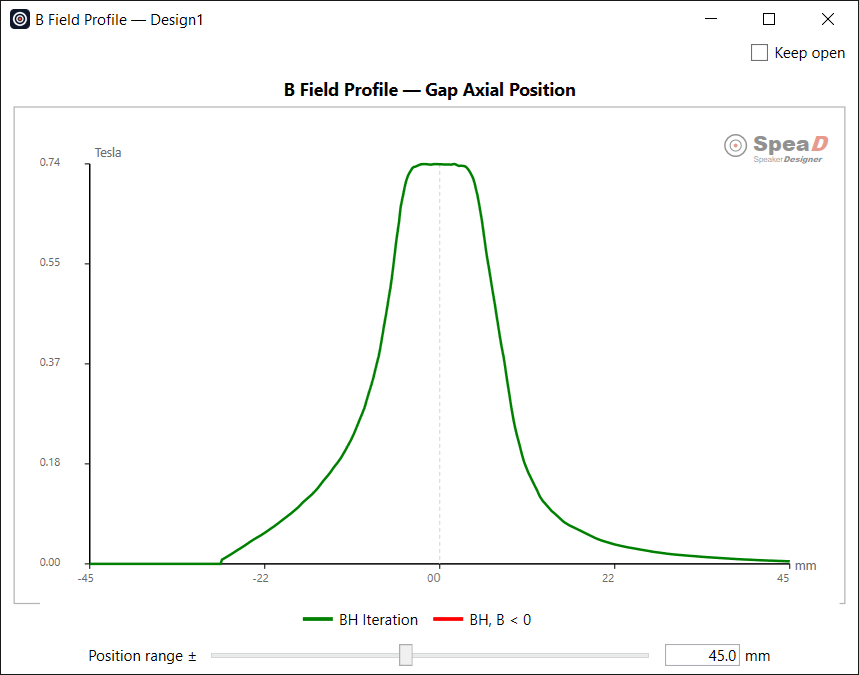
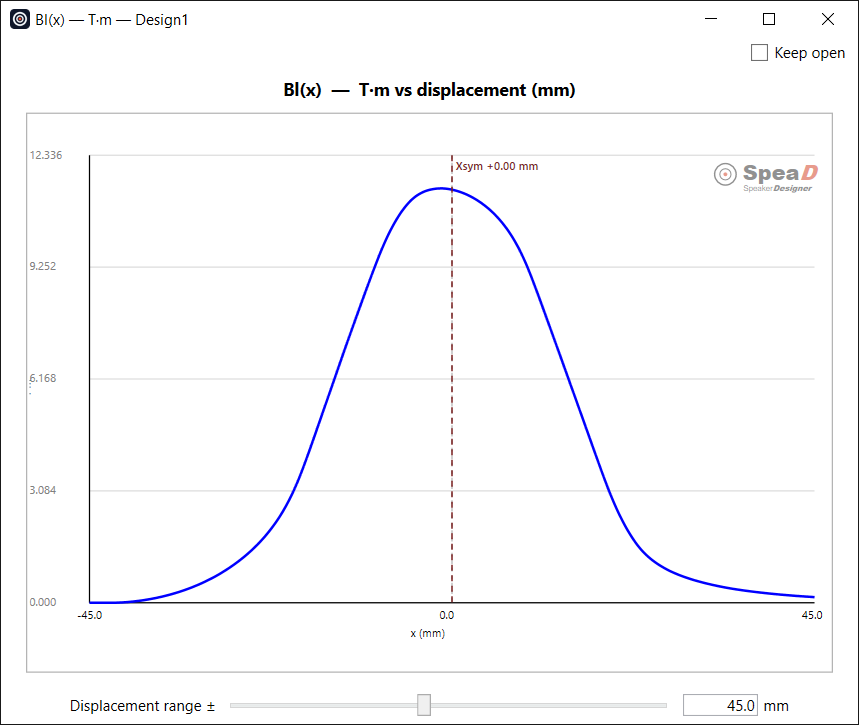
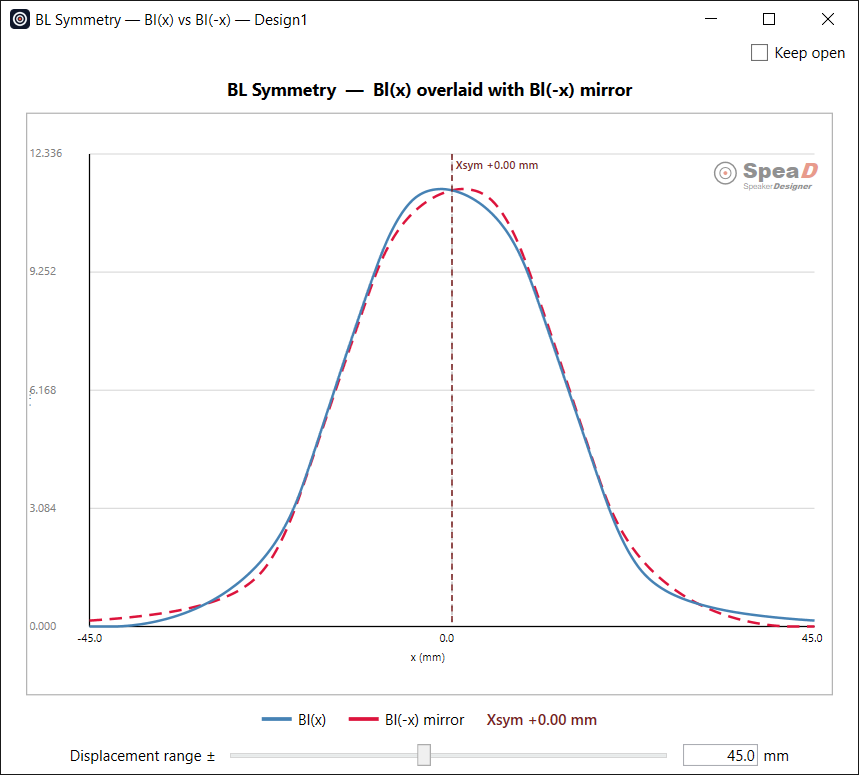
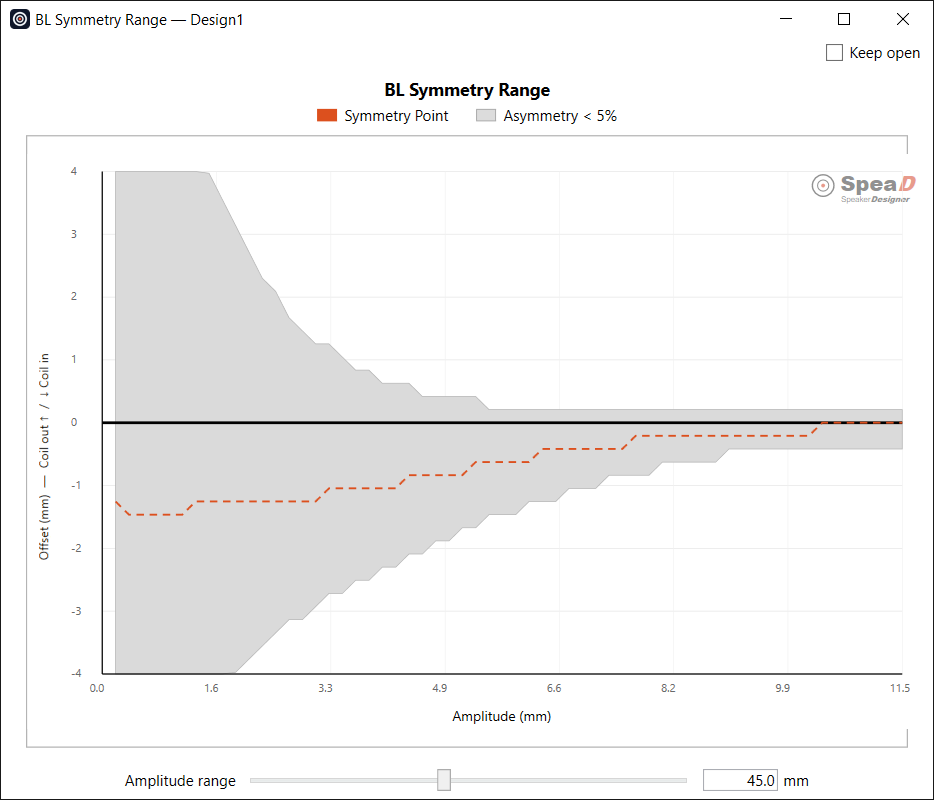
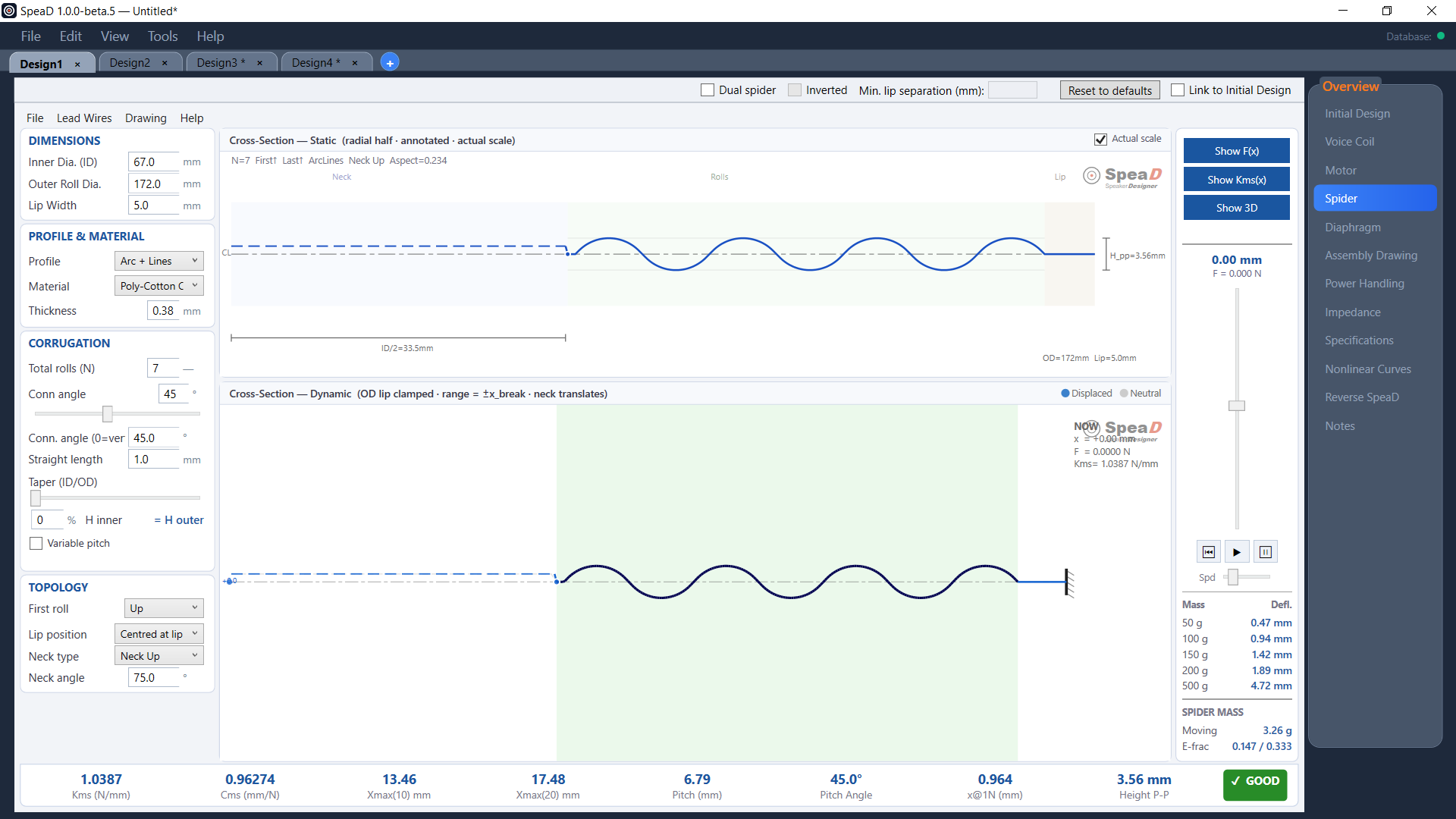
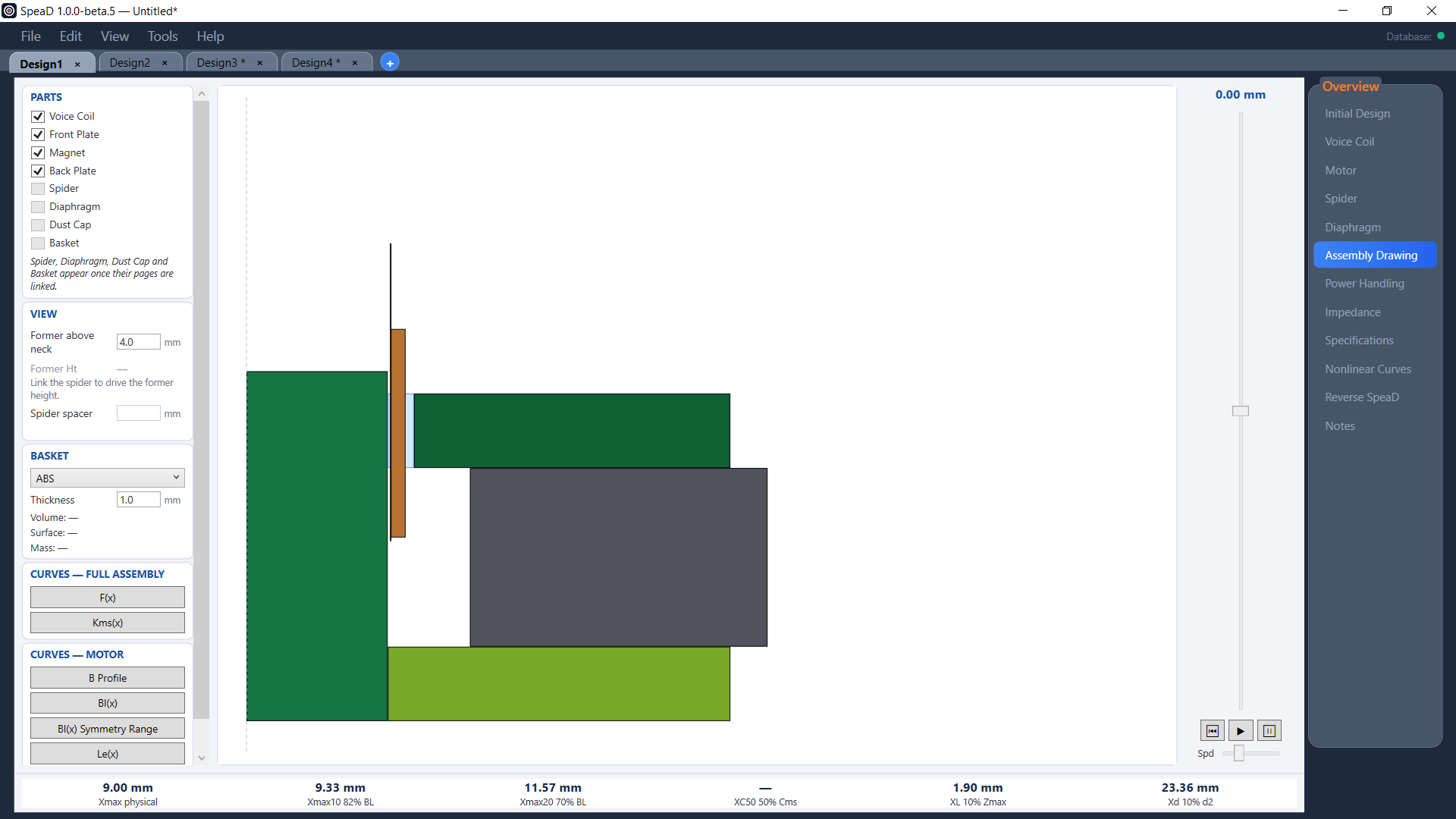
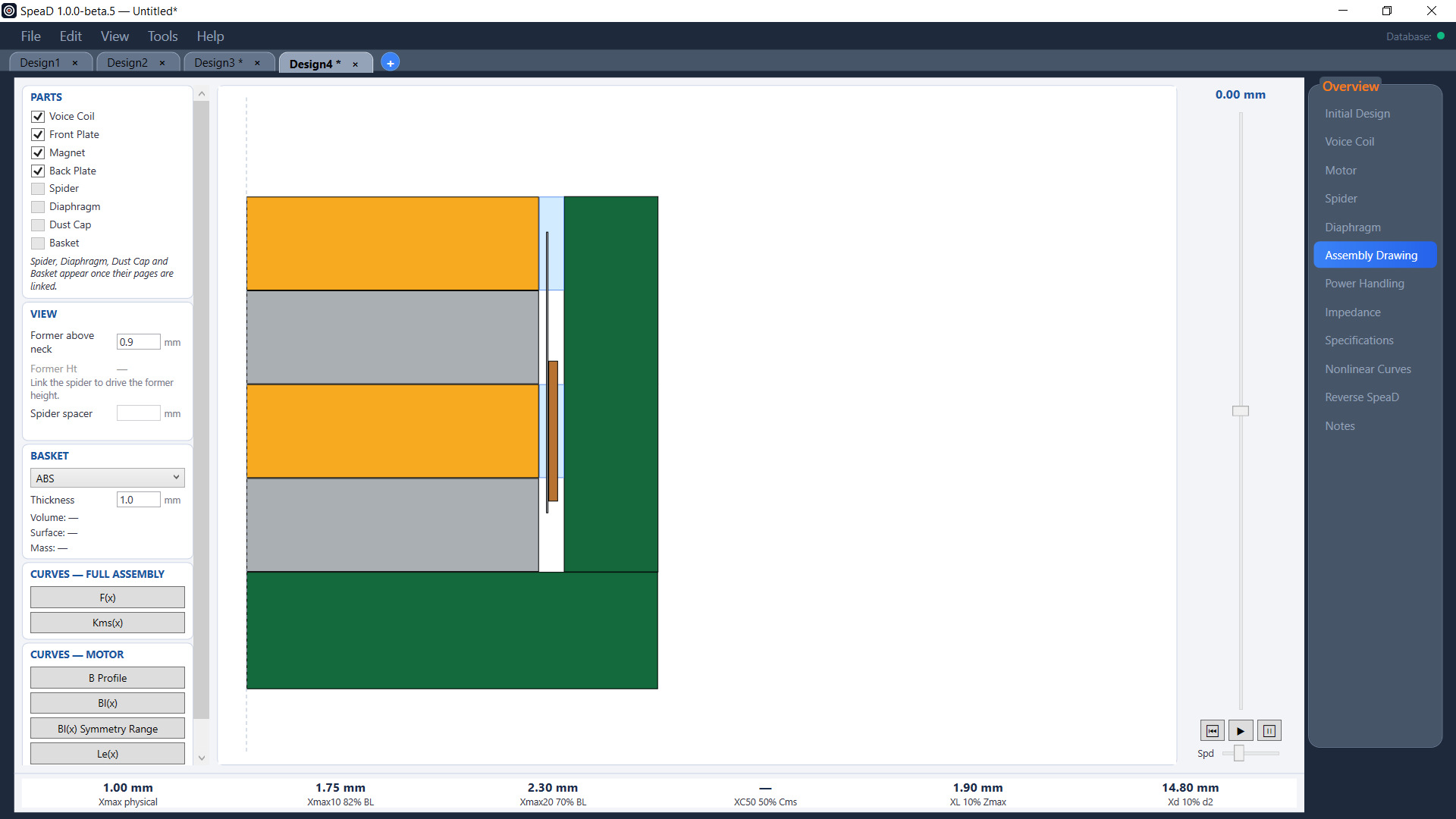
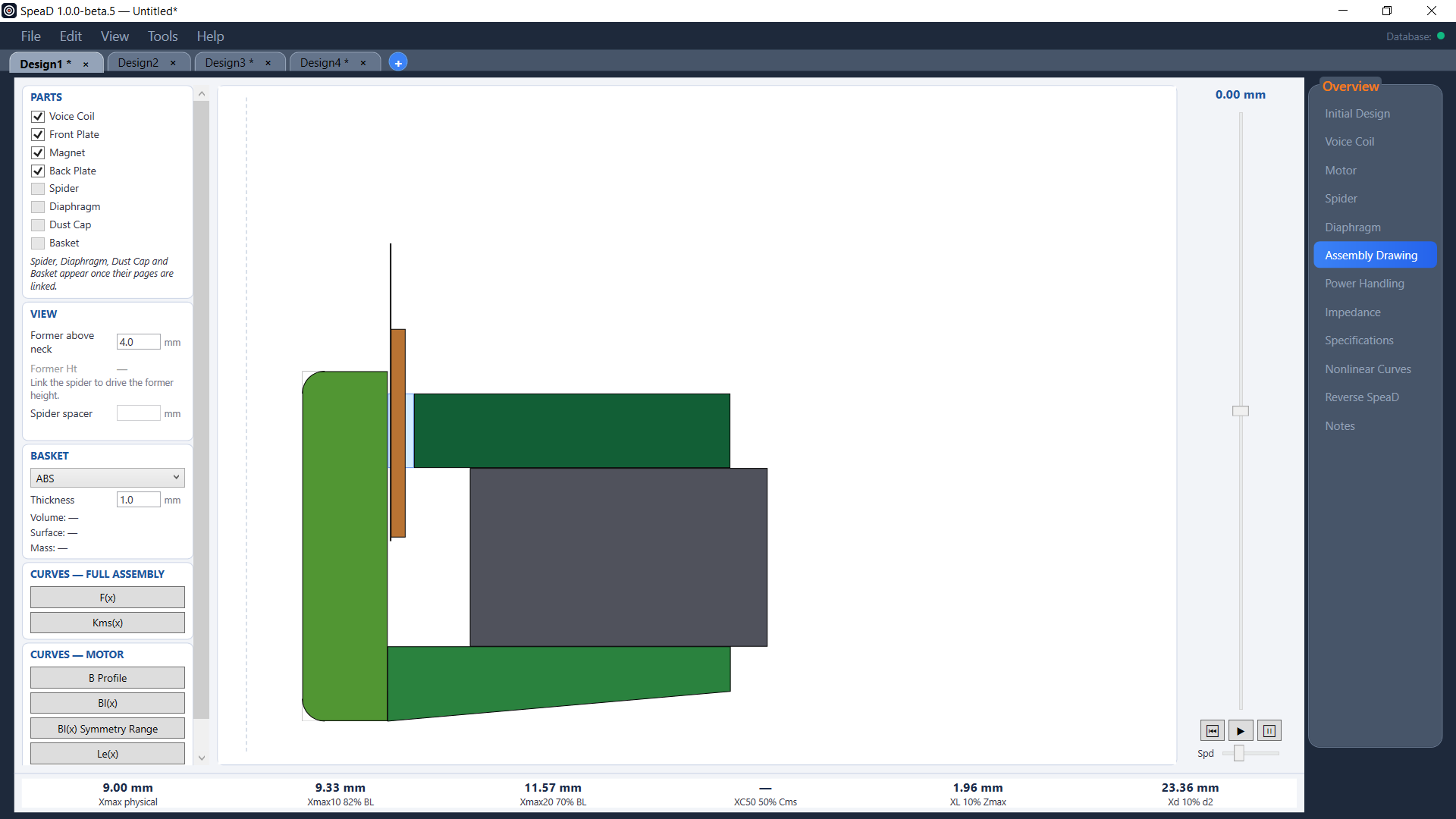
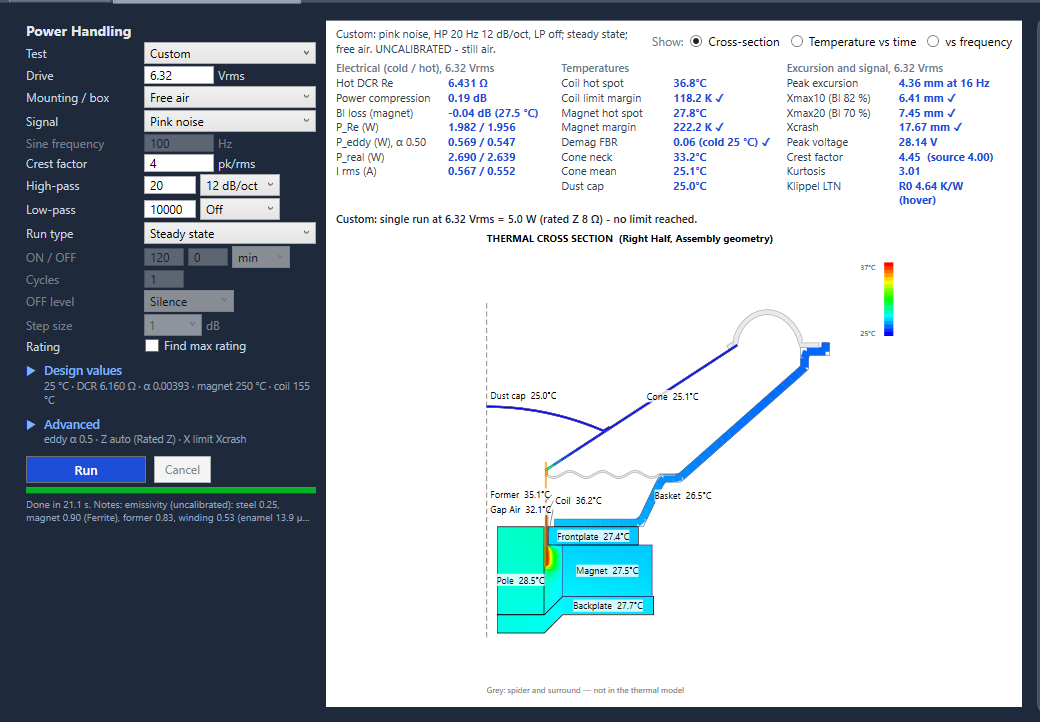
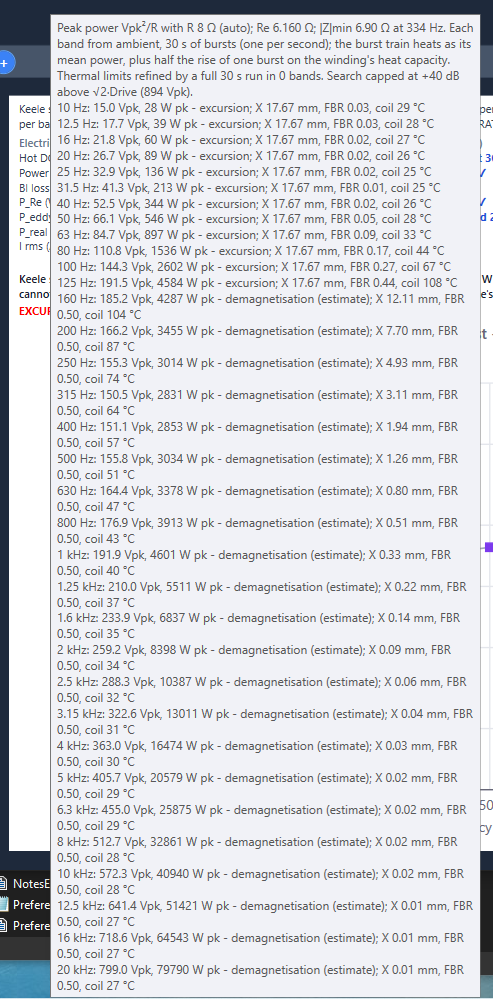
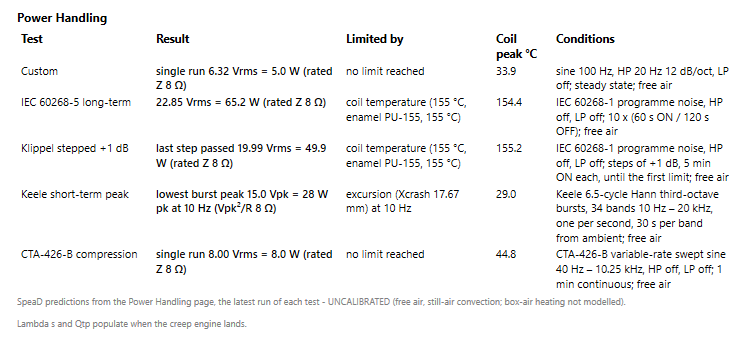
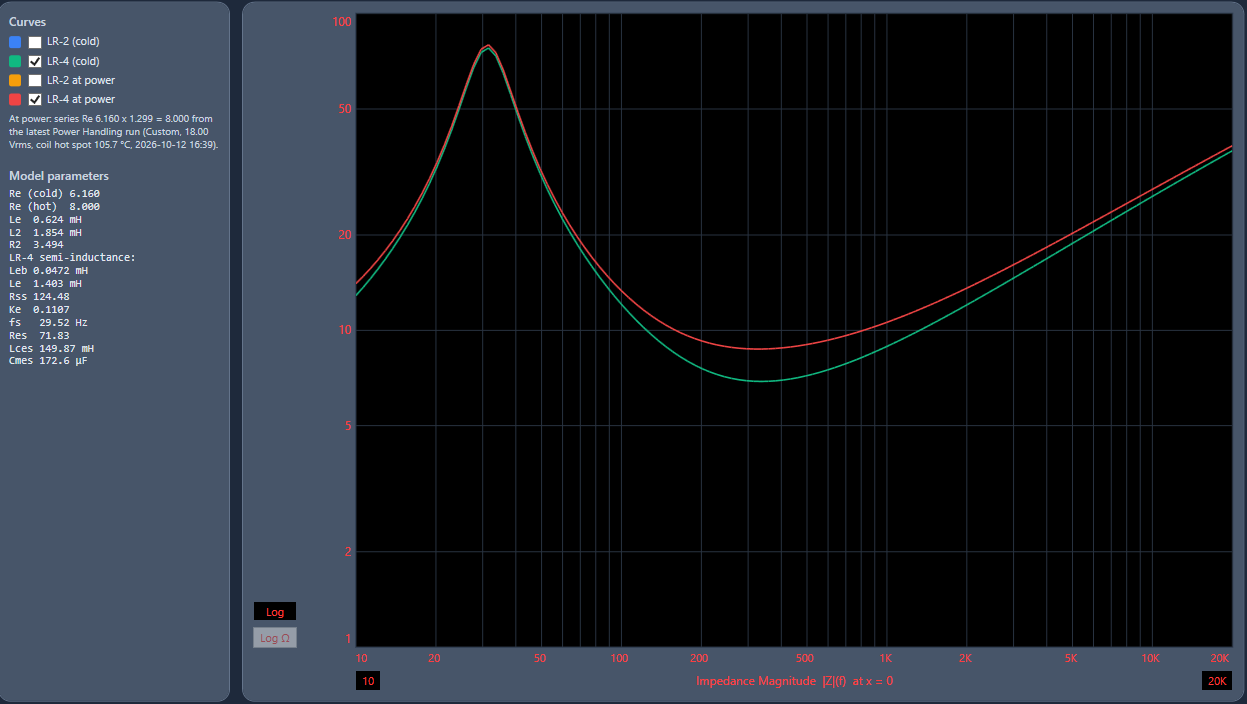
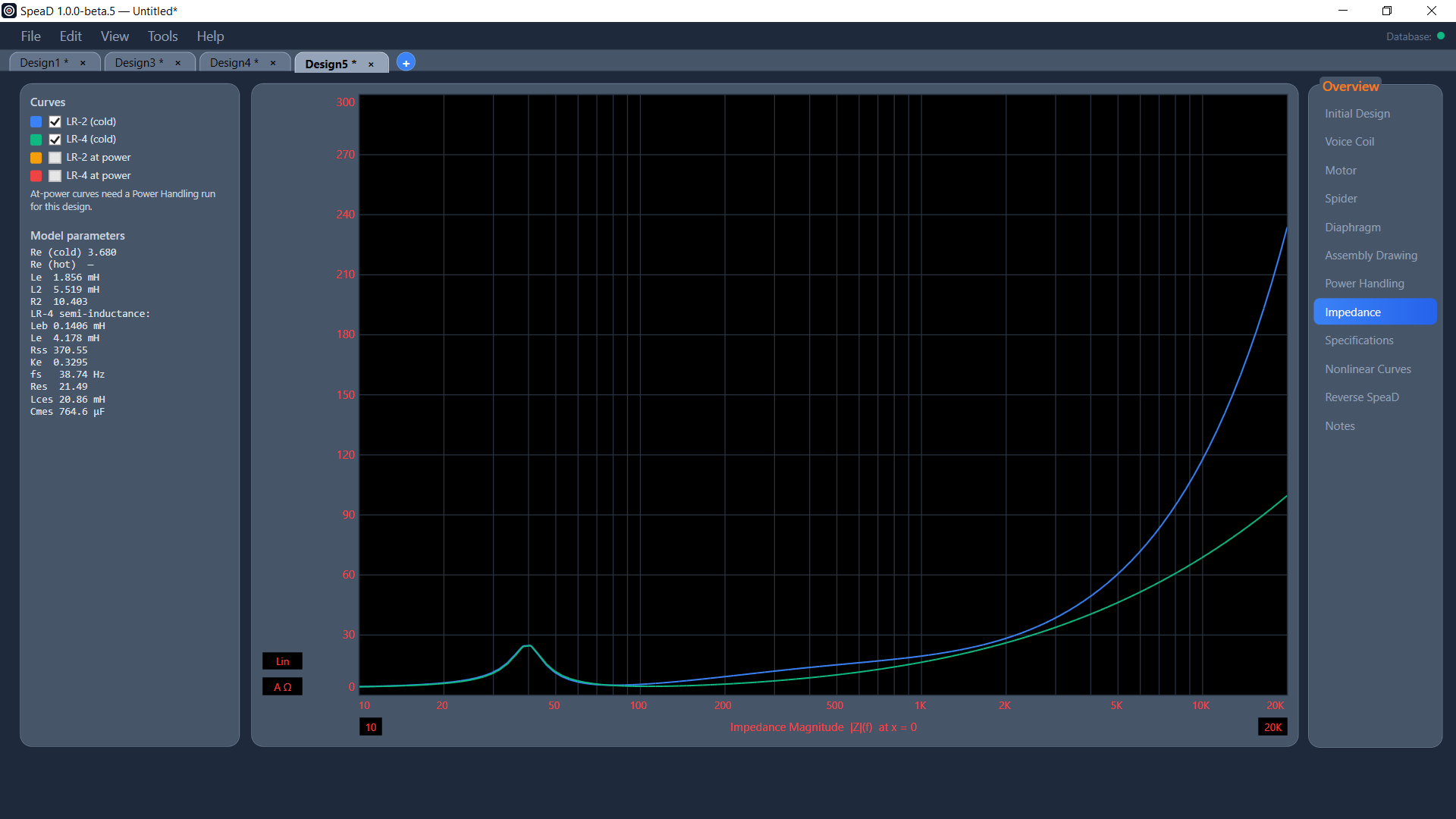
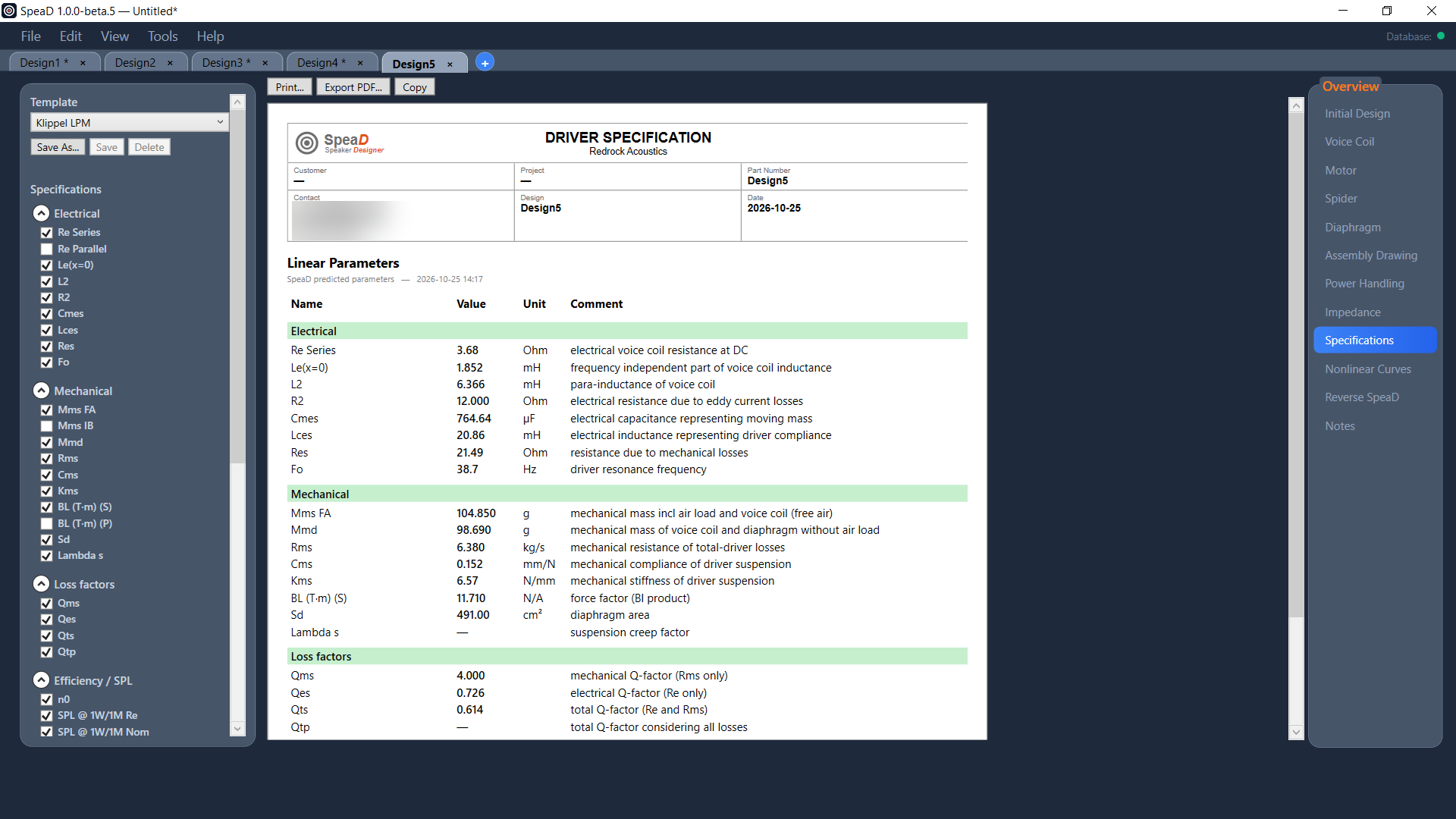
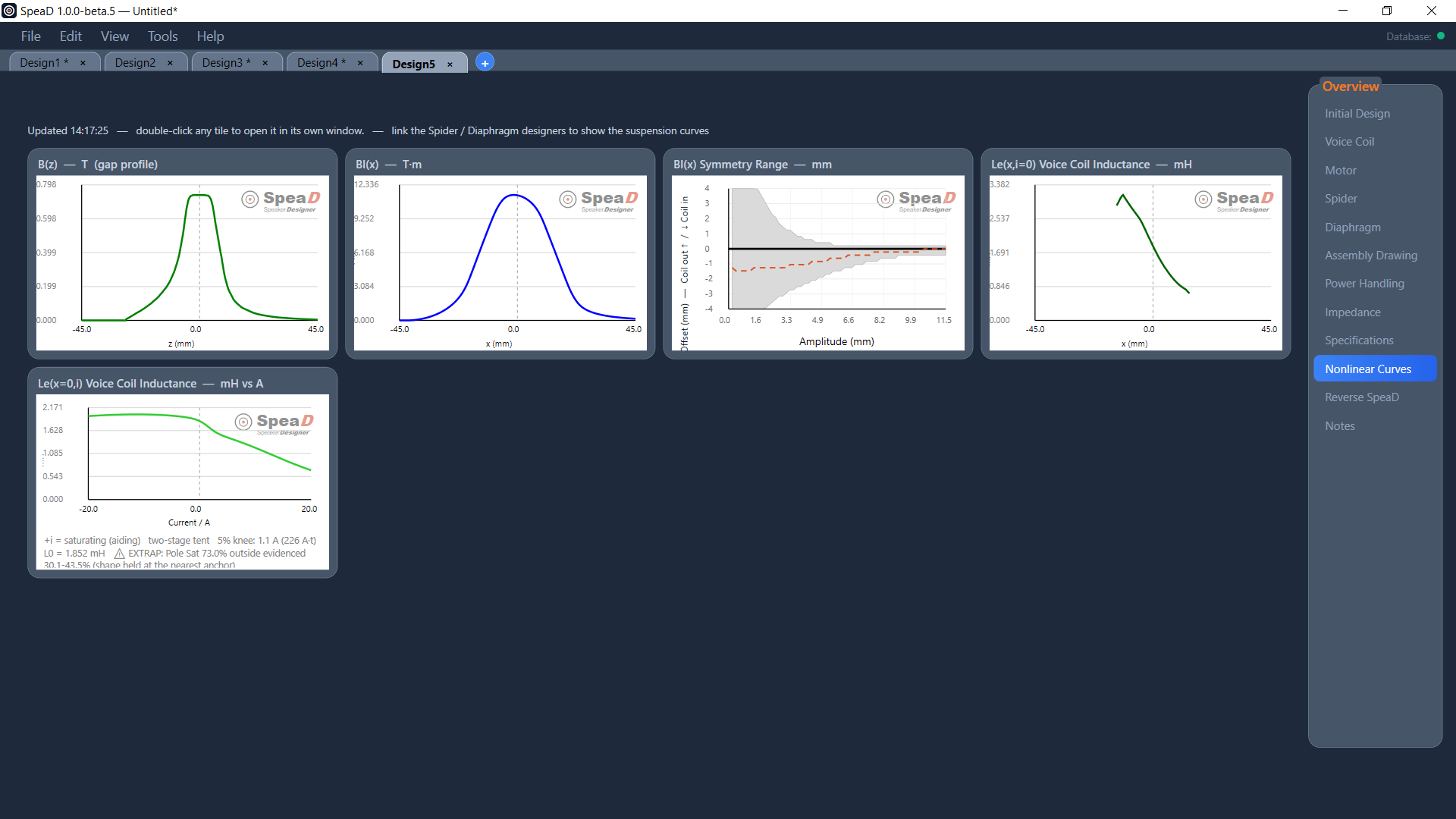
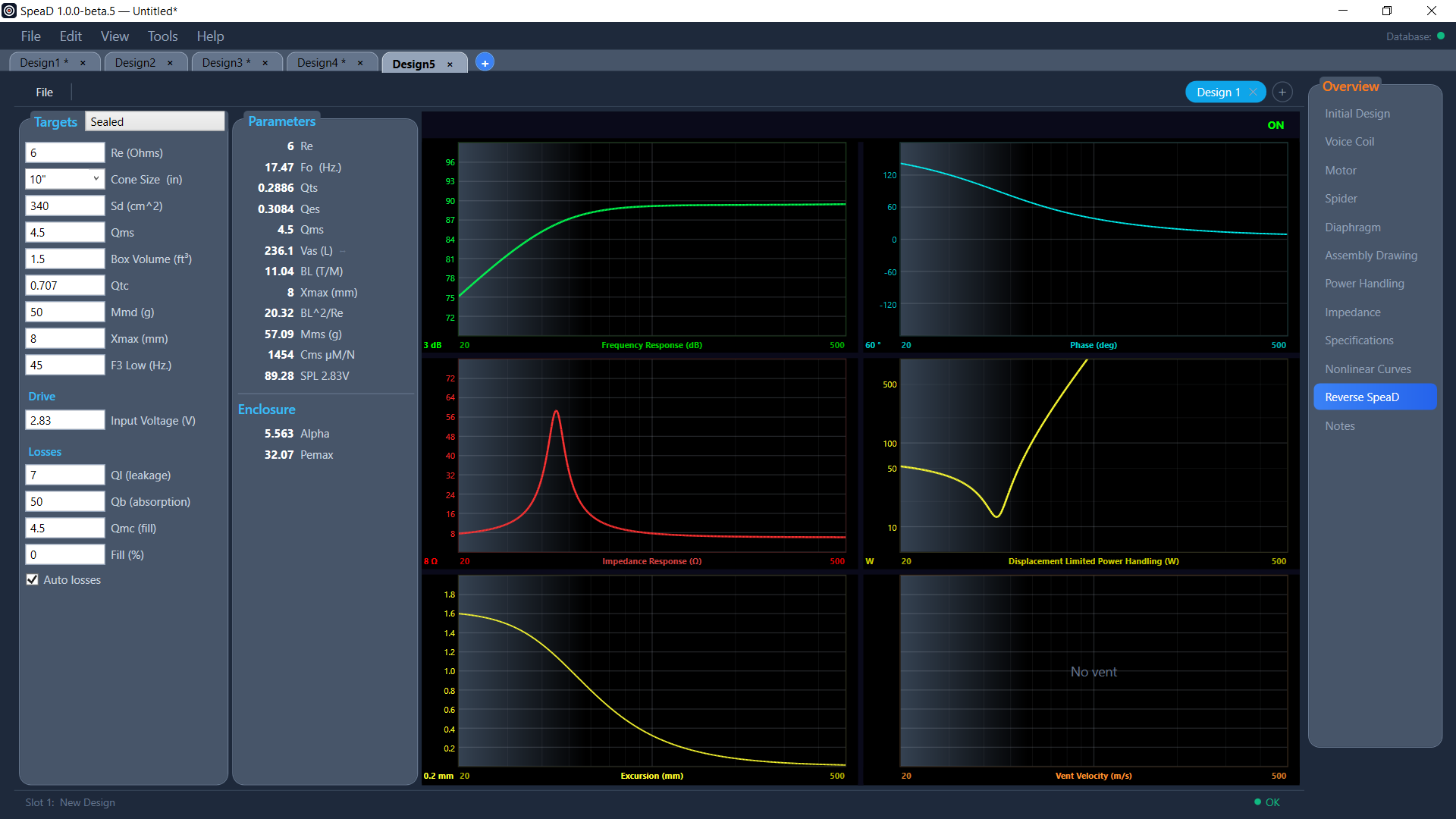
The page where a driver is designed — coil, motor, soft parts, and the parameters they resolve to. Everything downstream reads from here.
Initial Design is where a driver is designed. Nearly every value that defines the driver is typed here, and the rest of SpeaD reads from it: the Motor, Spider, Diaphragm, Power Handling, Specifications and Nonlinear Curves tabs are all downstream of this one page.
The page is built from input panels you type into and calculated-values panels reporting results — most sitting directly beneath the input panel they belong to, and Parameters running full height and summarising the finished driver. They are all live — there is no Calculate button anywhere on the page. Type a value and press Tab or Enter, and every affected panel updates.
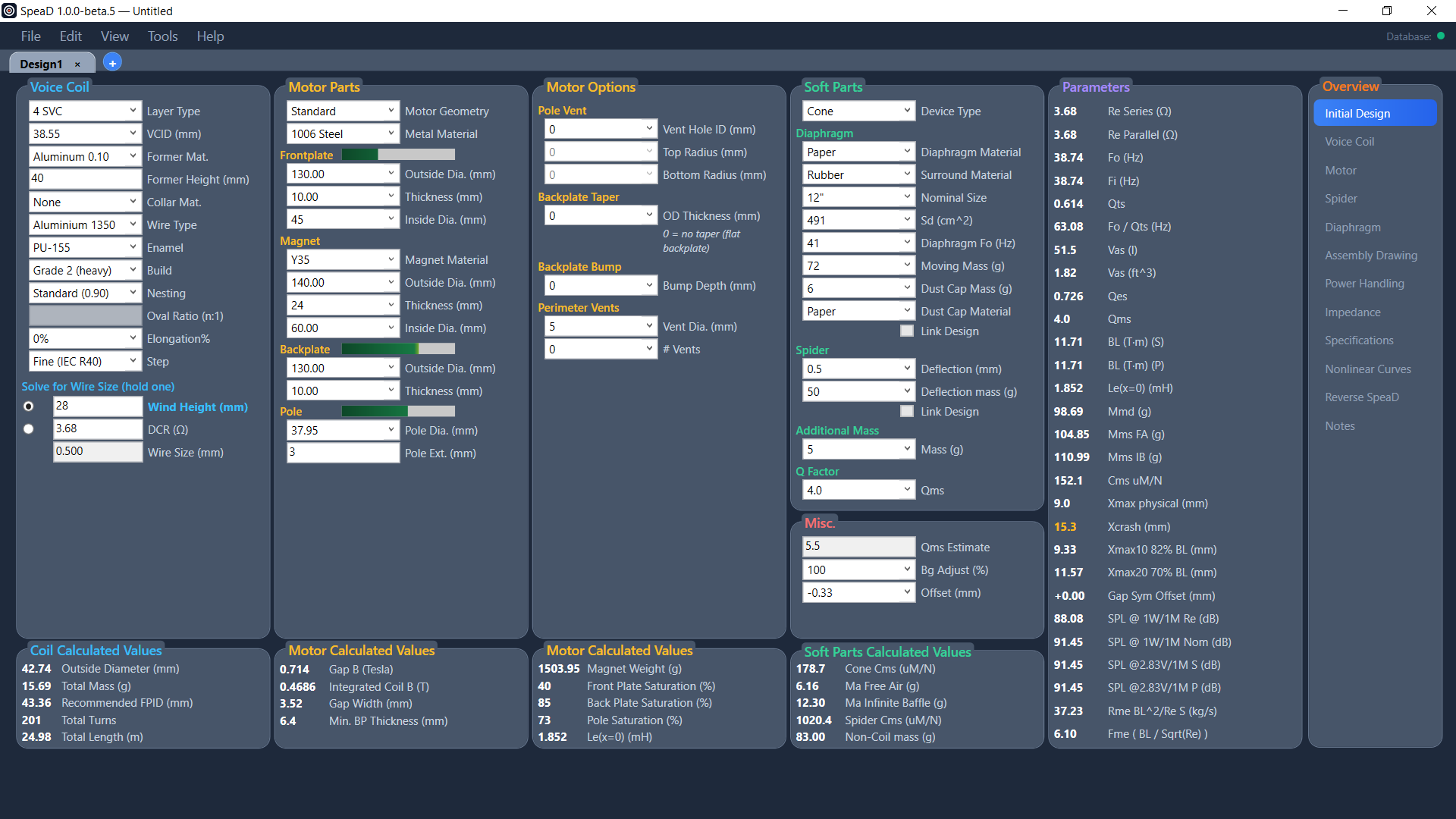
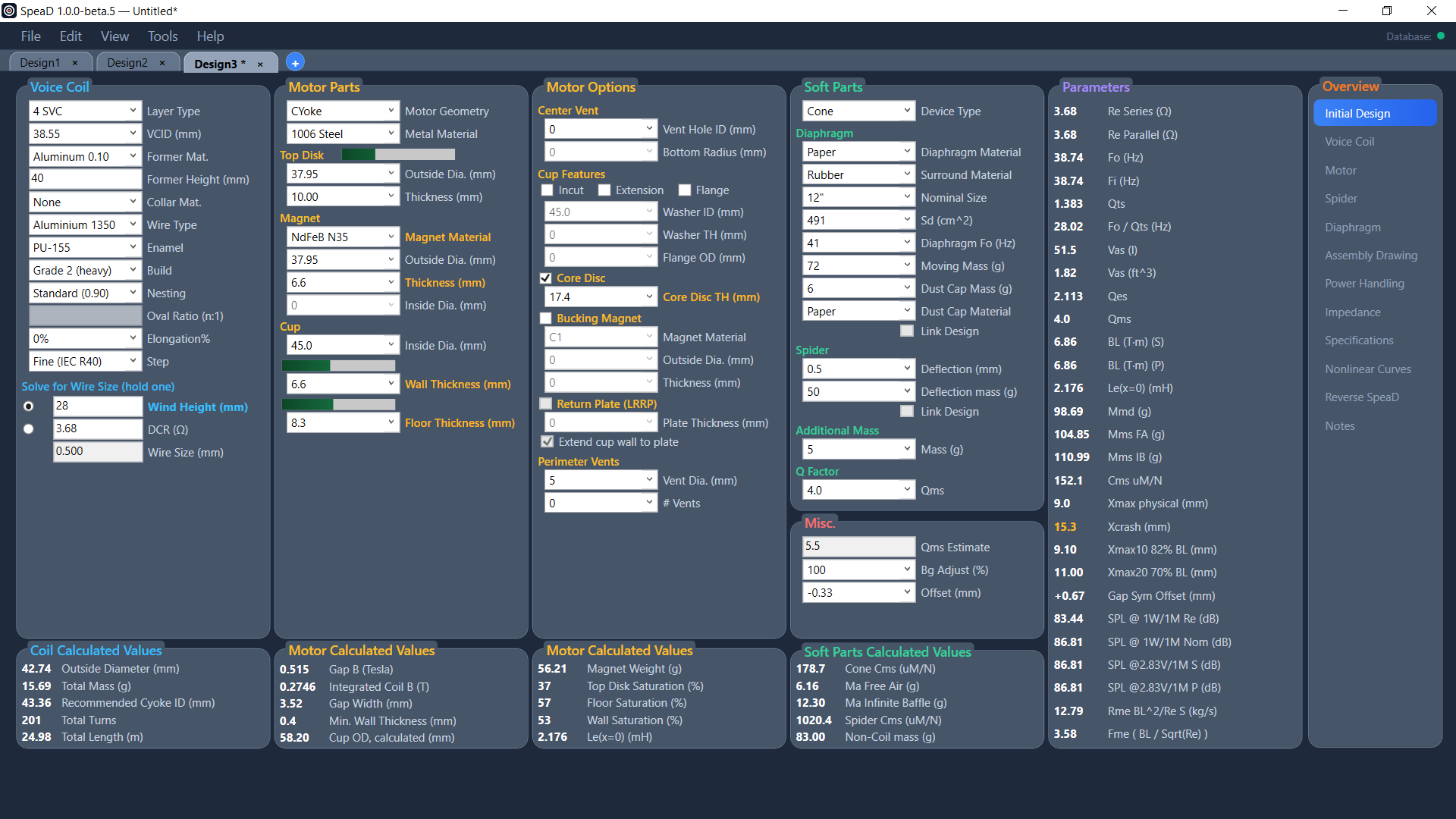
The Initial Design page with the start design of a new tab. Inputs across the top, calculated values along the bottom, Parameters and the Overview navigator on the right. Click the image to open it full size.
Because the whole page recalculates every time you press Tab or Enter, the fastest way to learn a design is to change one number and watch which panels move. A dimension that changes nothing downstream is telling you something too.
The page reads left to right in six columns. The first four are the design itself — Voice Coil, Motor Parts, Motor Options, and Soft Parts with Misc. beneath it. The fifth is Parameters, running full height. The sixth is Overview, which is not a design panel at all but the navigator that moves you between SpeaD’s tabs.
The calculated-values panels do not sit inside those columns. They run as one row across the bottom of the page — Coil Calculated Values, two Motor Calculated Values panels and Soft Parts Calculated Values — each aligned under the input panel it belongs to, so results always read directly below their inputs.
Voice Coil
Column 1 · input
The coil: former, wire, winding architecture, and the solve targets. Covered in Voice Coil.
Coil Calculated Values
Bottom row, under Voice Coil · output
Coil outside diameter, mass, Recommended FPID (Recommended Cyoke ID on a CYoke), turns and wire length. See Coil Calculated Values.
Motor Parts
Column 2 · input
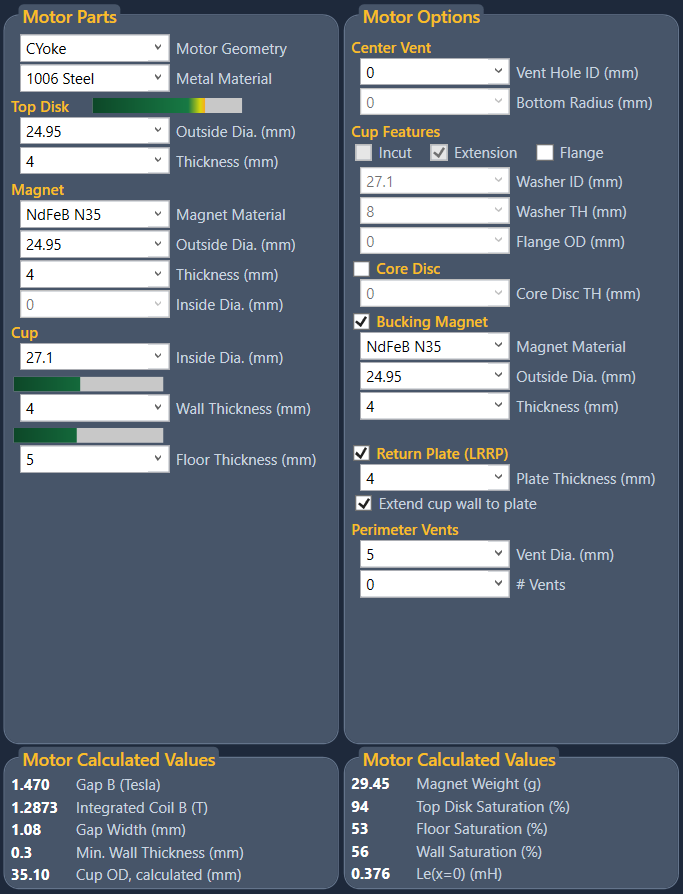
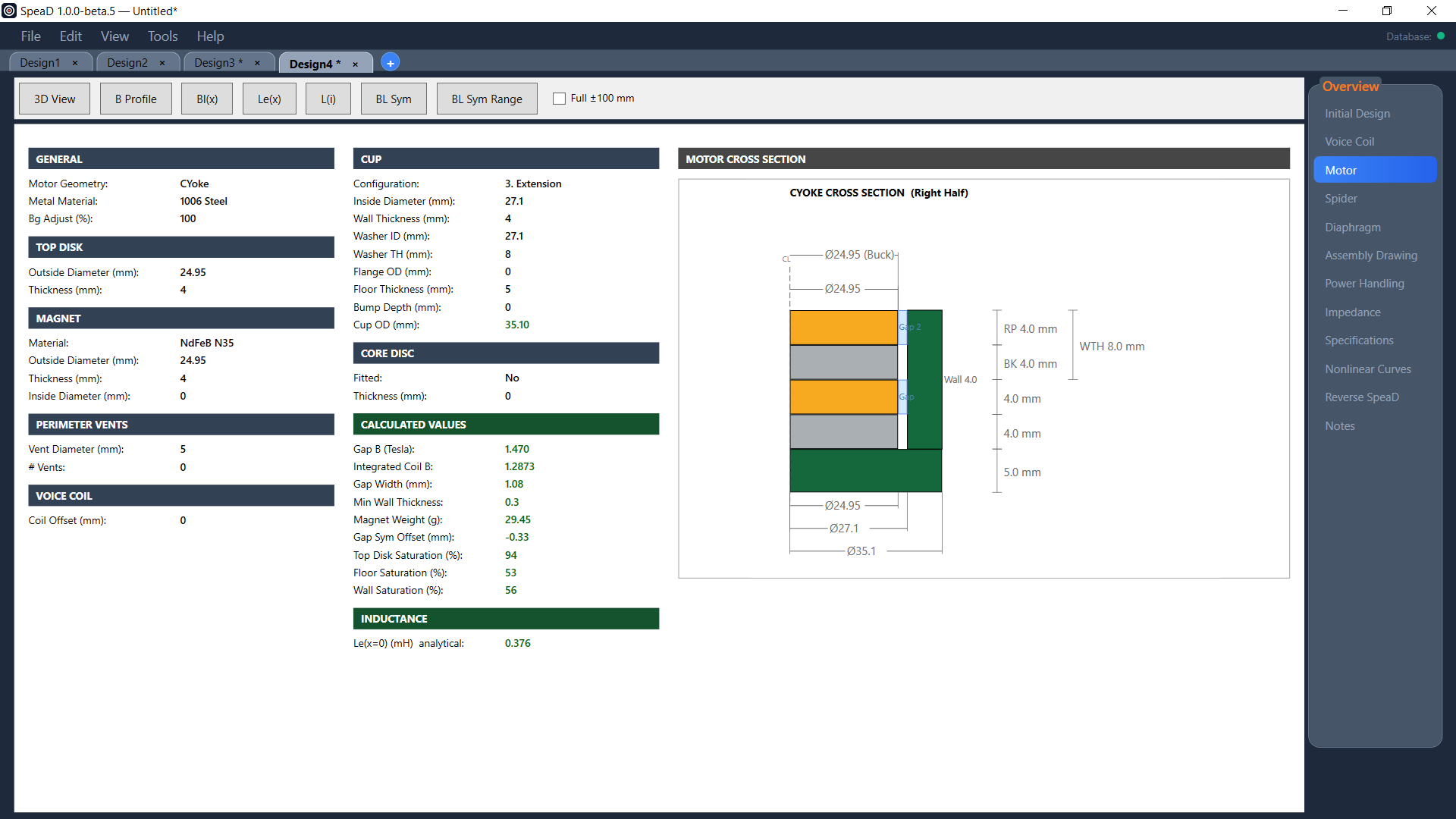
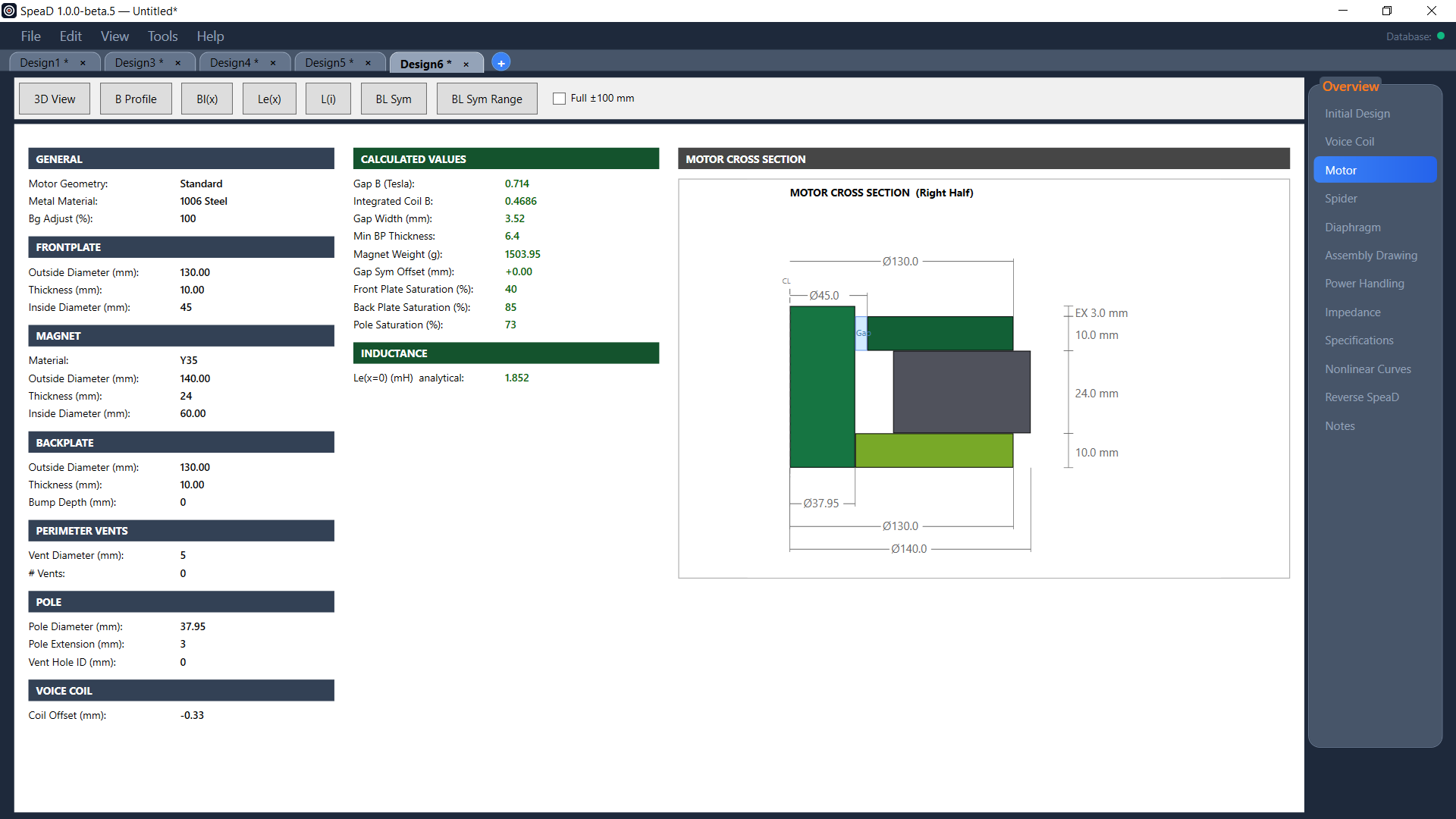
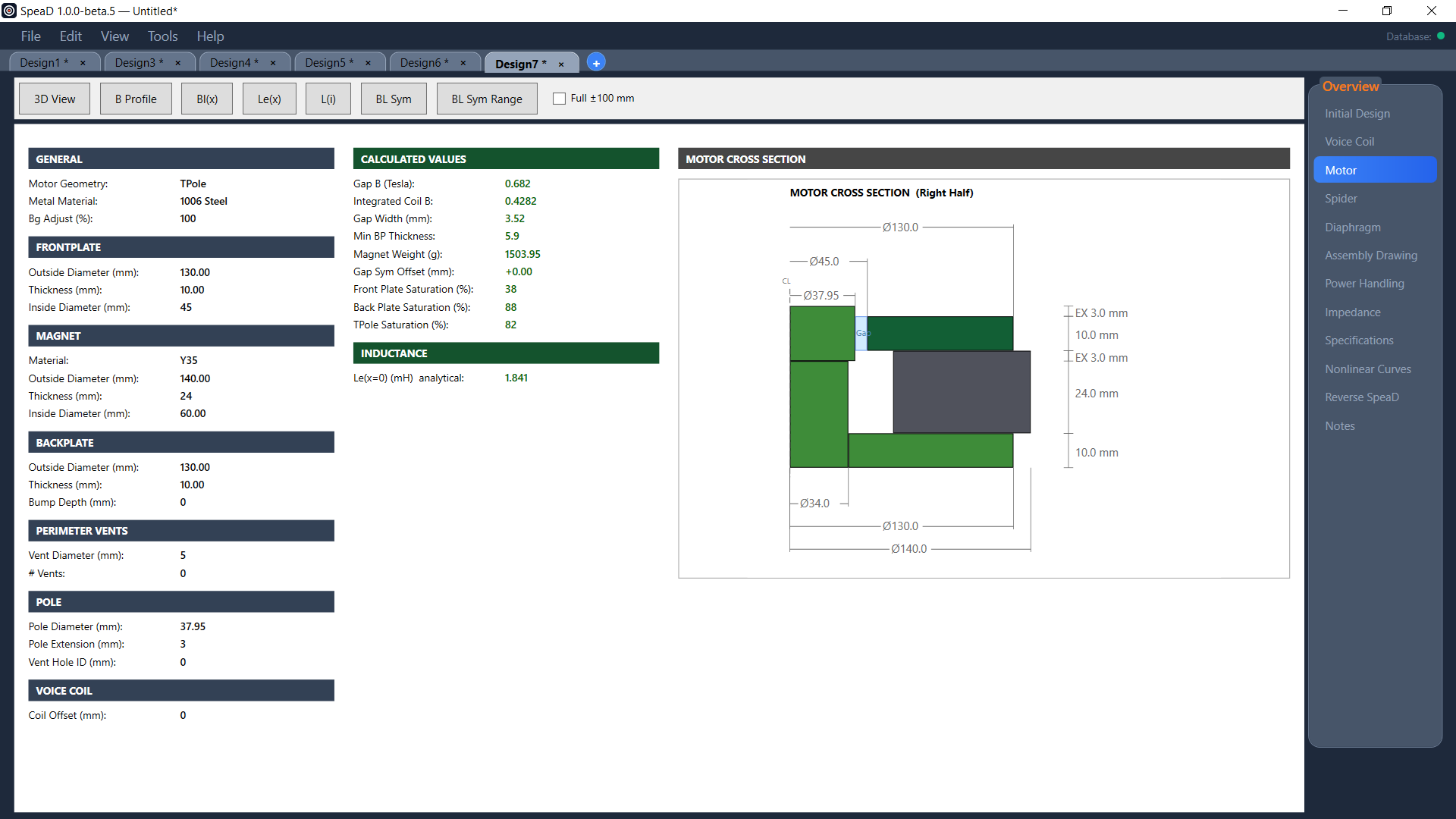
Topology, steel, the frontplate (top disk), magnet, backplate (cup) and pole dimensions, and the materials. Covered in Motor Parts Reference.
Motor Options
Column 3 · input
The parts a motor may or may not have: pole or center vent and its edge radii, backplate taper and bump, perimeter vents, and on a CYoke the cup features, core disc, bucking magnet and return plate. Covered in Motor Options Reference.
Motor Calculated Values
Bottom row, two panels under the motor columns · output
Gap B, integrated coil B, gap width and minimum backplate or wall thickness under Motor Parts; magnet weight (on a CYoke with a bucking magnet, both magnets together), the steel saturations and Le(x=0) under Motor Options. See Motor Calculated Values.
Soft Parts
Column 4 · input
Device type, diaphragm, dust-cap and surround materials, nominal size and Sd, diaphragm Fo, moving and dust-cap mass, spider deflection and deflection mass, additional mass, the Q factor, and the two Link Design tick boxes for the Diaphragm and Spider pages. Nominal Size lists the sizes held in the Data Manager; type your own Sd and the box shows Custom Sd. See Soft Parts.
Misc.
Column 4, beneath Soft Parts · input
Holds Qms Estimate, Bg Adjust (%) and the coil Offset.
Soft Parts Calculated Values
Bottom row, under Soft Parts · output
Cone and spider compliance, air masses and non-coil mass from the soft-parts selections.
Parameters
Column 5, full height · output
The Thiele-Small set the whole design resolves to, from Re and Fo through Qts, Vas, BL, the excursion limits, Gap Sym Offset and the SPL figures. It runs the full height of the page, so it reads as the summary of everything to its left.
Overview
Column 6, full height · navigation
Not a design panel. This is the tab navigator: Initial Design is highlighted here, and the entries below it — Voice Coil, Motor, Spider, Diaphragm, Assembly Drawing, Power Handling, Impedance, Specifications, Nonlinear Curves, Reverse SpeaD and Notes — open SpeaD’s other tabs for the same design.
Three fields sit beneath Soft Parts. Two are inputs; the first is a calculated reading.
Qms Estimate
calculated · read-only
An estimate of mechanical Q from the Surround Material: Rubber 5.5, Foam 6.5, Cloth 7.5. It updates when the surround material changes.
The former material does not change it. A former that is a closed conducting cylinder would act as a shorted turn and add eddy-current damping, but production aluminium formers are slit along their length, which opens that loop; SpeaD therefore treats every former as non-conducting here.
The estimate is advisory. The Qms that actually drives Qts and the rest of the parameter set is the Qms input in the Q Factor group, which you set yourself — this reading is here to tell you whether the figure you have entered is plausible for the parts you have chosen.
Bg Adjust (%)
input · starting value 100
Scales the calculated gap flux density. At 100 the calculation is untouched. This is the fine-tuning control for reconciling a predicted design with a driver you have measured: move it up or down until the predicted parameters line up with the measured ones, and everything downstream of the motor moves with it — BL, Fo, Qes, Qts, the SPL figures and the excursion limits.
Any value other than 100 shows Gap B and Integrated Coil B in red, so an adjusted result can never be mistaken for a raw prediction.
Offset (mm)
input · signed · starting value −0.33 (Standard), 0 (TPole, CYoke)
Shifts the coil’s rest position relative to the magnetic gap. Positive and negative values are both accepted.
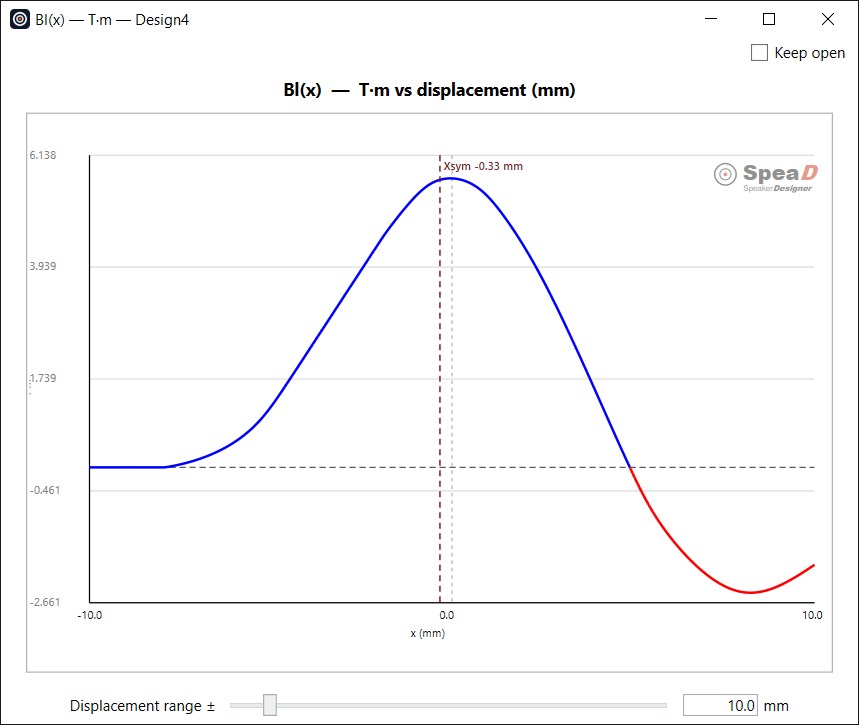
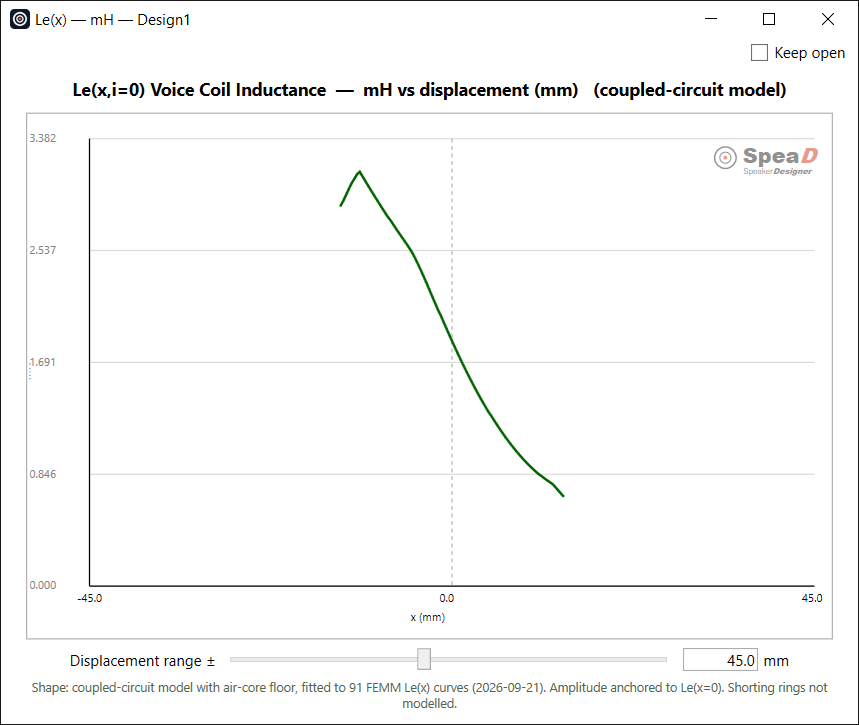
A centred coil sees the same field either side of rest, and Bl(x) comes out symmetric. Offset the coil and it no longer does: the curve leans, and that asymmetry is the mechanism behind even-order harmonic distortion. Open a Bl(x) window and change this value — the curve redraws immediately, which makes it the quickest way to see what a given offset costs.
Compare it with Gap Sym Offset in the Parameters column, which reports where the magnetic centre of the gap actually sits. That figure is the offset which would make Bl(x) symmetric — so the distance between the two tells you how far from magnetic centre the coil is currently sitting.
The menu bar across the top of the main window serves every design tab.
File
Designs and projects
New Design adds a design tab. Open Design…, Save Design and Save Design As… work on one design at a time (a .SpeaDDesign file; the name you save it under becomes the tab name). Open Project…, Save Project and Save Project As… work on every open design together, with the project notes, in a .SpeaDProject folder. Import Legacy .spd… brings a design from the old VB6 SpeaD into a new tab.
Tools
Database, preferences, notes
Data Manager (see Data Manager), Locate Database…, Preferences… (see Preferences), Create / Edit Design Notes and Create / Edit Project Notes… (see Notes).
Help → Owner’s Manual
This manual
Opens this manual in your web browser. It is installed in the Help folder beside SpeaD; if it is missing, reinstalling SpeaD restores it.
Help → Tutorials
Submenu
Lists the step-by-step tutorials installed with SpeaD, by title — Adding Cone Sizes. It opens in your web browser; when the tooltip language in Preferences → Language is set to Chinese, the Chinese version opens.
Help → Report a Bug… / Request a Feature…
Feedback
Opens a form for your name, email, a title and a description (a bug report also has a Severity). Your build version, operating system and licence are attached automatically. You can tick Attach the design I am working on, and add up to six images with Add image… or by pasting a screen capture with Ctrl+V. Send sends the report to RedRock Acoustics; Save report bundle… saves it as a file you can email instead; Copy to clipboard copies the text.
Help → Known Issues & Roadmap
Web page
Opens the RedRock Acoustics issues board in your web browser.
Help → Licence Agreement
Read-only
Shows the licence agreement accepted for this installation. If the agreement was not accepted during installation, or has changed since, SpeaD shows it before the main window opens; Accept is enabled once both I have read the licence agreement and I agree to the terms of the licence agreement are ticked, and Do Not Accept closes SpeaD.
Help → About SpeaD
Version
Shows the version and build date. Quote the version when you report a problem.
Section
Voice Coil
Design the coil — former, wire, and winding architecture — and let SpeaD solve for wire size, winding height, and DCR. The resulting turn count feeds the Motor tab, where it sets BL.
The Voice Coil panel takes a former, a conductor, and a winding architecture, and produces a fully specified coil: its outside diameter, turn count, wire length, and DC resistance. You give it a winding height and a target DCR in the Solve block, hold one of them, and it solves the wire size — and it computes the rest.
The panel is a live calculator: the solve re-runs as soon as you press Enter or Tab, leave a field, or pick from a list. Turn count flows downstream to the motor, so a change here propagates to the motor's BL.
Its results appear in two places. The Coil Calculated Values panel sits directly below it on the same page. The separate Voice Coil tab shows a fuller read-out along with the drawing and document inputs used for the coil drawing.
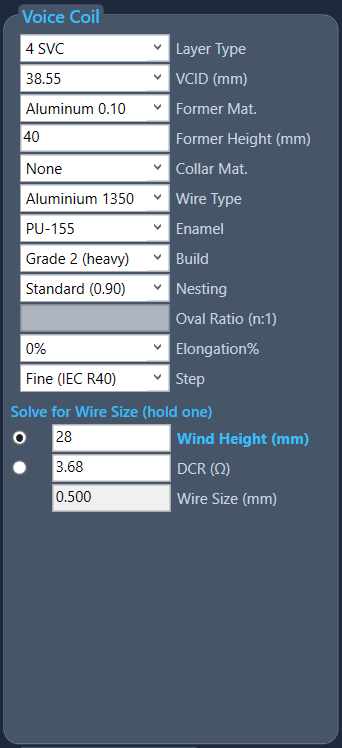
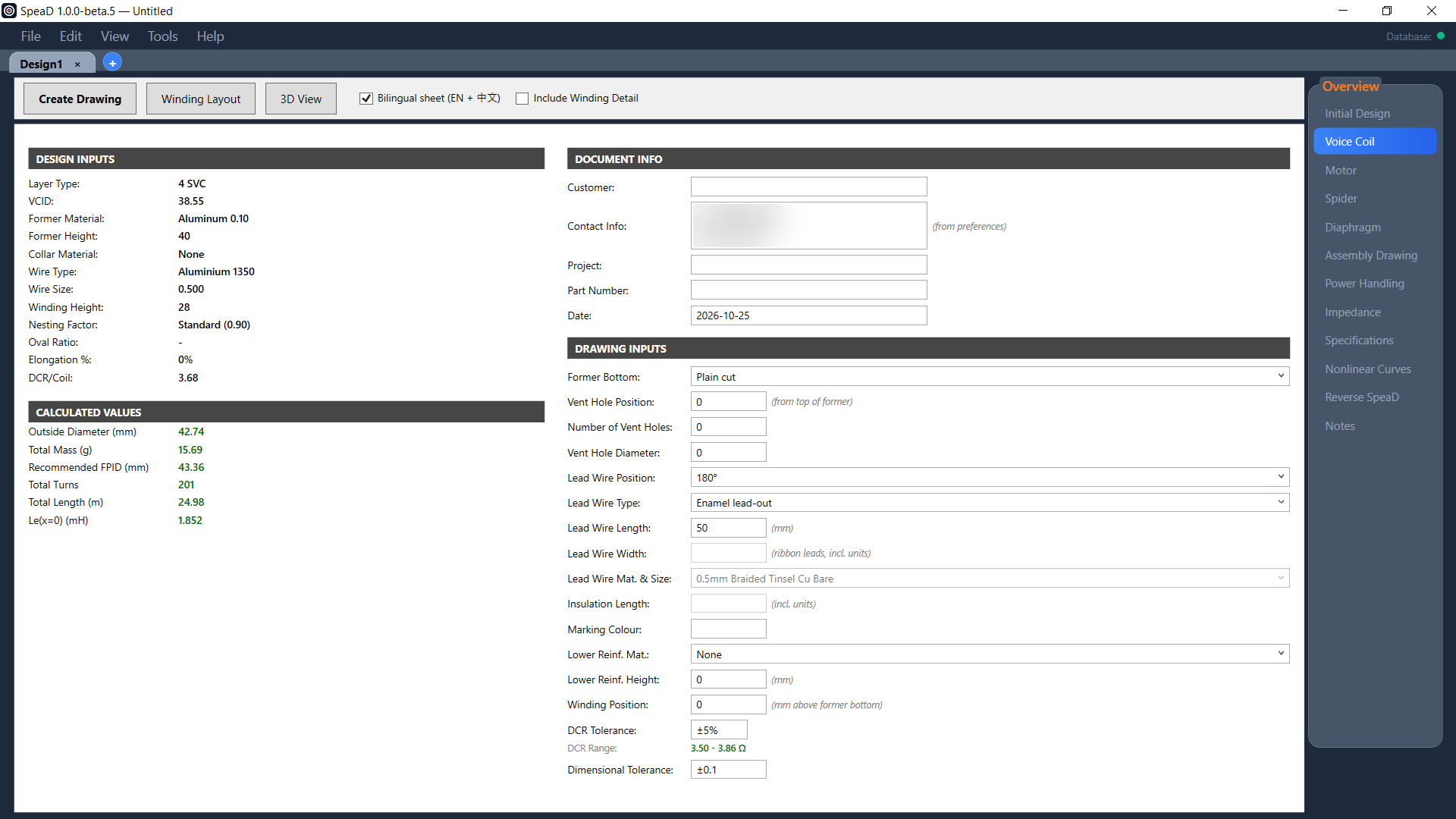
The Voice Coil panel at the start design a new tab opens with — 4 SVC on a 38.55 mm former, Aluminium 1350 wire, Wind Height held at 28 mm, DCR 3.68 Ω, Wire Size solving to 0.500 mm on the Fine (IEC R40) step. Click the image to open it full size.
The controls, top to bottom as they appear in the panel. Dropdowns are selection-only unless noted; numeric boxes accept typed values.
Layer Type
Dropdown
The winding architecture — how many conductors, how many layers, and how they are wound. It selects which wire-length and turns formula runs. Full catalog in the Layer Types topic. Starting value 4 SVC.
VCID
Editable dropdown · numeric
Voice-coil inner diameter in mm — the former's inside diameter. For inside/outside (I/O) layer types, VCID is instead the inside diameter of the inner winding, since the former sits outside the inner stack. You can either type your own value here or pick a preset from the database. To make a custom dimension available as a preset, enter it in the database and tick the check mark next to it; it will then appear in the VCID pull-down. Starting value 38.55.
Former Mat.
Dropdown
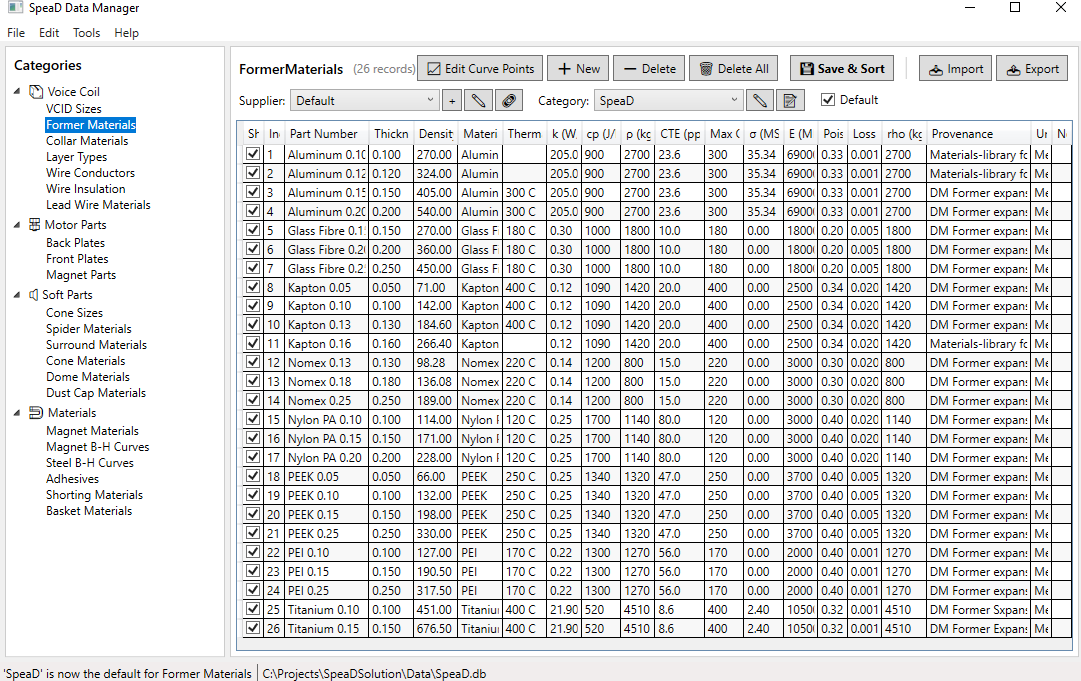
Material of the voice coil former. Each entry is a material and a thickness, since the thickness sets both the coil's outside diameter and its mass. All thicknesses are in mm. Ten families are included in the standard database — Aluminum (0.10 / 0.12 / 0.15 / 0.20 mm, anodised), Aluminum Bare (the same four thicknesses, not anodised), Kapton (0.05 / 0.10 / 0.13 / 0.16 mm), Kapton MTB (0.05 / 0.10 / 0.13 / 0.16 mm, a black, thermally conductive polyimide), Nomex (0.13 / 0.18 / 0.25 mm), Glass Fibre (0.15 / 0.20 / 0.25 mm), PEEK (0.05 / 0.10 / 0.15 / 0.25 mm), PEI (0.10 / 0.15 / 0.25 mm), Nylon PA (0.10 / 0.15 / 0.20 mm) and Titanium (0.10 / 0.15 mm). Aluminium is by far the best heat path and titanium the stiffest, but both are conductive — a metal former acts as a shorted turn and adds eddy-current damping, aluminium about fifteen times more than titanium. Kapton, Kapton MTB and Titanium carry the highest temperature rating (400 °C), PEEK 250 °C; the non-metal formers have no eddy losses. Kapton MTB conducts heat about three times better than plain Kapton. Anodised and bare aluminium share every property except surface emissivity, which the thermal model uses.
Former Height
Numeric box
Height of the former tube in mm. Also acts as an upper bound on the solved winding height — if the winding would exceed the former, the Former Height field turns red and the coil outputs clear. Starting value 40. While the Spider page is linked (Link to Initial Design), Former Height is driven for you and greyed: it is the cone neck position plus Former above neck on the Assembly Drawing page. With the spider unlinked you type it here.
Collar Mat.
Dropdown
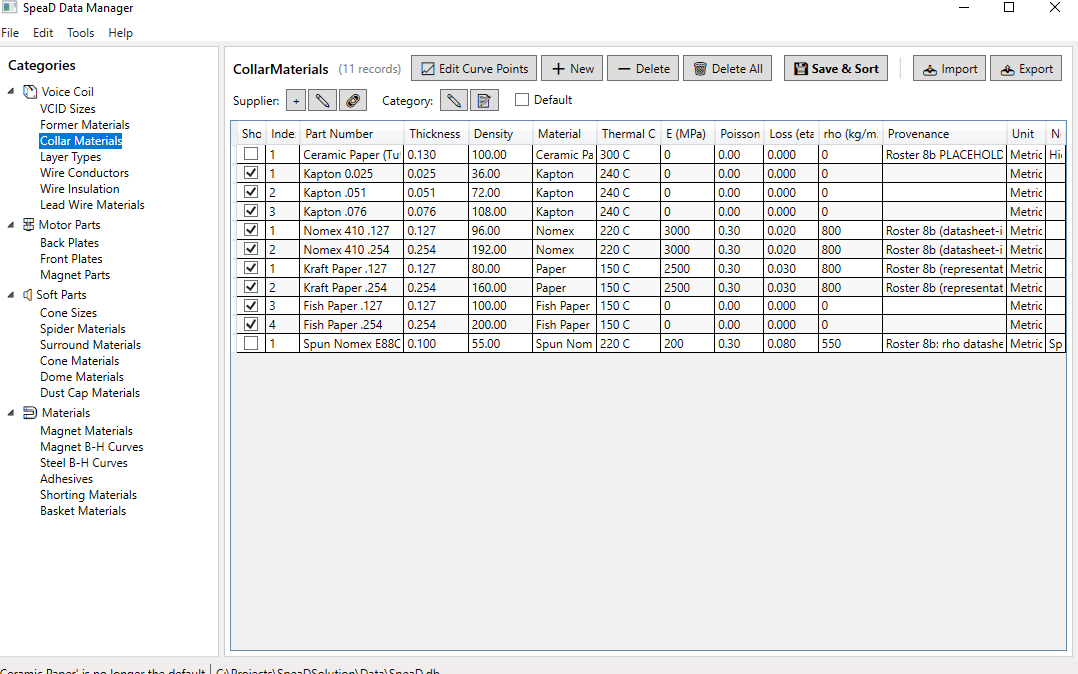
Material of the collar — the reinforcing wrap over the former above the winding. Like the former list, each entry is a material and a thickness, and all thicknesses are in mm: Kapton (0.025 / 0.051 / 0.076 mm), Nomex 410 (0.127 / 0.254 mm), Kraft Paper (0.127 / 0.254 mm) and Fish Paper (0.127 / 0.254 mm). Set to None when there is no collar. The choice is a trade between stiffness and bond: Kapton stiffens the voice coil former, while kraft paper and Nomex increase bonding strength.
Wire Type
Dropdown
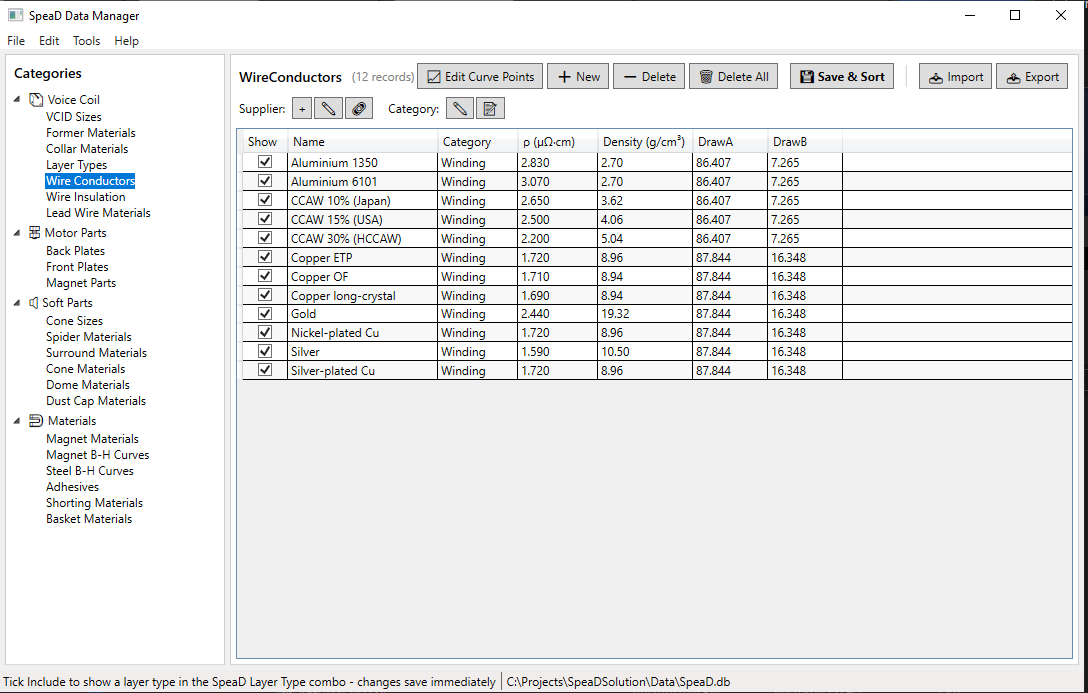
The conductor metal. Twelve entries, each carrying its own resistivity and density: Copper ETP (the 100 % IACS reference), Copper OF, Copper long-crystal, Nickel-plated Cu, Silver-plated Cu, Silver, Gold, Aluminium 1350 (the starting selection), Aluminium 6101, and three copper-clad aluminium grades — CCAW 10 % (Japan), CCAW 15 % (USA) and CCAW 30 % (HCCAW). Silver is the only metal that beats copper on conductivity, and only by about 8 % in SpeaD’s data (1.59 against 1.72 µΩ·cm). The aluminium and CCAW grades trade conductivity for a large drop in moving mass — aluminium is roughly 61 % as conductive as copper at about 30 % of the density.
Enamel
Dropdown
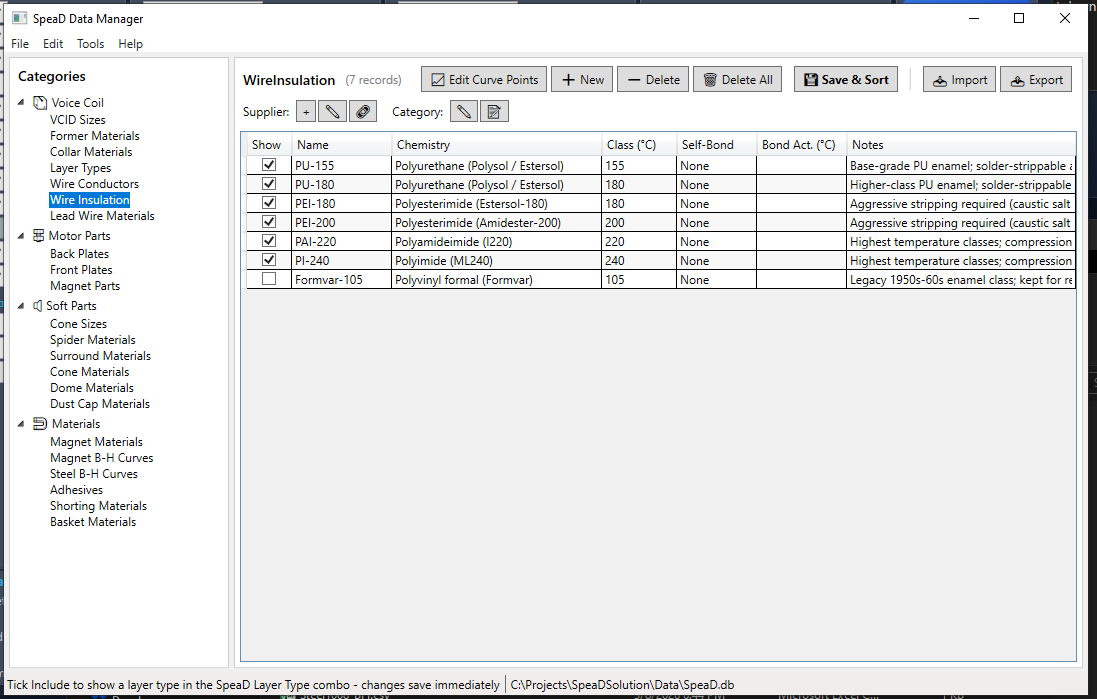
Insulation chemistry and temperature class, listed coolest to hottest: PU-155 and PU-180 (polyurethane), PEI-180 and PEI-200 (polyesterimide), PAI-220 (polyamideimide) and PI-240 (polyimide). The number is the temperature class in °C. The two polyurethanes are solder-strippable — the enamel burns off in the solder pot at termination — while PEI and above need aggressive stripping (caustic bath, abrasion, or ultrasonic welding). PAI-220 and PI-240 are the compression-driver and high-power professional classes. This control is a reference selection: the insulation thickness that actually changes wire outside diameter is carried by Build below.
Build
Dropdown
Insulation build grade — how thick a coat of enamel is on the conductor, which sets the wire's outside diameter and therefore how many turns fit in a layer. Three grades: Grade 1 (single), Grade 1A (intermediate) and Grade 2 (heavy). Heavier builds are tougher and more voltage-resistant but waste winding space. Starting value Grade 2 (heavy).
Nesting
Dropdown
Packing factor for how tightly successive layers nest, which sets build height:
Precision (0.87) tight hexagonal packing,
Standard (0.90) typical production,
Adhesive (0.93) bonded between layers,
Flat Wire (1.0) no nesting. Starting value Standard (0.90).
Oval Ratio (n:1)
Numeric box · usually disabled
Wide-face to narrow-face ratio of the wire cross-section. Enabled only for the Flat and Edge layer types; greyed out and empty for round wire. A value below 1 turns the field red and blocks the solve; left empty it is read as 1.
Elongation%
Editable dropdown
Wire stretch during winding, which raises DCR and slightly reduces diameter. Presets 0%, 1%, 2%, 3%, or type any value from 0 to 3; outside that range the field turns red and the solve is blocked. As a rule of thumb, 2% stretch gives roughly 1% smaller diameter and about 2% higher DCR. Each voice coil supplier will have its own standard elongation factor for the various wire types it winds, so use the figure your winder works to rather than a generic one. Starting value 0%.
Step
Dropdown
How the solved wire diameter is snapped to a real, purchasable size. Continuous leaves the solved diameter exactly as computed — correct for a custom draw, but it may not be a size you can buy. Standard (IEC R20) snaps to the IEC 60317 preferred series at 20 sizes per decade — the normally stocked sizes, and the right choice for production. Fine (IEC R40) snaps to the denser 40-per-decade series for intermediate sizes. Snapping always picks the nearest size in the series, so DCR moves slightly from your target when it engages. Starting value Fine (IEC R40).
The Layer Type sets the coil's winding architecture: how many separate conductors are wound, how many layers deep, and in what wire form. This choice determines the turns that sit in the gap — and therefore BL — as well as the coil's DCR and inductance, so it is one of the most consequential inputs on the panel. Which types appear in the dropdown is itself configurable — see Hiding Layer Types in the Data Manager section.
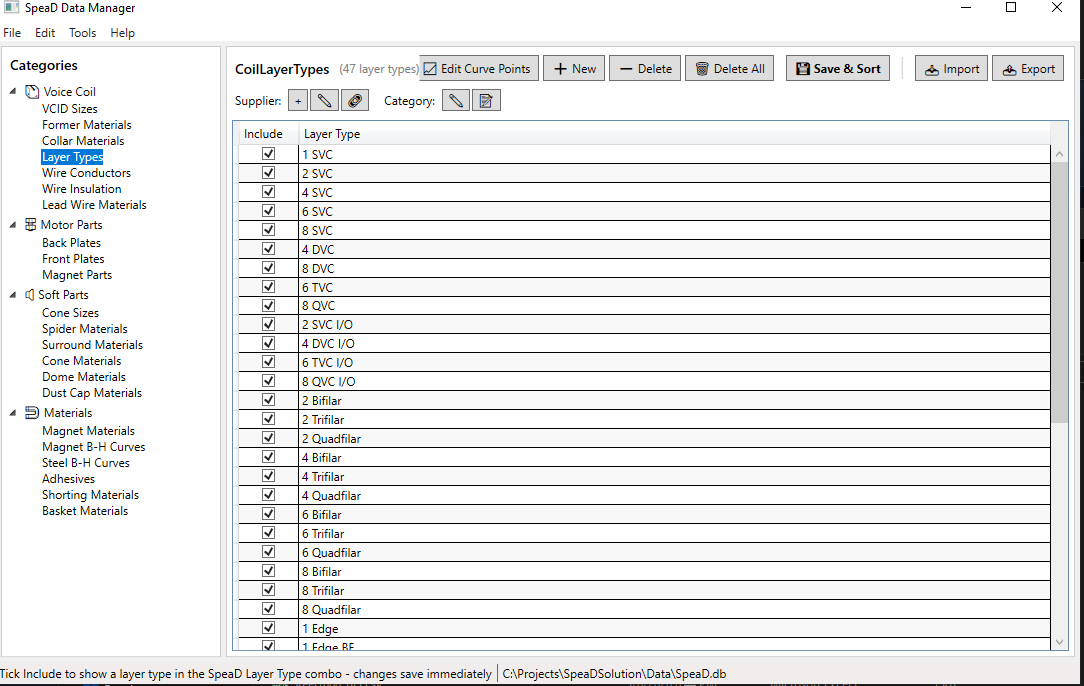
The families fall into a few groups. SVC (single voice coil) winds one conductor in 1–8 layers. DVC / TVC / QVC wind two, three, or four independent coils on the same former for multi-channel or series/parallel wiring. I/O (inside/outside) winds on both faces of the former wall — the ISV construction, covered in Inside/Outside (ISV) Winding. Multifilar (bifilar / trifilar / quadfilar) winds several conductors together as a set. Edge and Flat use rectangular wire for a high fill factor. Stepped windings vary the layer count along the height to shape the BL(x) curve.
Single Voice Coil (round wire)
1 SVC
One conductor, one layer.
2 SVC
One conductor, two layers — the most common build.
4 SVC
One conductor, four layers — the starting selection.
6 SVC
One conductor, six layers.
8 SVC
One conductor, eight layers.
Multi-coil (round wire)
4 DVC
Dual voice coil — two independent conductors, four layers total (two per coil).
8 DVC
Dual voice coil, eight layers total (four per coil).
6 TVC
Triple voice coil — three independent conductors, six layers total.
8 QVC
Quad voice coil — four independent conductors, eight layers total.
Inside/Outside — ISV (round wire)
2 SVC I/O
One input wound on both faces of the former — one layer inside, one outside, two total. The base ISV build.
4 DVC I/O
Two inputs, each inside-and-outside — two layers per face, four total.
6 TVC I/O
Three inputs, each inside-and-outside — three layers per face, six total.
8 QVC I/O
Four inputs, each inside-and-outside — four layers per face, eight total.
Multifilar (wound together)
2 Bifilar
Two conductors wound side by side, two layers.
2 Trifilar
Three conductors wound together, two layers.
2 Quadfilar
Four conductors wound together, two layers.
4 Bifilar
Two conductors wound together, four layers.
4 Trifilar
Three conductors wound together, four layers.
4 Quadfilar
Four conductors wound together, four layers.
6 Bifilar
Two conductors wound together, six layers.
6 Trifilar
Three conductors wound together, six layers.
6 Quadfilar
Four conductors wound together, six layers.
8 Bifilar
Two conductors wound together, eight layers.
8 Trifilar
Three conductors wound together, eight layers.
8 Quadfilar
Four conductors wound together, eight layers.
Edge-wound (rectangular wire, on edge)
1 Edge
Single edge-wound layer — rectangular wire on its edge for a high fill factor.
1 Edge BF
Bifilar edge-wound, single layer.
2 Edge I/O
Edge-wound on both faces of the former — one layer per face, the edge-wound ceiling. See Inside/Outside (ISV) Winding.
2 Edge BF I/O
Bifilar two-layer edge-wound, inside/outside.
Flat wire (wound flat)
2 Flat SVC
Single conductor, two flat-wound layers.
2 Flat BF
Bifilar, two flat-wound layers.
4 Flat SVC
Single conductor, four flat-wound layers.
4 Flat DVC
Dual coil, four flat-wound layers.
4 Flat BF
Bifilar, four flat-wound layers.
6 Flat SVC
Single conductor, six flat-wound layers.
6 Flat BF
Bifilar, six flat-wound layers.
6 Flat TVC
Triple coil, six flat-wound layers.
8 Flat SVC
Single conductor, eight flat-wound layers.
8 Flat DVC
Dual coil, eight flat-wound layers.
8 Flat BF
Bifilar, eight flat-wound layers.
8 Flat QVC
Quad coil, eight flat-wound layers.
Stepped (layer count varies along the height)
Stepped 4/2/4
Edge-loaded — four layers at each end, two in the centre. More turns at the extremes extends symmetric Xmax.
Stepped 6/2/6
Edge-loaded, heavier ends.
Stepped 8/4/8
Edge-loaded, heaviest ends.
Stepped 2/4/2
Centre-loaded — more layers in the middle. Concentrates BL near rest.
Stepped 2/6/2
Centre-loaded, heavier centre.
Stepped 4/8/4
Centre-loaded, heaviest centre.
The three numbers in a stepped name are the end / centre / end layer counts. Edge-loaded builds (e.g. 4/2/4) push turns toward the ends to widen Xmax; centre-loaded builds (e.g. 2/4/2) concentrate turns near rest. The wire-size solver covers the stepped types too.
The I/O layer types wind wire on both faces of the former wall, so both stacks sit in the magnetic gap and both are swept by the gap flux. The industry name is ISV — Interleaved Sandwich Voicecoil. It is not a dual voice coil: the inner and outer stacks are normally one continuous electrical winding.
Three things make the harder wind worth it:
Sensitivity. Active conductor in the gap roughly doubles for the same coil height — peak BL roughly doubles for the same coil mass.
Thermal. The inner stack faces the pole across air alone, with no former wall in the heat path, and the wire-to-steel proximity area roughly doubles.
Inductance flattening. The two stacks straddle the former, so inductance variation with excursion is more even.
What it does not buy: BL(x) linearity. The added symmetry is radial, not axial, so the BL curve shape is unchanged. The costs are a harder wind and more complex lead-out routing through the collar.
Why series only. A continuous wire runs up the inside face and back down the outside, with the winding sense reversing at the former edge so both stacks push the same way. Both lead-outs exit the same end of the former, one from each side, through the collar — two terminals per input, no internal joint. Splitting the stacks into independent inputs would need four lead-outs, two of them off the inner face with nowhere clean to exit; paralleling them is out because the unequal circumferences give unequal DCR and an uncontrolled current split between the stacks.
Geometry convention. For every I/O type, VCID is the inside diameter of the inner winding, not the former. Input 1 is wound against the former on both faces and carries full turns; each later input loses one wire diameter of winding height per face.
Why edge-wound stops at one layer per face. Edge-wound flat wire cannot be stacked radially: each flat winding acts as a knife working its way into the layer beneath, and winding-machine tension forces it in. That is why 2 Edge I/O is the edge-wound ceiling. The only route to more conductor on an edge-wound coil is multifilar — and multifilar adds turns per unit of axial height, not conductor across the radius, so it does not deliver the layer-count BL multiplier that round-wire I/O does.
Fill factors in production, after the insulation is accounted for: round wire square packing 0.55–0.65, round wire hex packing 0.65–0.75, ribbon / flat wire 0.80–0.90. The bare-conductor geometric limits are 78 %, 91 % and 96 % respectively.
Constructions deliberately not offered in SpeaD: hexagonal aluminium wire (proprietary to one manufacturer, with no general supply line); litz wire (only pays above roughly 5 kHz, in compression drivers and tweeters); inside-only winding (a motor topology, not a coil option); and dual-gap opposing-flux motor architectures (patent-protected).
The Layer Types catalog names every winding architecture SpeaD can build. This topic shows what they actually look like wound — turn by turn, at the wire size the solve arrived at.
Open one from the Winding Layout button on the Voice Coil tab toolbar. The window draws a half section through the coil: the former on the left, the winding built outward from it, every turn drawn at its true wire diameter. Because a coil is mostly empty space in the middle, the drawing places a standard break between the axis and the stack — every dimension shown is a true value, but the dead air is compressed so the winding stays legible at any wire pitch.
Reading the drawing:
L1, L2 … label each layer, ordered outward from the former.
The arrow beside a layer label is the winding-direction annotation — layers alternate. It marks direction only; SpeaD does not model winding sense.
IN and OUT mark the lead ends. Odd layer counts finish at the top, even counts at the bottom.
A final part-turn is drawn translucent. The layer table carries the exact count.
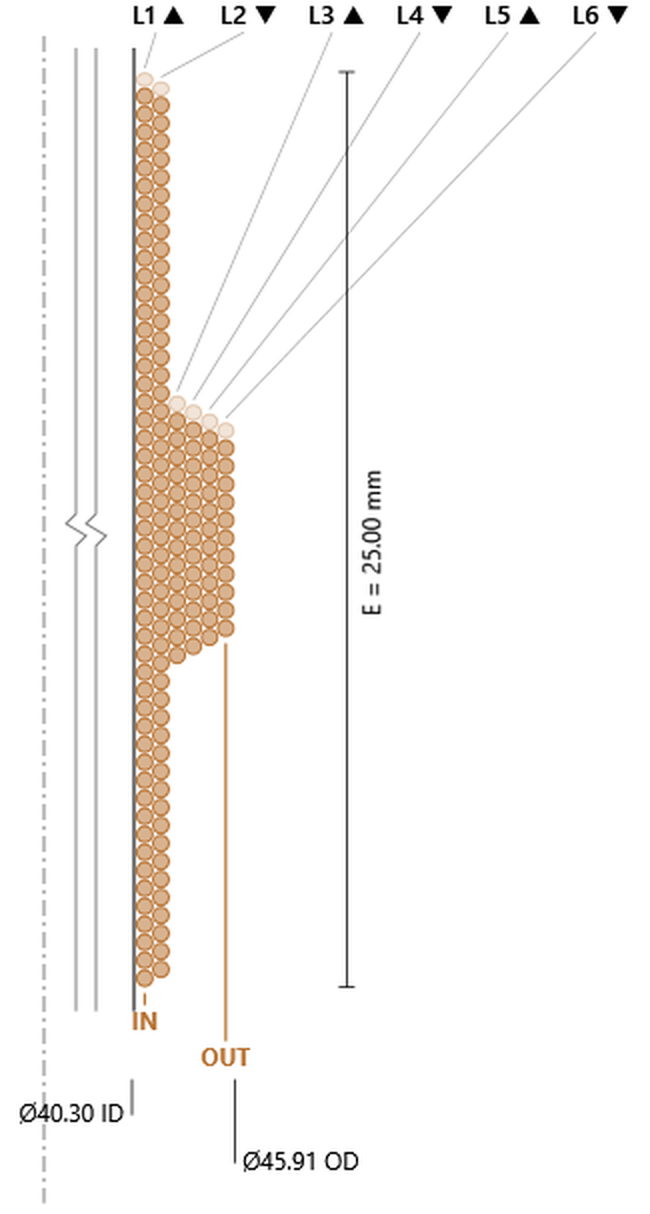
E is the winding height, and the diameters below the coil are its true ID and OD.
The panel beside the drawing cross-checks the layout against the solve: turns and outside diameter are shown from both, and agreement is reported in green. If the two differ the line turns red and reads Layout and solve differ - re-run Calculate and reopen. Press Enter in any coil field to re-solve, then reopen the window; if it persists, report it. The window’s toolbar also has Copy to Clipboard and Print. The wire diameters it quotes, and the ones in the drawings below, are over the insulation; the Wire Size box on the panel shows the bare conductor.
The figures below were all drawn at one fixed reference coil — VCID 40.30 mm, Wind Height 25.00 mm and DCR held at 3.98 Ω — with only the layer type changed between them. That is not the start design a new tab opens with (4 SVC on a 38.55 mm former), so the numbers on your own coil will differ.
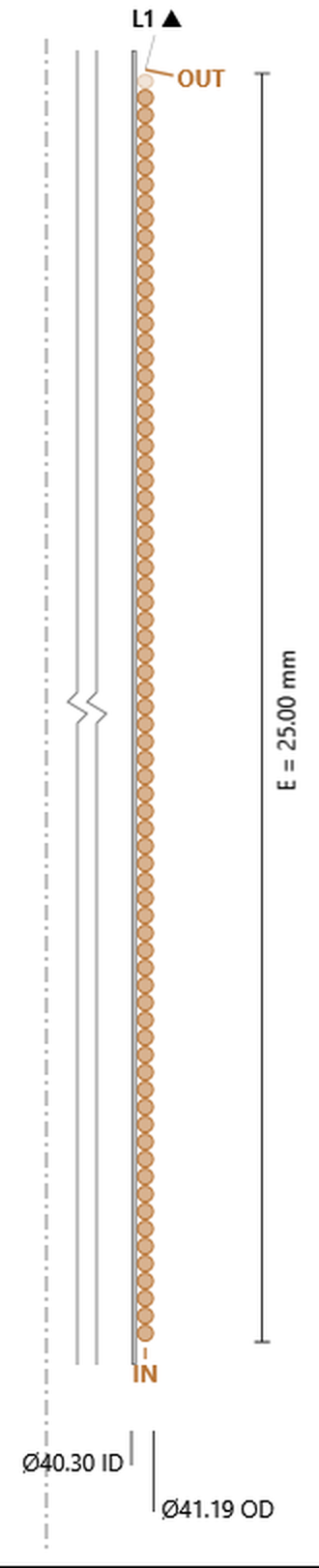
1 SVCsingle layer, single voice coil
The simplest case, and a useful one to read first because everything else is a variation on it. One layer wound directly onto the former, turns stacked along the winding height, the lead entering at the bottom and leaving at the top. With a single layer there is no nesting to see and no stagger between layers — the coil is exactly one wire thick, so its outside diameter is the former ID plus two former walls plus two wire diameters.
1 SVC at the reference coil: one layer, 72.9 turns, ID 40.30 mm, OD 41.19 mm. Click the image to open it full size.
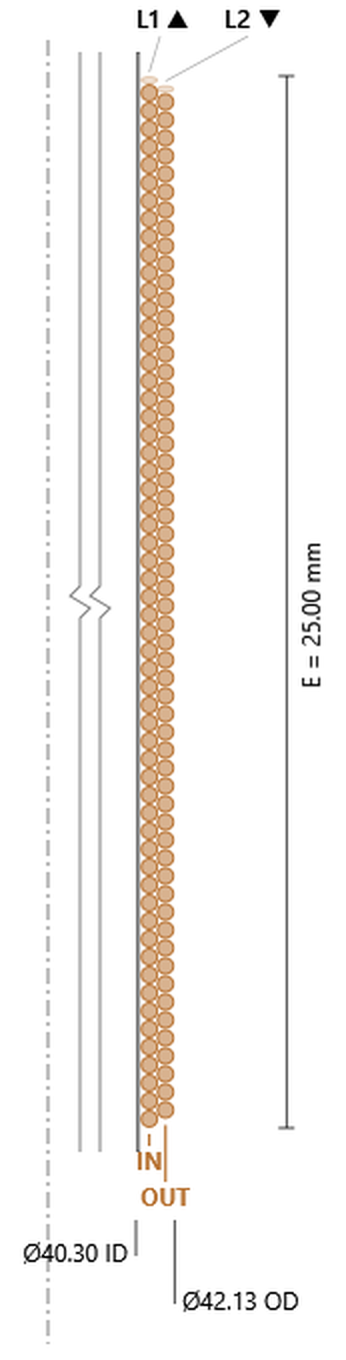
2 SVCtwo layers, single voice coil
One winding, wound up the former and back down again. Two things appear here that the single layer had no way to show. The turns nest: the second layer sits in the valleys of the first rather than directly on top of it, and the drawing staggers them accordingly. And the second layer carries one turn fewer than the first — 57.4 against 58.4 — because the half-wire setback at each end costs a turn per layer. That is the calculation’s own convention, drawn symmetrically at both ends.
With an even layer count the wire finishes at the end it started, so IN and OUT are both at the bottom.
2 SVC: 58.4 + 57.4 = 115.9 turns, OD 42.13 mm. The reference coil. Click the image to open it full size.
4 SVCfour layers, single voice coil
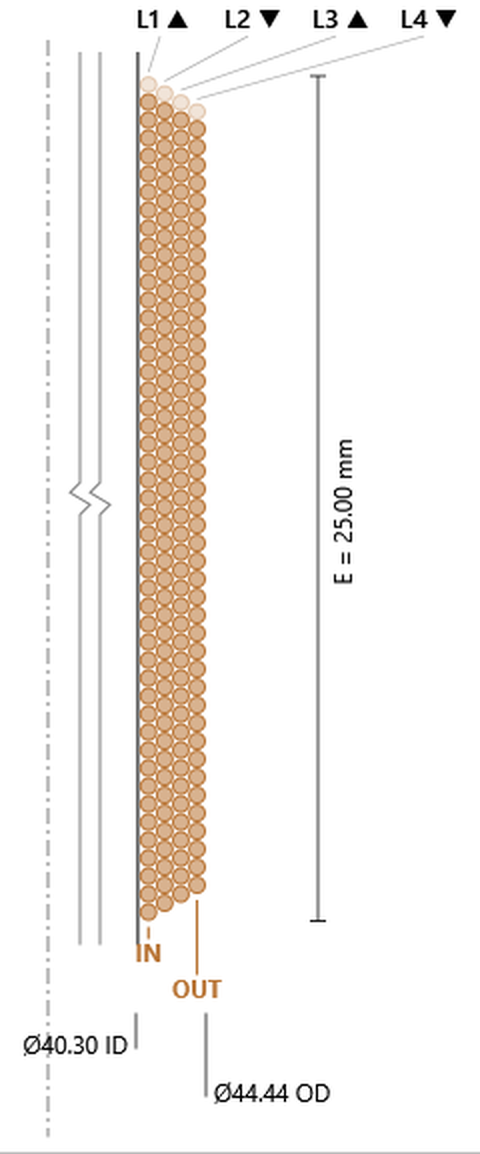
The same winding continued for two more passes. The one-turn-per-layer loss now reads as a clear progression — 46.9, 45.9, 44.9, 43.9 — and the direction arrows alternate up, down, up, down. Note the mean diameter column climbing with each layer: outer layers are longer per turn, which is why turns and wire length are not proportional to each other.
4 SVC: 181.8 turns over four layers, OD 44.44 mm. Click the image to open it full size.
6 SVCsix layers, single voice coil
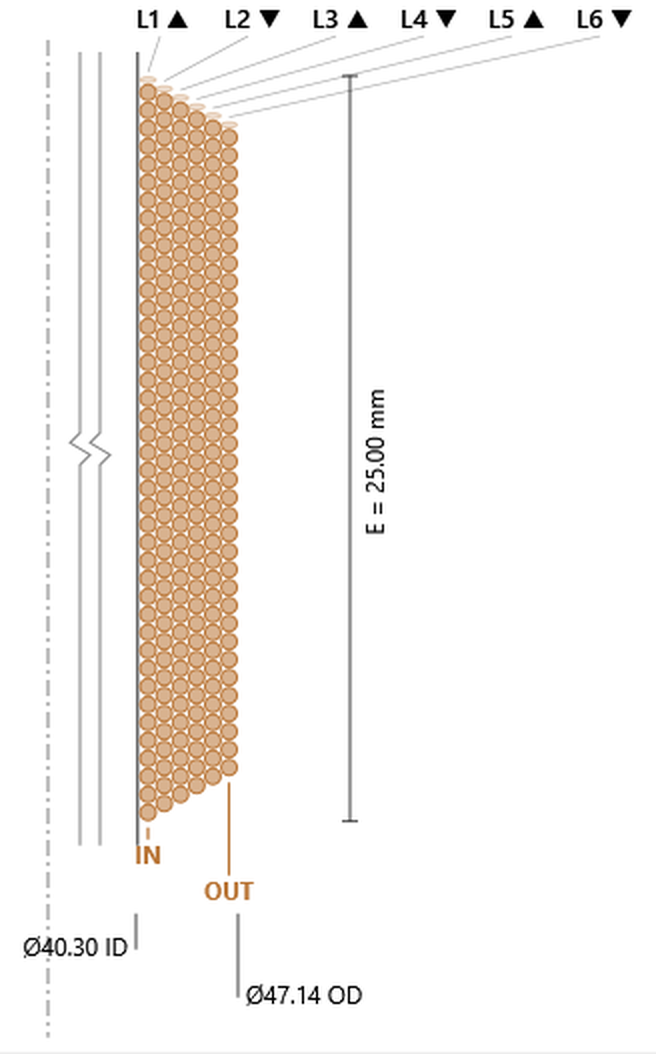
At six layers the build is becoming a substantial fraction of the coil diameter: 40.30 mm inside, 47.14 mm outside — the winding is now more than 3 mm thick on each side. This is where the gap has to be designed around the coil rather than the other way about, and where the outer layers sit far enough from the pole that they see appreciably less field than the inner ones.
6 SVC: 233.5 turns over six layers, OD 47.14 mm. Click the image to open it full size.
8 SVCeight layers, single voice coil
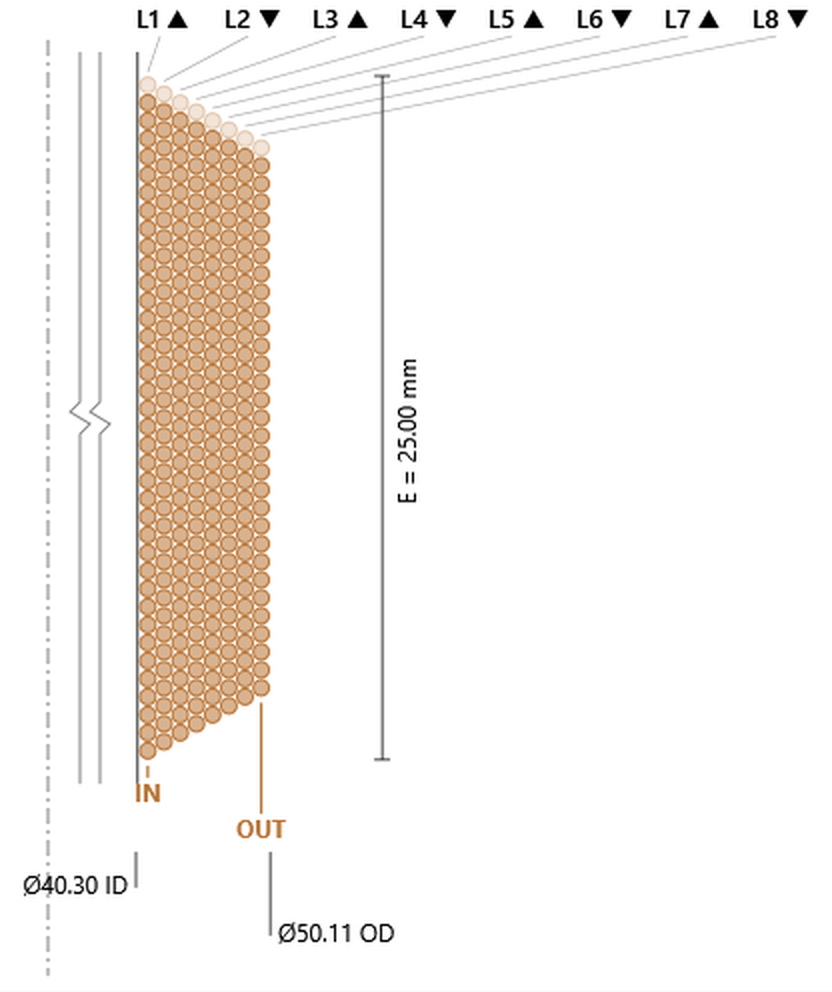
The deepest single-coil build in the catalog, and the clearest illustration of the trade. Eight layers reach 50.11 mm outside diameter on a 40.30 mm former — nearly 5 mm of winding per side — and the stagger between layers is plainly visible down the stack.
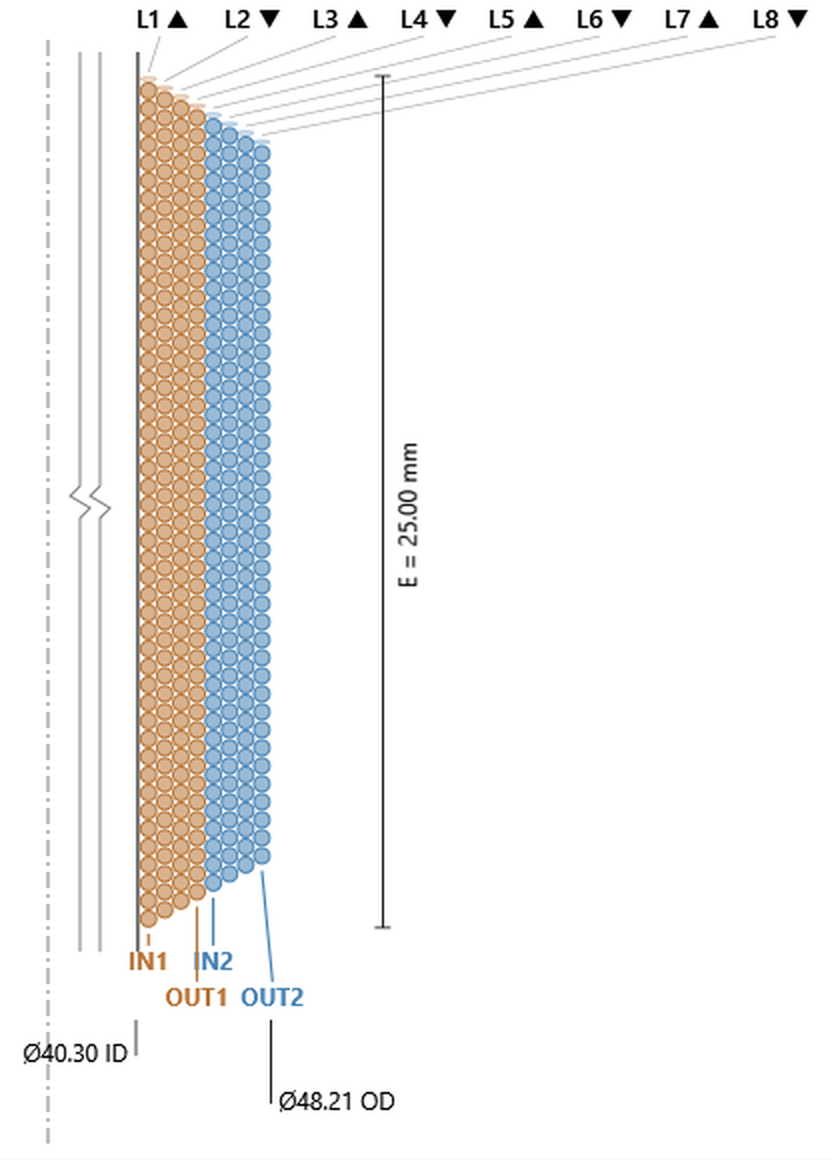
Read this series together and one thing stands out that no single drawing shows: the wire gets thicker as layers are added — Ø0.343 at one layer, 0.428 at two, 0.533, 0.604, and 0.658 at eight. Nothing was changed between these designs except the layer type. Because the solve is holding DCR at 3.98 Ω, more layers mean more turns and more wire length, so the only way to hold the resistance is a larger conductor. Layer count is not a free choice: it sets the wire size for you.
8 SVC: 275.9 turns over eight layers, OD 50.11 mm. Click the image to open it full size.
4 DVCfour layers, two independent voice coils
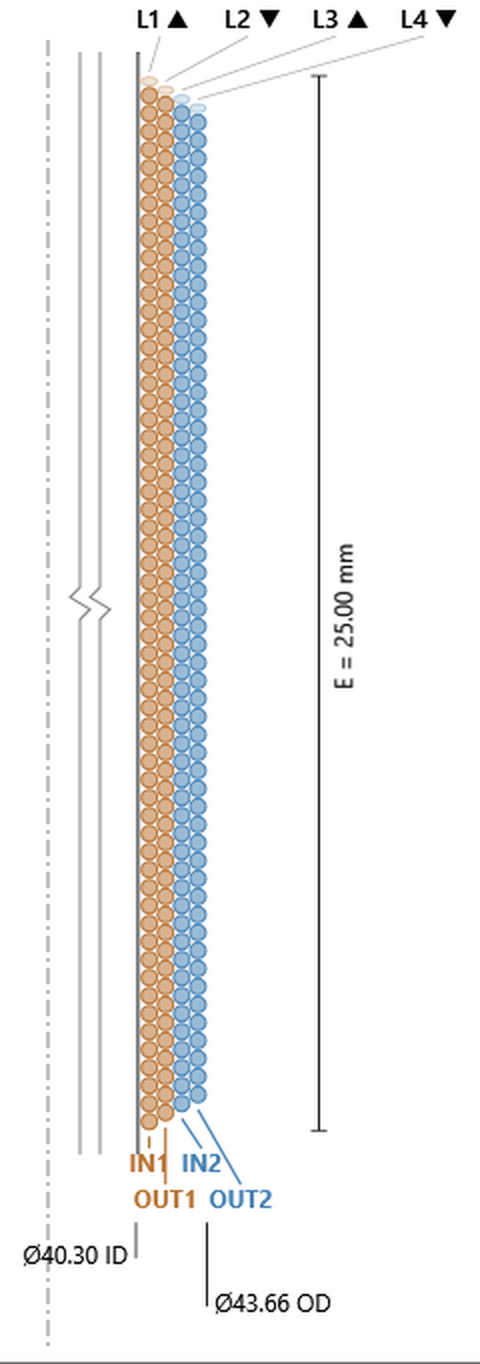
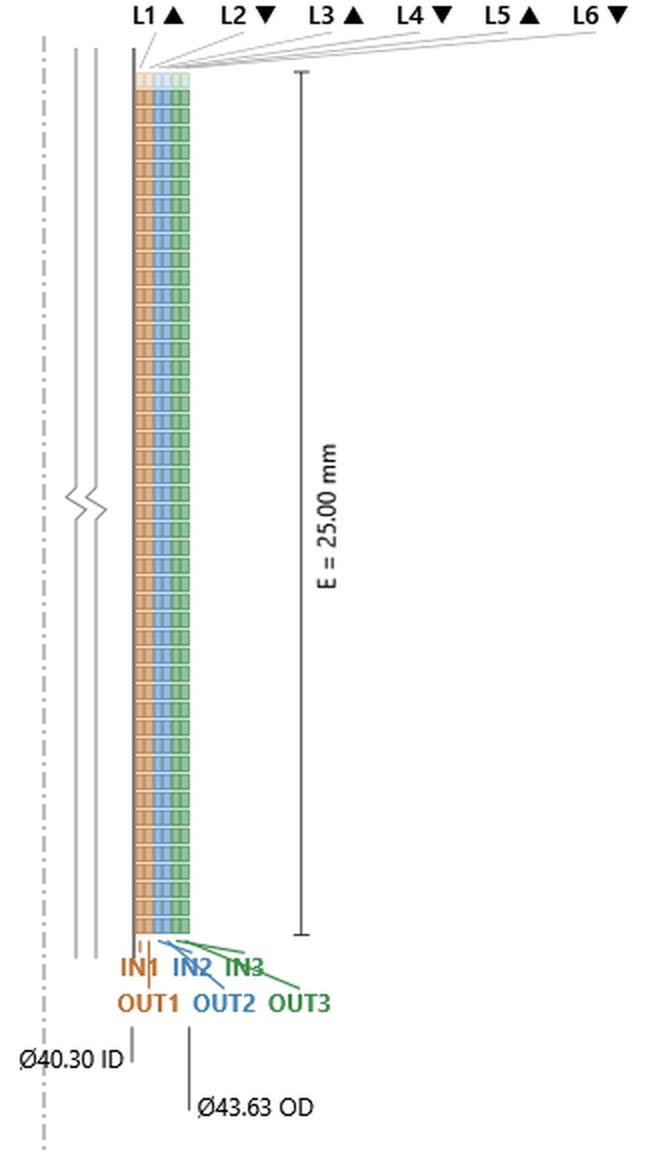
Two separate windings on one former, and the first thing the drawing tells you is how they are arranged: not interleaved, but stacked. Winding 1 takes the inner two layers, Winding 2 the outer two. Each winding is coloured, and its leads are labelled and coloured to match — IN1/OUT1 against IN2/OUT2.
That arrangement has a consequence worth understanding before you wire one up. The two coils do not occupy the same place in the gap. Winding 2 sits further out, at a larger mean diameter, so it sees a slightly weaker field than Winding 1. The layer table also shows it carries fewer turns — 112.2 against 116.2 — because every layer outward loses a turn to the setback.
Those two differences pull against each other, and the result is better than either suggests. Fewer turns at a larger diameter comes out to almost exactly the same length of wire: working the layer table through, the two windings differ by about 0.15% in conductor length, so their DC resistances are near enough identical. A designer wiring these in series or parallel can treat them as a matched pair, which is the whole point of a dual voice coil.
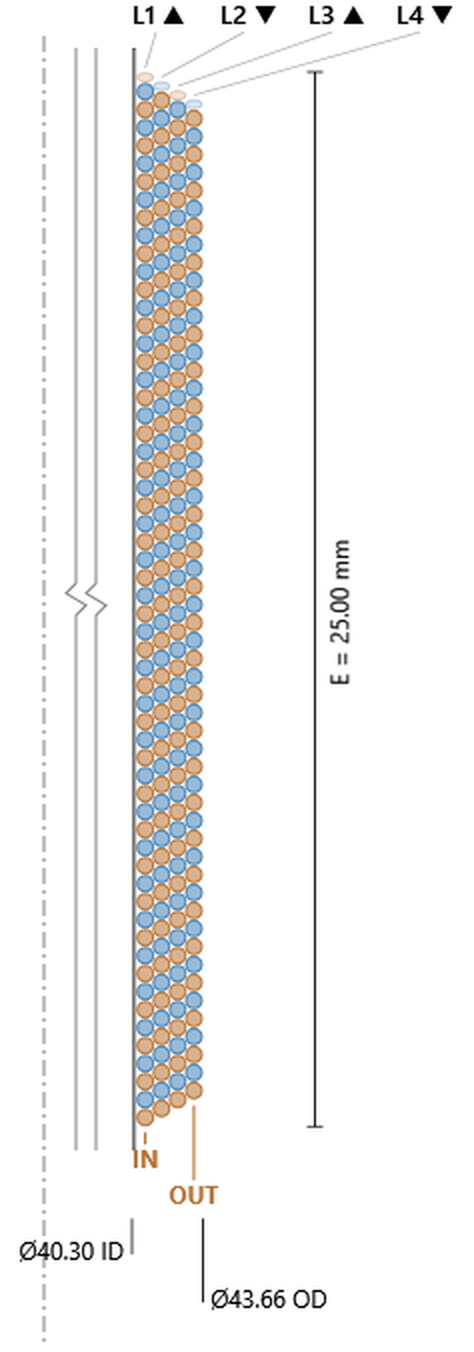
4 DVC: Winding 1 on layers 1–2, Winding 2 on layers 3–4. 228.3 turns total, OD 43.66 mm. Click the image to open it full size.
8 DVCeight layers, two voice coils of four layers each
The same two-winding arrangement taken deeper: four layers each. Winding 1 runs from the former out to layer 4, Winding 2 from layer 5 to the outside. With this much radial build the gap between the two windings’ working diameters widens — Winding 1 averages around 42 mm, Winding 2 around 46 mm — so the field difference between them is more pronounced than on the four-layer version.
The length matching still holds, but less tightly: about 0.6% apart here rather than 0.15%. Deep builds trade some of that natural balance for their extra turns.
8 DVC: 350.5 turns over eight layers, OD 48.21 mm. Click the image to open it full size.
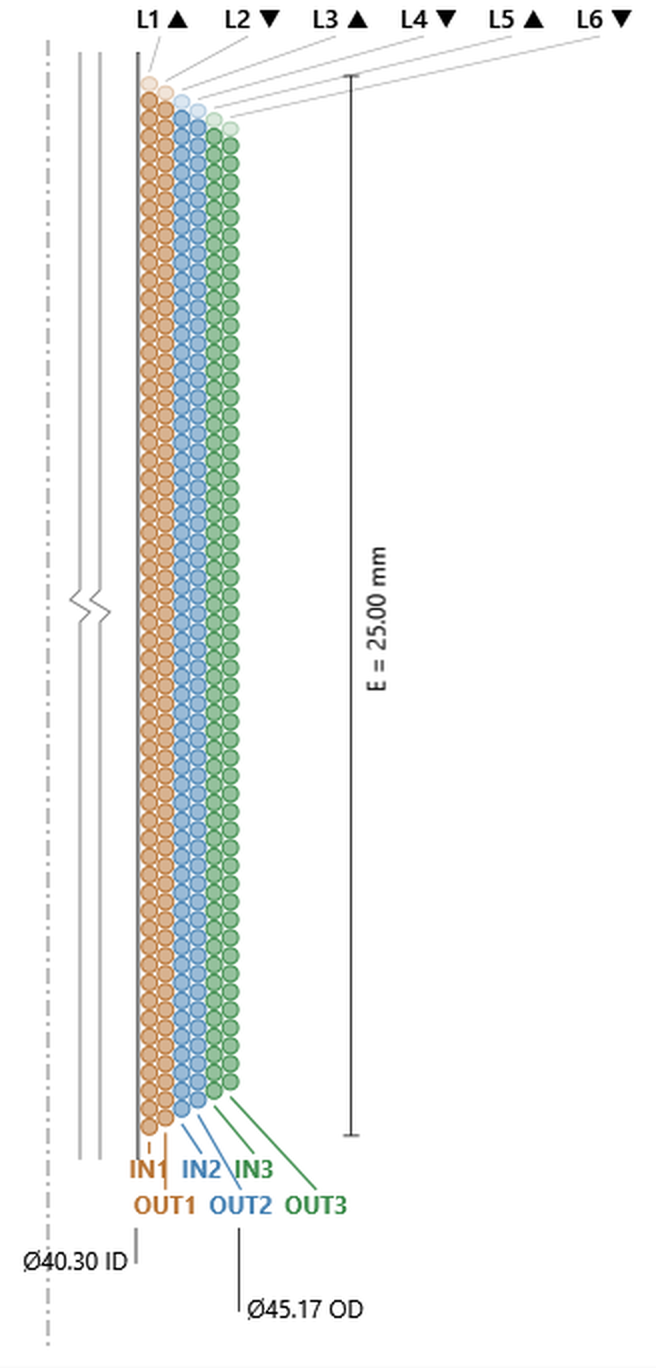
6 TVCsix layers, three voice coils of two layers each
Three independent windings, two layers apiece, stacked outward from the former in the same way — Winding 1 innermost, Winding 3 outermost, each with its own colour and its own numbered lead pair.
This is the clearest case of the balancing act described above, because there are three windings to compare rather than two. Turn counts fall steadily outward — 116.8, 112.8, 108.8 — while mean diameters climb, and the resulting conductor lengths land within 0.1% of one another across all three. Three coils, three different turn counts, three different diameters, and effectively one resistance.
6 TVC: three windings of two layers each. 338.2 turns total, OD 45.17 mm. Click the image to open it full size.
8 QVCeight layers, four voice coils of two layers each
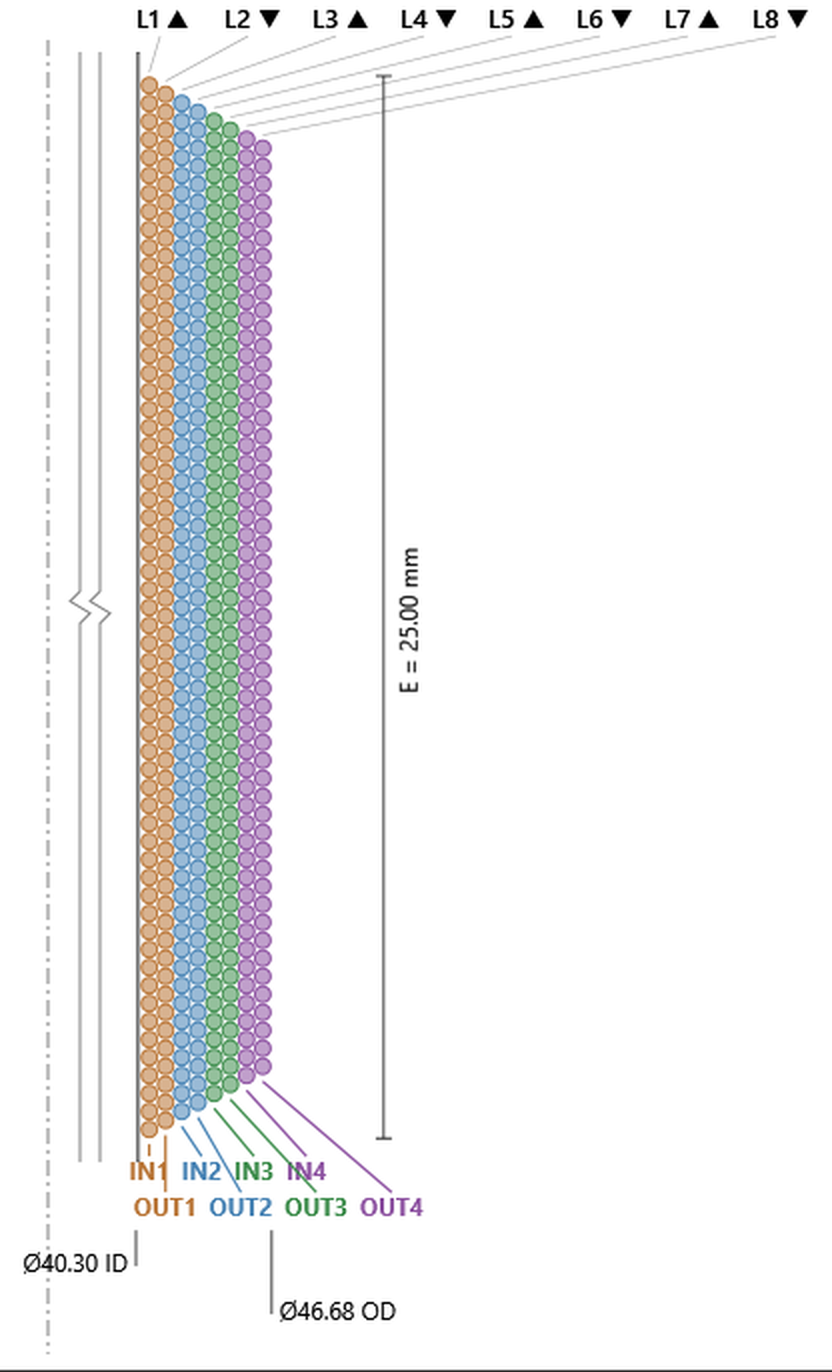
Four independent windings on one former, two layers apiece — the deepest division in the catalog. Four colours, four numbered lead pairs, and the leader lines fanning out at the bottom of the drawing are the reason the layout view exists: on a real coil these four pairs emerge within a few millimetres of one another, and knowing which is which is a production problem before it is a design one.
The arithmetic is worth pausing on. Turn counts fall in an exact progression — 117, 113, 109, 105 — four fewer for each winding outward, two layers each losing one turn to the setback. Mean diameters climb correspondingly. Conductor lengths across all four windings spread by 0.46%.
Read the multi-coil group together and the pattern is consistent: two windings, three, or four, the same trade of turns against diameter keeps them within a fraction of a percent of one another on resistance. That is what makes multi-coil drivers wirable in series, parallel, or any combination without matching parts by hand.
8 QVC: four windings of two layers each. 444.1 turns total, OD 46.68 mm. Click the image to open it full size.
The four Inside/Outside (ISV) types read differently from everything above, and it helps to know what to look for before opening one. The wire runs on both faces of the former, so the former wall is buried inside the winding rather than sitting underneath it, and the layer numbers no longer run in physical order across the page. Two conventions follow. The diameter at the bottom left is the inside diameter of the inner winding, not the former — the former diameter is an output, and it moves outward as inputs are added. And the Stack column in the layer table becomes meaningful: In for the inner face, Out for the outer.
2 SVC I/Oone winding, one layer on each face
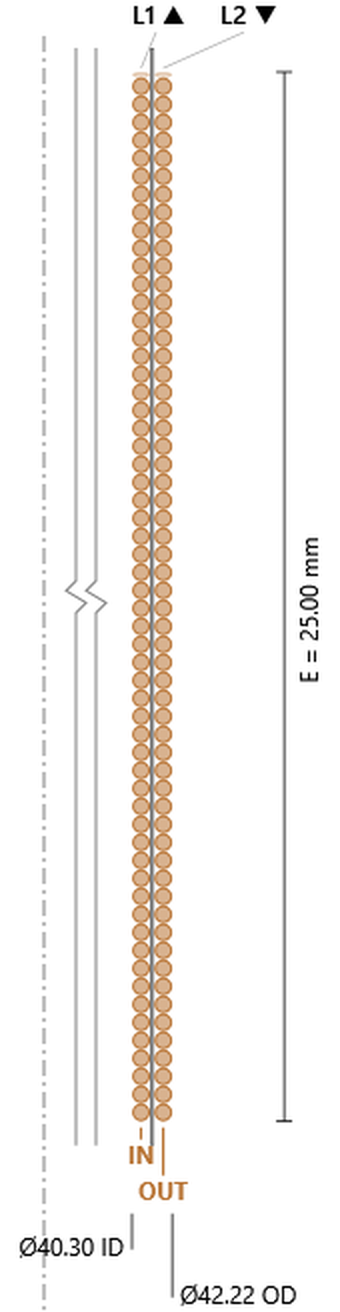
The base ISV build, and worth reading against the plain 2 SVC above, because from the outside the two coils are almost the same object: 116.6 turns against 115.9, Ø0.429 wire against Ø0.428, 42.22 mm outside diameter against 42.13. What changed is where the conductor sits.
Two figures in the layer table carry the whole construction. Both layers show 58.3 turns — equal, where the stacked 2 SVC lost a turn on its second layer. On an I/O type the one-wire setback is charged per input, not per layer, and here there is only one input. And the two mean diameters, 40.73 and 41.79, are 1.06 mm apart: half a wire out to the inner layer’s face, 0.10 mm of former wall, half a wire in to the outer layer’s centre — 0.53 mm of radius, which doubles in the diameter column. Nothing nests across the former; there is a wall in the way.
The rest closes on the same arithmetic: 40.73 less one wire gives the 40.30 mm inner ID, 41.79 plus one wire gives the 42.22 mm OD. IN and OUT both leave the bottom, one off each face, which is the lead-out convention described in the ISV topic.
2 SVC I/O: one winding, 58.3 turns on each face, OD 42.22 mm. The former wall sits between the two layers. Click the image to open it full size.
4 DVC I/Otwo windings, two layers each, one per face
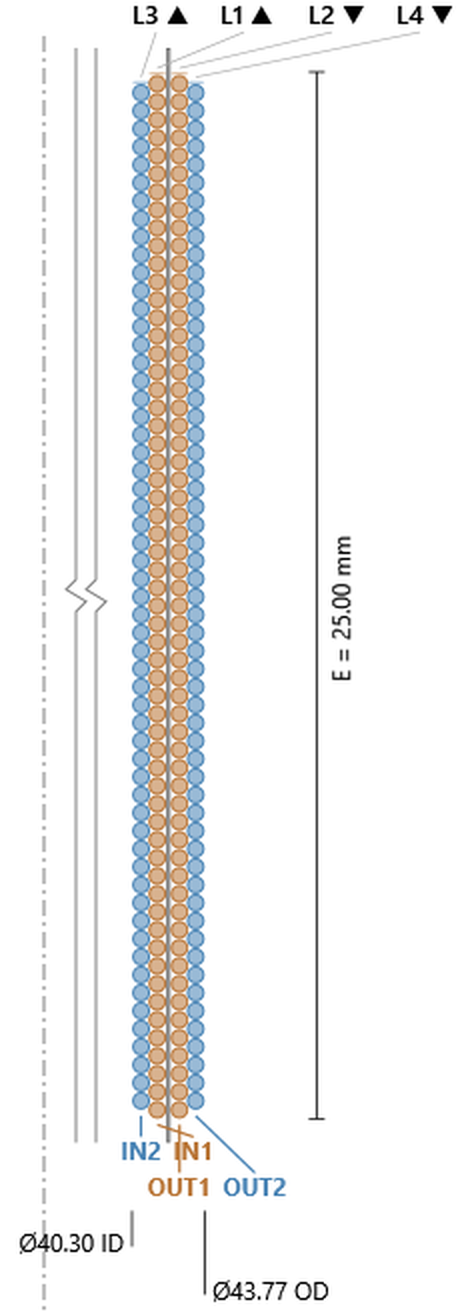
Read the layer labels along the top of the drawing: L3 L1 L2 L4, not 1 2 3 4. The numbering follows the windings, the drawing follows the radius, and the two do not agree. Physically the stack runs L3 (Winding 2, inner face), L1 (Winding 1, inner face), the former wall, L2 (Winding 1, outer face), L4 (Winding 2, outer face). Winding 1 lies against the former on both sides and Winding 2 wraps around the outside of it on both sides — a sandwich, symmetric about the former.
That symmetry has a consequence the mean-diameter column shows plainly. Winding 2 gives up 0.77 mm of mean diameter on the inner face and gains 0.78 mm on the outer, so its two mean diameters sum to 40.73 + 43.34 = 84.07 — the same figure as Winding 1’s 41.50 + 42.56 = 84.06. The diameter term cancels.
On the stacked 4 DVC further up this page, the climb in diameter was exactly what compensated for the turns lost outward, and the two windings finished within 0.15% on conductor length. Here there is nothing left to do the compensating. The turn counts are 58.2 and 57.2, and the conductor lengths come out 1.7% apart — the turn difference passed straight through. That is a DCR mismatch between the two windings, and it grows with every input added.
4 DVC I/O: Winding 1 against the former on both faces, Winding 2 wrapped outside it. 230.6 turns total, OD 43.77 mm. Click the image to open it full size.
6 TVC I/Othree windings, two layers each
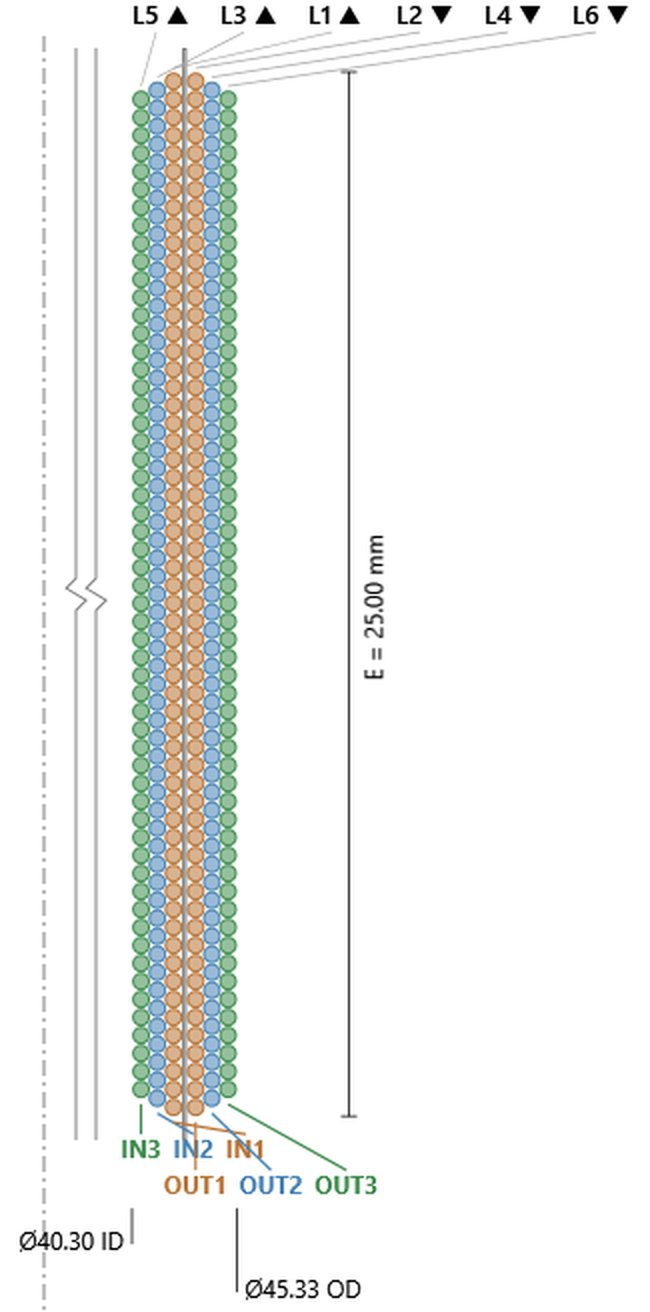
The same construction with one more shell: L5 L3 L1 — former — L2 L4 L6, Winding 1 innermost against the former, Winding 3 outermost on both faces. Turns fall by exactly one per input outward — 58.0, 57.0, 56.0 — and the mean-diameter sums repeat the pattern: 85.62, 85.63, 85.63, identical to two decimal places across all three windings.
With the diameters cancelling, the spread follows the turn counts alone: 3.6% in conductor length between Winding 1 and Winding 3.
6 TVC I/O: three windings, three layers per face. 342.1 turns total, OD 45.33 mm. Click the image to open it full size.
8 QVC I/Ofour windings, two layers each
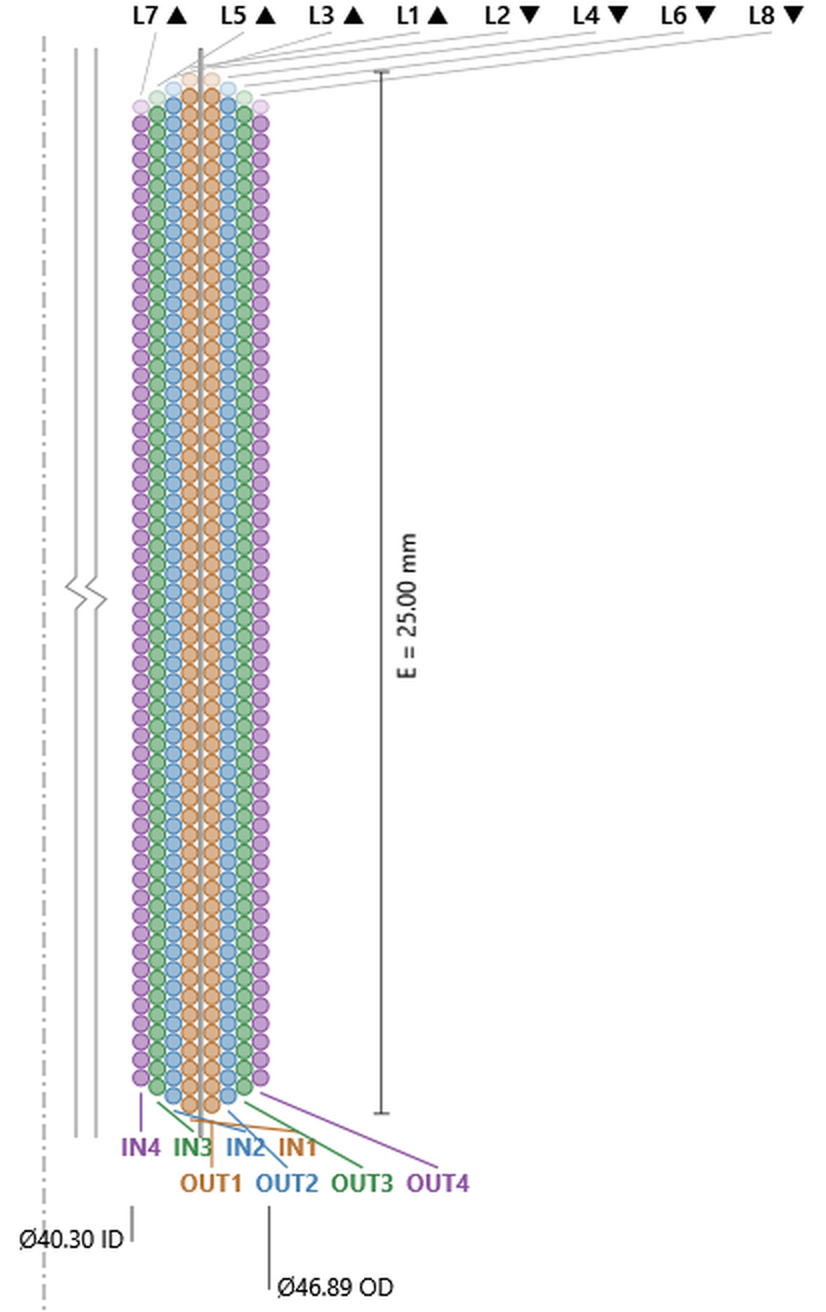
The deepest I/O build in the catalog: four shells about the former, L7 L5 L3 L1 — former — L2 L4 L6 L8. Four lead pairs, all leaving the same end of the former, half of them off the inner face, all routed through the collar. That routing is the practical limit on this construction, not the winding.
Turns run 57.9, 56.9, 55.9, 54.9; mean-diameter sums run 87.19, 87.20, 87.19, 87.19. Conductor length between the innermost and outermost windings is 5.5% apart — which is one of the reasons the I/O types are wired in series rather than paralleled.
8 QVC I/O: four windings, four layers per face. 451.0 turns total, OD 46.89 mm. Click the image to open it full size.
Read the four I/O drawings together and one number refuses to move: the wire size. Ø0.429, 0.430, 0.431, 0.432 across two, four, six and eight layers — where the stacked SVC series ran from Ø0.343 to Ø0.658 over the same range. The turn counts explain it. Every I/O input is exactly two layers, one per face, so each input arrives as very nearly a copy of the reference two-layer coil at around 116 turns, and holding 3.98 Ω asks for the same conductor every time. Adding inputs on an I/O type adds coils, not turns per coil.
What it does add is diameter: 42.22, 43.77, 45.33, 46.89 mm — a steady 1.56 mm per input, all of it outward, because the inner winding ID is the value you entered and does not move. The former travels outward with it, sitting at roughly 41.3, 42.0, 42.8 and 43.6 mm across the four builds.
The multifilar types work in the third possible direction. The layer-stacked multi-coil types divide the coil radially, the I/O types divide it about the former, and multifilar divides it axially: two, three or four conductors wound side by side up the same layer, sharing the winding height between them. The layer table announces it in two places — the Wind column reads a range (1-2, 1-3, 1-4) because every conductor is present in every layer, and the Stack column is blank because there is no inner or outer face to distinguish.
One number in these tables is worth checking by hand, because it explains the whole family. The turns shown for layer 1 are the winding height divided by the wire diameter, exactly: 25.00 ÷ 0.343 = 72.9 on the 2 Bifilar, 25.00 ÷ 0.301 = 83.0 on the 2 Trifilar, 25.00 ÷ 0.275 = 90.9 on the 2 Quadfilar. The Turns column is counting wire cross-sections, not turns of one conductor, and the conductors are sharing them. Each filar gets its 1/N share of every layer, which is why the filars in a multifilar set are matched exactly rather than approximately.
2 Bifilartwo conductors wound together, two layers
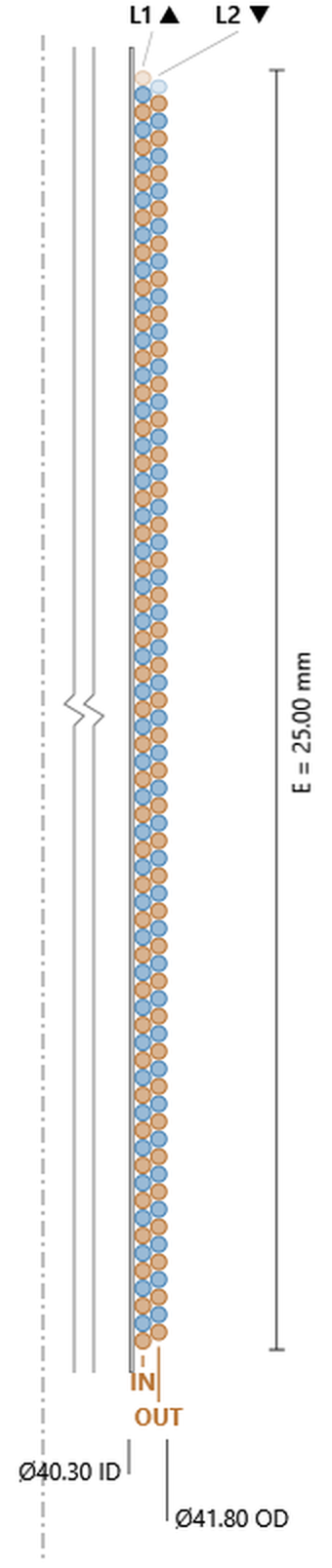
Two wires laid side by side up the former and back down again. In the drawing they alternate turn by turn all the way up the stack — orange, blue, orange, blue — rather than occupying separate regions of the coil, and a single IN/OUT pair is marked because the bundle enters and leaves together.
Against the plain 2 SVC above: 144.8 turns instead of 115.9, on Ø0.343 wire instead of Ø0.428, and a slightly smaller outside diameter — 41.80 mm against 42.13. More turns on thinner wire in a tighter envelope, but the turns are split between two conductors, so each one carries 72.4 — well under the single coil’s 115.9. The one-wire setback still applies per layer: 72.9 then 71.9.
2 Bifilar: two conductors alternating turn by turn. 144.8 turns total, 72.4 per conductor, OD 41.80 mm. Click the image to open it full size.
2 Trifilarthree conductors wound together, two layers
Three wires in the bundle, so each layer divides three ways and the wire has to come down again to fit: Ø0.301. Total turns rise to 165.1, but per conductor that is 55.0. Outside diameter 41.64 mm.
2 Trifilar: 165.1 turns total, 55.0 per conductor, OD 41.64 mm. Click the image to open it full size.
2 Quadfilarfour conductors wound together, two layers
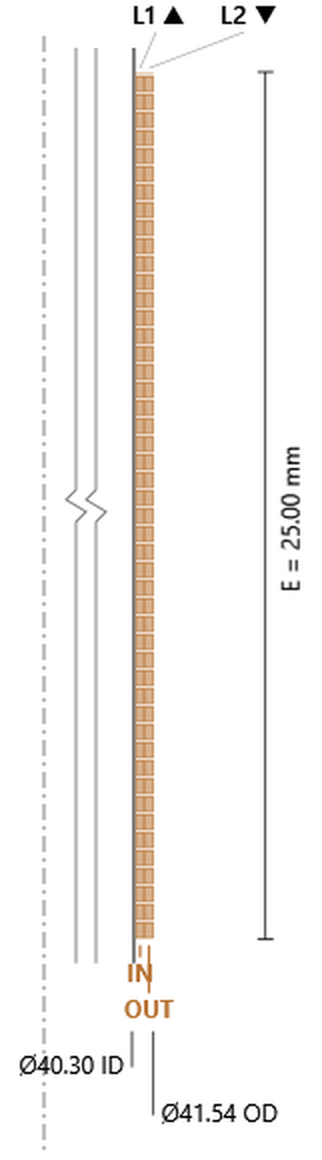
Four wires, Ø0.275, 180.9 turns total and 45.2 per conductor. Read the three two-layer multifilar drawings in order and the trend is clear: as filars are added, each conductor gets both shorter and thinner — 72.4 turns at Ø0.343, 55.0 at Ø0.301, 45.2 at Ø0.275 — which is what holding one resistance target on each conductor requires. Meanwhile the coil itself barely moves, and moves the wrong way: 41.80, 41.64, 41.54 mm. More conductors in the same two layers means a slightly smaller coil, not a bigger one.
2 Quadfilar: four conductors sharing every layer. 180.9 turns total, 45.2 per conductor, OD 41.54 mm. Click the image to open it full size.
4 Bifilartwo conductors wound together, four layers
This one is worth setting directly beside the 4 DVC drawing further up the page, because the two come out with the same numbers: 228.3 turns and 43.66 mm outside diameter on both. Same copper, same envelope, two independent conductors either way. Everything that differs is in how those conductors are distributed.
The 4 DVC gives Winding 1 the inner two layers and Winding 2 the outer two, and the two finish 0.15% apart on conductor length — close, but not equal, and they sit at different mean diameters so they do not see quite the same field. The 4 Bifilar puts both conductors in all four layers, half of each: 29.3, 28.8, 28.3, 27.8 turns apiece, 114.2 in total for each wire. The two are identical by construction — same turns, same mean diameters, same length, no residual mismatch at all — and each one is very nearly the reference two-layer coil repeated (Ø0.427 over 114.2 turns, against Ø0.428 over 115.9).
That is the reason to choose bifilar over DVC when the two windings must match: interleaving removes the mismatch instead of minimising it. What it costs is the DVC’s separation — the two conductors are wound together all the way, so they cannot be handled or terminated independently along the stack.
4 Bifilar: two conductors sharing all four layers. 228.3 turns total, 114.2 per conductor, OD 43.66 mm — the same totals as the 4 DVC, differently arranged. Click the image to open it full size.
4 Trifilarthree conductors wound together, four layers
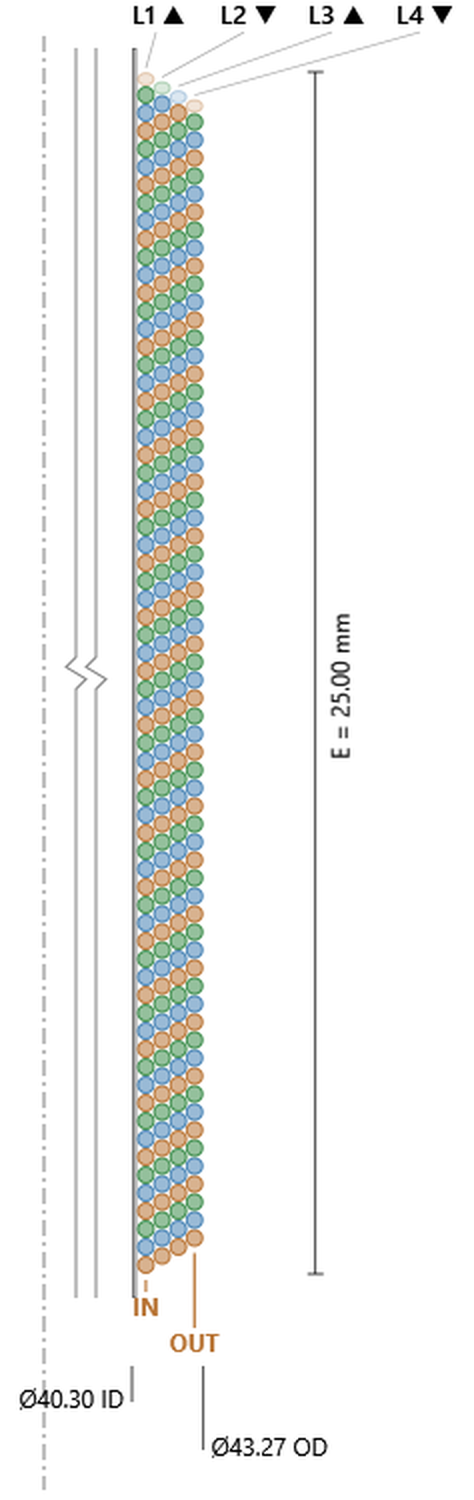
Three matched conductors, 261.1 turns total, 87.0 each, Ø0.374 wire, OD 43.27 mm. The comparison to draw is with the 6 TVC above, which also gives three independent windings: that one reaches 338.2 turns but needs 45.17 mm of outside diameter to do it, and its three windings land within 0.1% of one another rather than dead equal.
So the choice between them is not really about matching — both are good — but about turns against envelope. Stacking the three windings radially buys turns per winding and costs diameter; interleaving them axially holds the diameter down and costs turns.
4 Trifilar: three conductors sharing four layers. 261.1 turns total, 87.0 per conductor, OD 43.27 mm. Click the image to open it full size.
4 Quadfilarfour conductors wound together, four layers
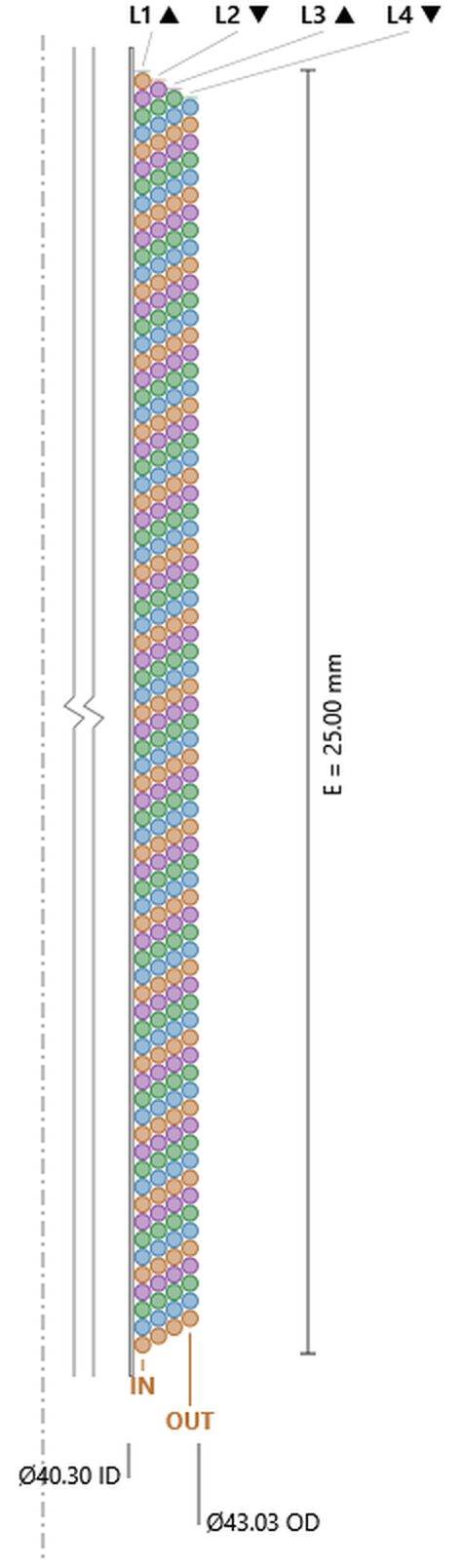
Four matched conductors, 286.5 turns total, 71.6 each, Ø0.342 wire, OD 43.03 mm. Layer turns run 73.1, 72.1, 71.1, 70.1 — and 25.00 ÷ 0.342 is 73.1, so the same arithmetic holds at four filars as at two.
Set this against the 2 Bifilar at the head of the group and something useful falls out. The wire is the same — Ø0.342 here, Ø0.343 there — and so is the turn count per conductor: 71.6 against 72.4. Two conductors in two layers and four conductors in four layers produce the same conductor, four times over instead of twice. Doubling the filar count halves each conductor’s share of a layer; doubling the layer count hands it straight back. What actually changed is the coil: 41.80 mm outside diameter becomes 43.03 mm, which is the price of the extra two conductors.
Against the stacked 8 QVC further up, which also delivers four windings: that one reaches 444.1 turns at 46.68 mm outside diameter, roughly 111 turns per winding. So the same trade as trifilar against 6 TVC, one step further along — radial stacking buys turns per winding and costs 3.6 mm of diameter; axial interleaving holds the build down and gives each conductor less.
4 Quadfilar: four conductors sharing all four layers. 286.5 turns total, 71.6 per conductor, OD 43.03 mm. Click the image to open it full size.
6 Bifilartwo conductors wound together, six layers
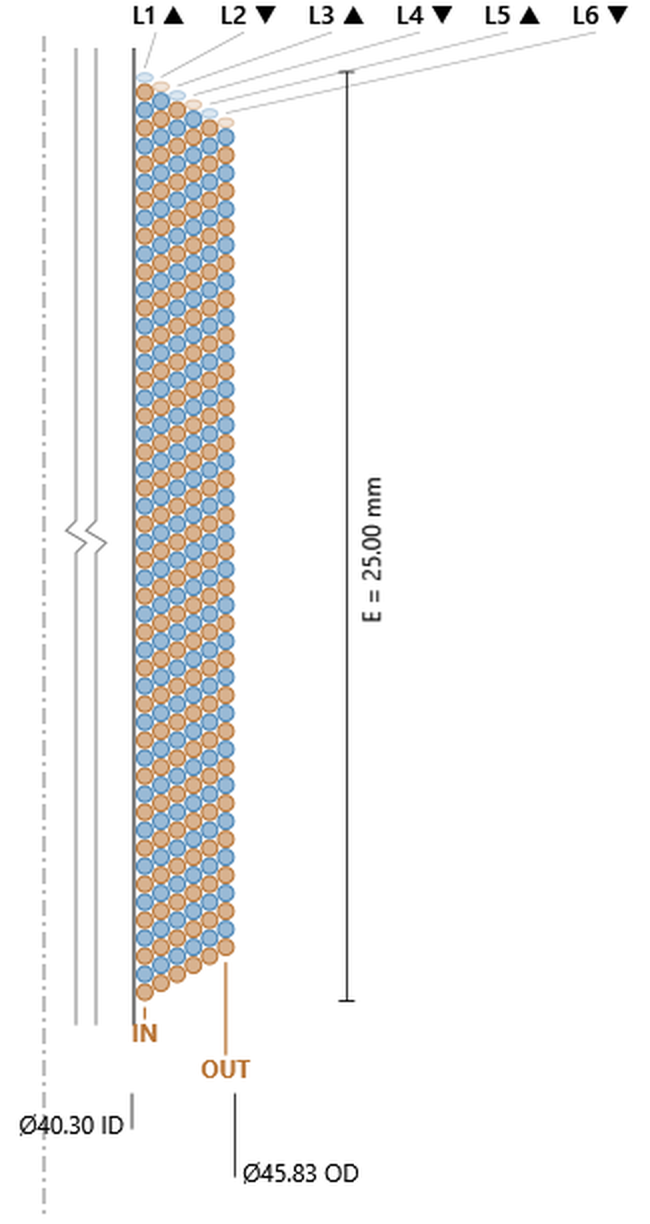
294.7 turns total, 147.4 per conductor, Ø0.484 wire, OD 45.83 mm. Six layers of a two-wire bundle: each conductor now carries more than the reference coil does, and the wire has grown to suit.
6 Bifilar: 294.7 turns total, 147.4 per conductor, OD 45.83 mm. Click the image to open it full size.
6 Trifilarthree conductors wound together, six layers
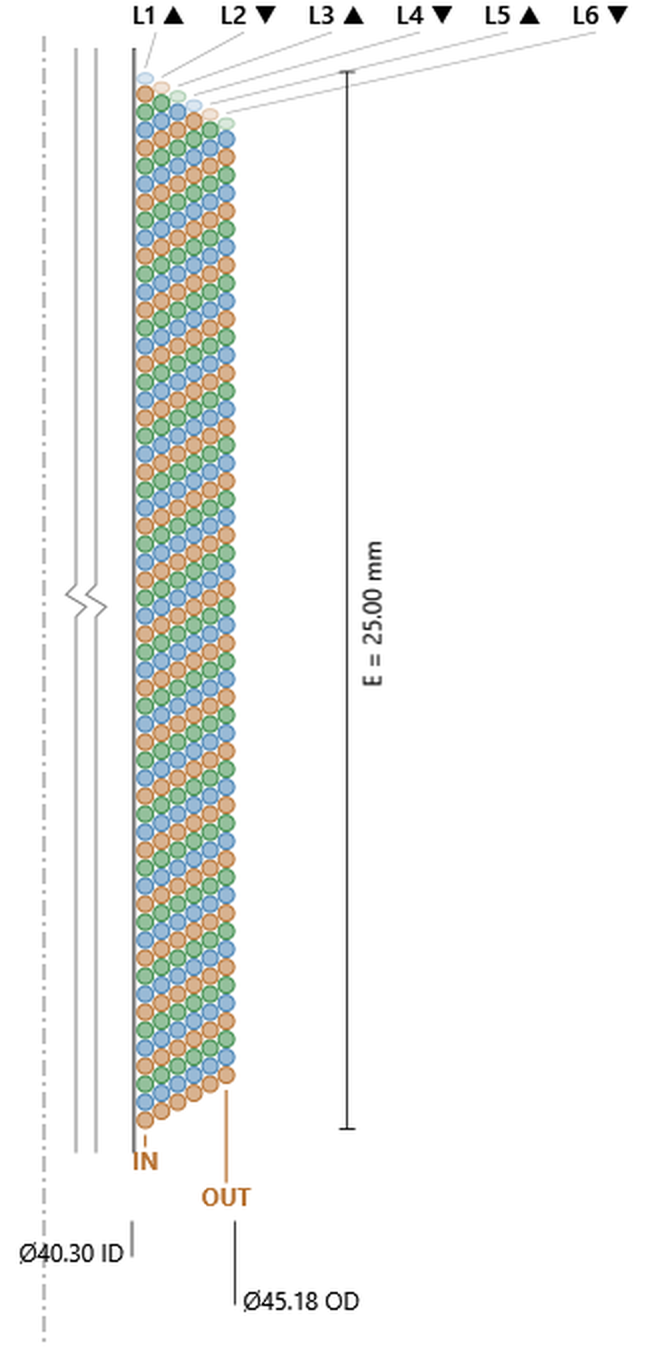
337.4 turns total, 112.5 per conductor, Ø0.426 wire, OD 45.18 mm. Compare the 6 TVC higher up the page: 338.2 turns at 45.17 mm. Three windings, six layers, the same copper in the same envelope — interleaved here, stacked there.
6 Trifilar: 337.4 turns total, 112.5 per conductor, OD 45.18 mm — the 6 TVC totals, differently arranged. Click the image to open it full size.
6 Quadfilarfour conductors wound together, six layers
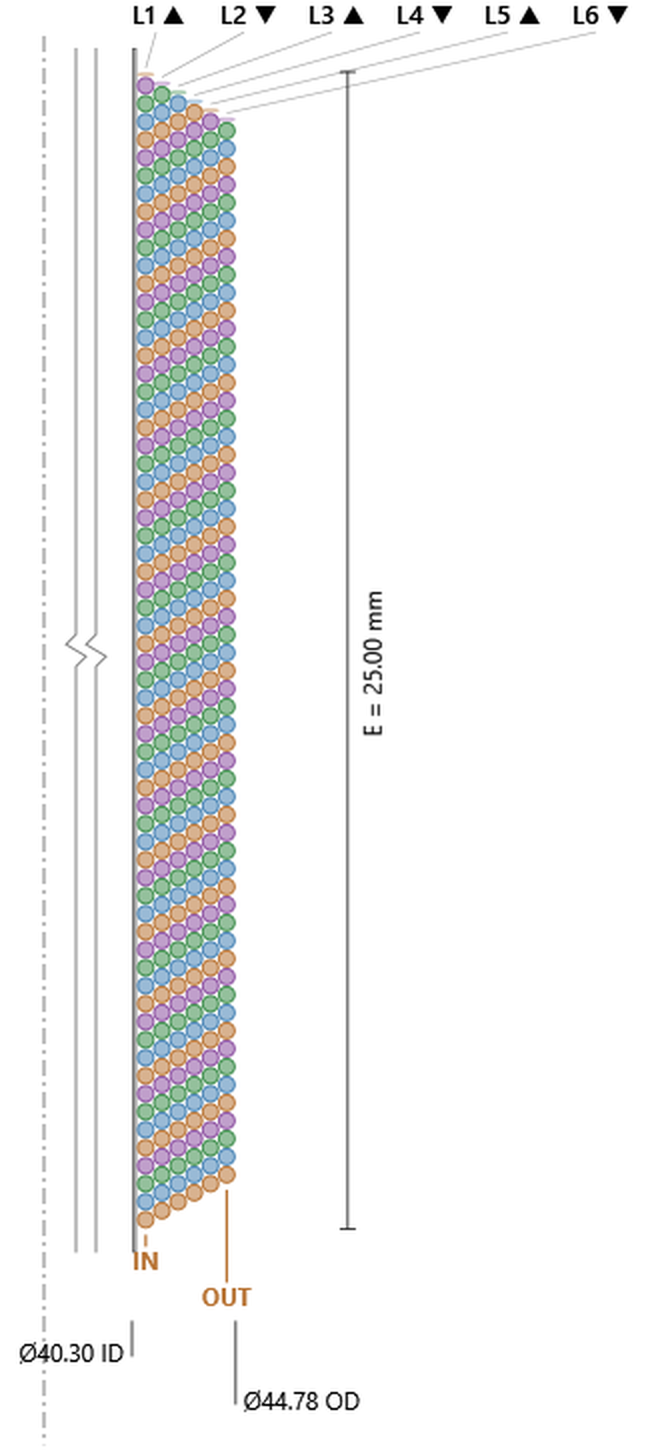
370.5 turns total, 92.6 per conductor, Ø0.389 wire, OD 44.78 mm. There is no six-layer four-winding stacked type to set against this one; the catalog has no way to divide six layers four ways radially, and interleaving does it without difficulty.
6 Quadfilar: 370.5 turns total, 92.6 per conductor, OD 44.78 mm. Click the image to open it full size.
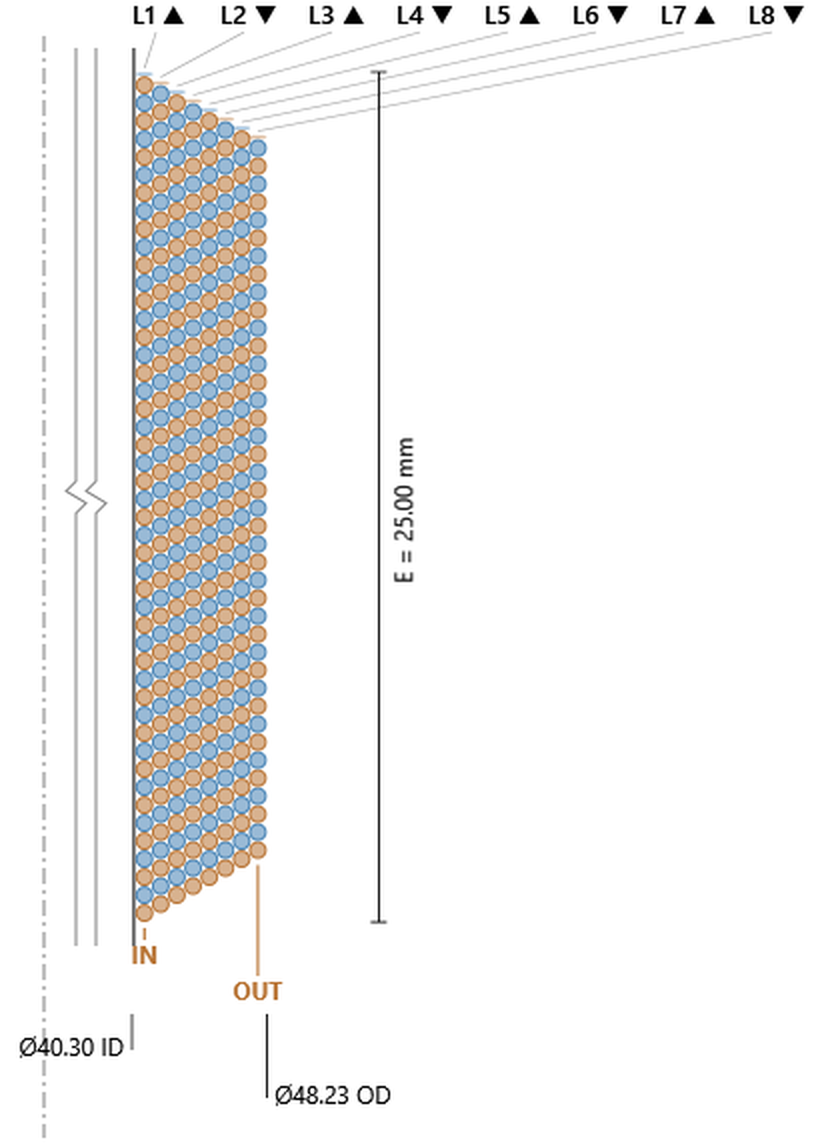
349.8 turns total, 174.9 per conductor, Ø0.529 wire, OD 48.23 mm — against the 8 DVC’s 350.5 turns at 48.21 mm. The same pairing again, at eight layers.
8 Bifilar: 349.8 turns total, 174.9 per conductor, OD 48.23 mm. Click the image to open it full size.
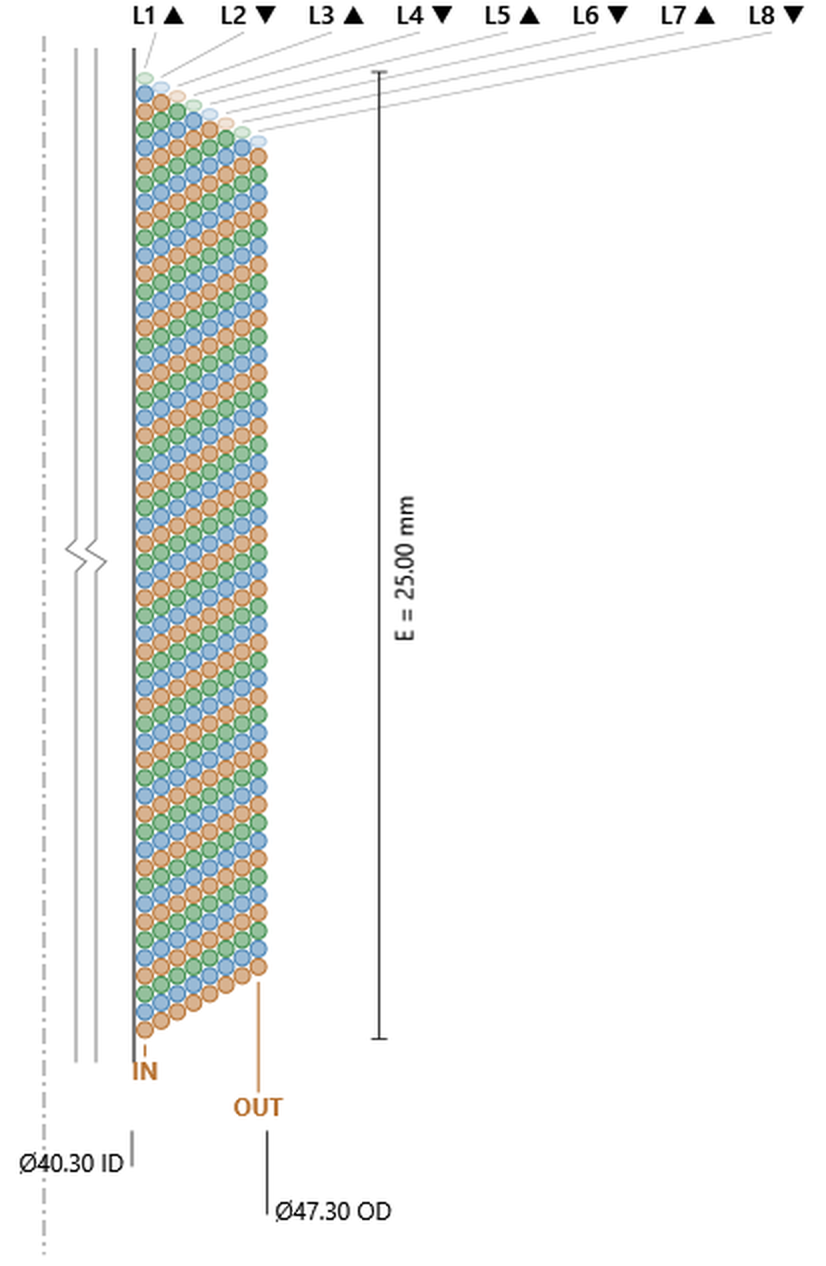
401.6 turns total, 133.9 per conductor, Ø0.466 wire, OD 47.30 mm. Eight layers do not divide evenly by three, and there is no stacked three-winding eight-layer type to compare it with.
8 Trifilar: 401.6 turns total, 133.9 per conductor, OD 47.30 mm. Click the image to open it full size.
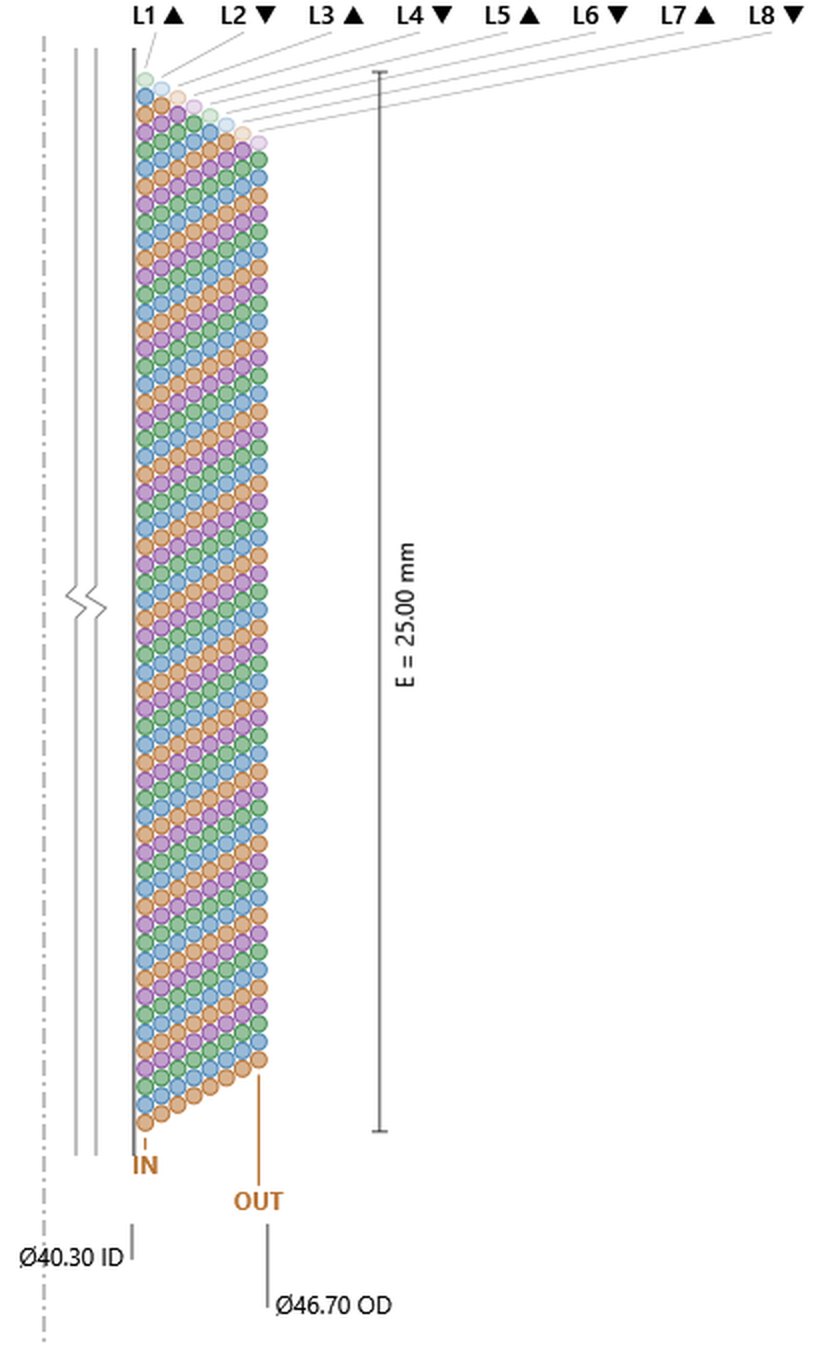
The deepest multifilar build: 443.0 turns total, 110.8 per conductor, Ø0.425 wire, OD 46.70 mm. The 8 QVC reaches 444.1 turns at 46.68 mm. Four windings either way, and the two constructions land on the same coil.
8 Quadfilar: 443.0 turns total, 110.8 per conductor, OD 46.70 mm — the 8 QVC totals, differently arranged. Click the image to open it full size.
All twelve multifilar types are drawn above, and read as a set they collapse into one rule worth carrying away. Divide the layer count by the filar count and you have the single-coil winding each conductor is getting. The 2 Bifilar is two copies of the 1 SVC — 72.4 turns each on Ø0.343 wire, against the 1 SVC’s 72.9 on Ø0.343. The 4 Bifilar and the 8 Quadfilar are both copies of the 2 SVC. The 8 Bifilar is two copies of the 4 SVC: 174.9 turns on Ø0.529, against 181.8 on Ø0.533. Each conductor falls a few percent short of its single-coil twin, because a conductor spread over more layers pays the one-wire setback more times and sits at larger mean diameters, but the correspondence is close enough to design with.
So the filar count and the layer count are not two knobs pulling against each other. The filar count is how many matched conductors come out of the coil; the ratio of layers to filars is what each of them is worth.
The other thing the set settles is the choice between interleaving and radial stacking. Wherever the catalog offers both — and it does at four combinations — they arrive at the same coil:
Same turns, same outside diameter, within a few tenths of a percent in every case. What differs is not the amount of copper but its arrangement, and that decides three things: the multifilar windings are matched exactly rather than to a fraction of a percent, because every conductor sees every layer; the stacked windings sit at distinctly different mean diameters and so see distinctly different field, where the interleaved ones share the same average position in the gap; and the stacked windings can be handled as separate regions of the coil, where a multifilar bundle is wound and terminated as one. Choose on those, not on the numbers — the numbers are the same.
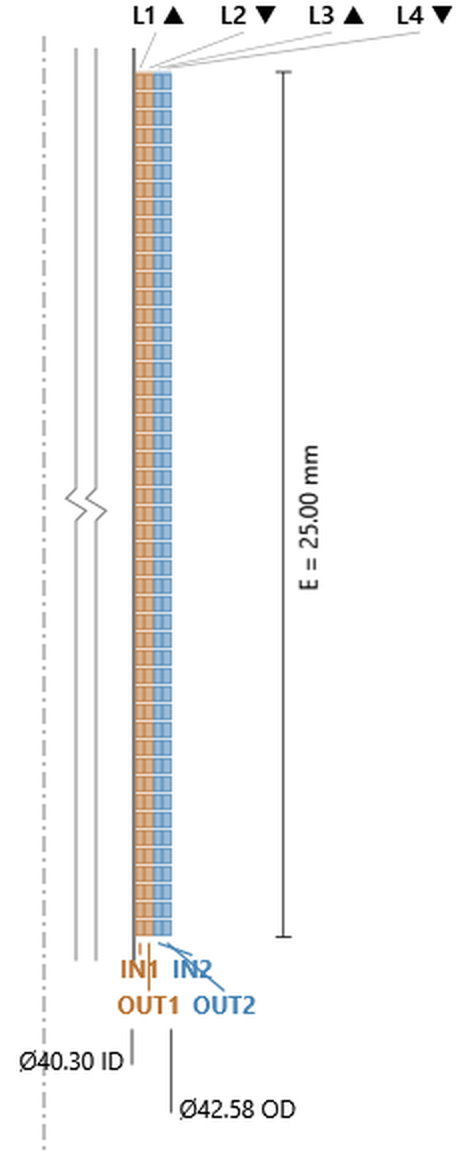
Everything to this point has been round wire. The edge-wound and flat-wire types use rectangular ribbon, and three things change on screen. The drawing fills with rectangles rather than circles. The header line above the layer table reads Ribbon 0.517 x 0.259 mm (incl. insulation) instead of a single diameter — radial dimension first, axial second. And the Oval Ratio field on the Voice Coil panel comes alive: it is disabled for every round type and enabled here; a value below 1 is refused (field red, solve blocked), and left empty it is read as 1.
The ratio means the same thing in both families — wide face to narrow face, n:1 — and what changes is which way the ribbon is turned. Edge types stand it on its narrow face, so the wide dimension runs radially and the narrow one axially. Flat types lay it down, and the two swap. With Oval Ratio 2 the 1 Edge solves to 0.517 × 0.259 and the 2 Flat SVC to 0.259 × 0.519: the same ribbon, rotated a quarter turn.
The ribbon is not a separate thing the solver picks. It is the round wire the solve arrived at, reshaped at constant cross-sectional area to the ratio you asked for — which is why the manual can say the rotation pairs are the same coil, and why both dimensions are quoted on the same over-insulation basis as a round wire diameter. Set Oval Ratio to 1 and a flat or edge type returns the round wire it started from.
Two pieces of arithmetic run through all six drawings below. The turns in a layer are the winding height divided by the axial dimension — 25.00 ÷ 0.259 = 96.5 on the 1 Edge, 25.00 ÷ 0.519 = 48.2 per layer on the 2 Flat SVC. And the mean diameter climbs by exactly twice the radial dimension from one layer to the next, with nothing subtracted: ribbon does not nest, because there are no valleys between turns for the next layer to drop into. Round layers step by less than a full wire; these step by the full ribbon.
1 Edgeribbon on its narrow face, one layer
Ribbon 0.517 × 0.259, one layer, 96.6 turns, OD 41.53 mm. The whole coil is a single wrap: the narrow face lies against the former and the build outward is one ribbon width (0.517 mm a side), 40.50 mm to 41.53 mm.
That is the point of edge winding and also its limit. A single layer of ribbon puts more conductor in the gap than a single layer of round wire could, because the rectangle leaves no gaps between turns and no gap between the turn and the former — but there is nowhere sensible for a second layer to go, which is why the catalog offers deeper edge-wound builds only in the I/O form.
1 Edge: ribbon 0.517 × 0.259 standing on its narrow face. 96.6 turns, OD 41.53 mm. Click the image to open it full size.
1 Edge BFtwo ribbons wound together on edge, one layer
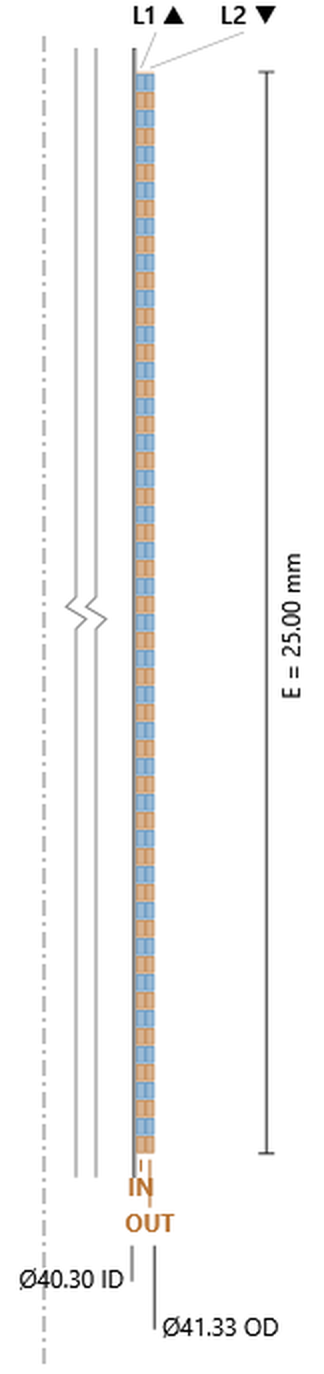
Bifilar edge winding: two ribbons alternating up the single layer, 0.415 × 0.207 each, 120.6 turns total and 60.3 apiece, OD 41.33 mm. The Wind column reads 1-2 exactly as it does on the round multifilar types — both ribbons are in the one layer, sharing the winding height between them, so a narrower ribbon fits more turns in.
1 Edge BF: two ribbons alternating in one layer. 120.6 turns total, 60.3 per ribbon, OD 41.33 mm. Click the image to open it full size.
2 Edge I/Oribbon on edge, one layer on each face of the former
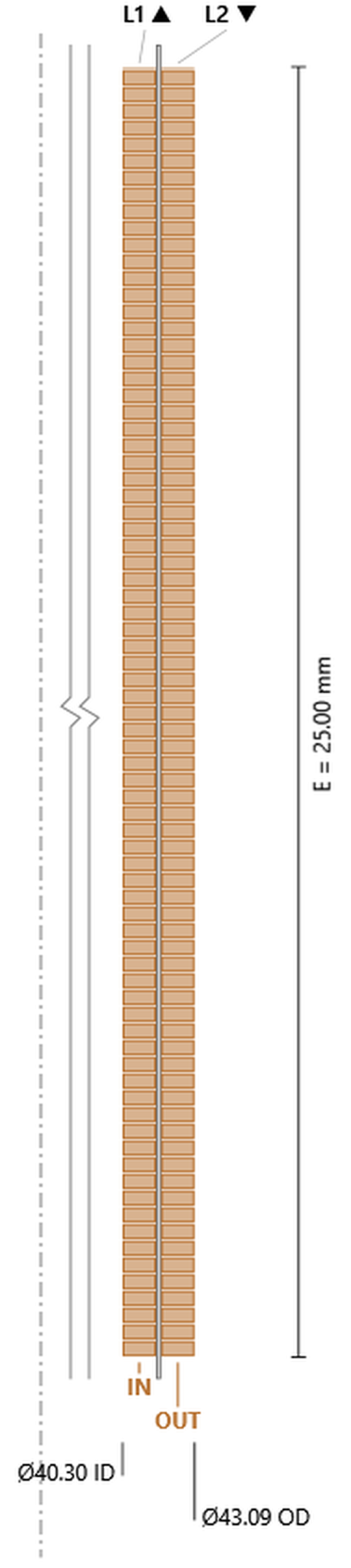
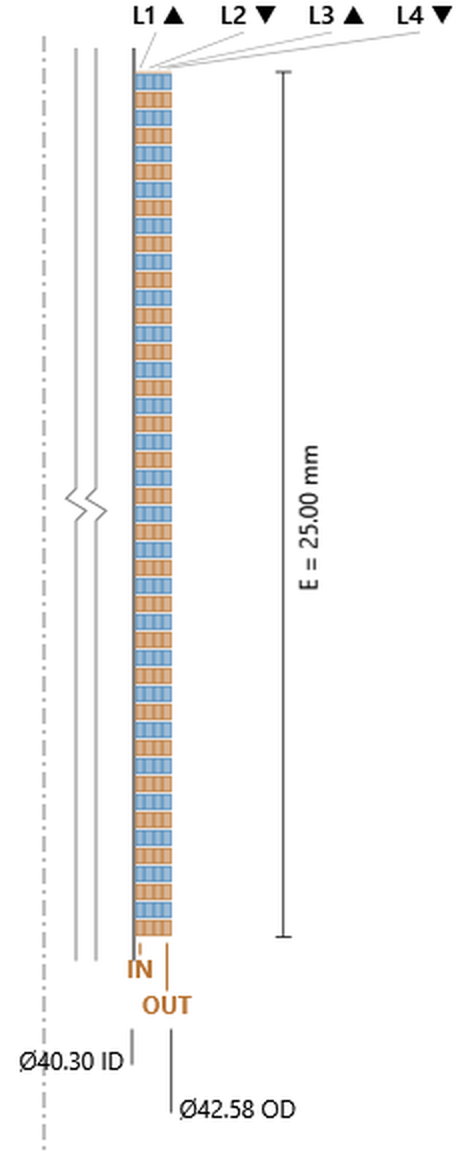
The way to get two layers of edge-wound ribbon: put one on each face rather than stacking them. Ribbon 0.648 × 0.324, 77.2 turns per face, 154.3 in total, OD 43.09 mm. The Stack column reads In and Out, and the drawing shows the former wall running down the middle of the winding, exactly as on the round I/O types.
The step from the inner mean diameter to the outer is 1.49 mm — half a ribbon out to the inner layer’s face, 0.10 mm of former, half a ribbon back — and both layers carry the same 77.2 turns, since the setback on an I/O type is charged per input and there is only one.
2 Edge I/O: one ribbon layer on each face of the former. 154.3 turns total, OD 43.09 mm. Click the image to open it full size.
2 Edge BF I/Otwo ribbons on edge, one layer on each face
Both ideas at once: bifilar ribbon, one layer per face. 0.519 × 0.259, 96.4 turns per face, 192.7 in total, OD 42.58 mm. This is the deepest edge-wound build the catalog offers, and the ribbon it solves to is the same one the 1 Edge uses — four times the conductor in the same section, arranged two ways at once.
2 Edge BF I/O: two ribbons per layer, one layer per face. 192.7 turns total, OD 42.58 mm. Click the image to open it full size.
2 Flat SVCribbon laid flat, two layers
Ribbon 0.259 × 0.519 — the 1 Edge ribbon turned on its side — wound two layers deep. 48.2 turns in each layer, 96.4 in total, OD 41.54 mm.
Set that against the 1 Edge and the two are the same coil. 96.4 turns against 96.6; 41.54 mm outside diameter against 41.53. One layer of ribbon standing on edge and two layers of the same ribbon lying flat occupy the same section and hold the same conductor, because rotating a rectangle does not change its area and the coil has to reach the same resistance either way. The choice between them is a winding-shop choice, not an electrical one.
Note also that both layers carry 48.2 turns. There is no one-turn setback here, and there should not be: the setback on round wire comes from the second layer dropping into the valleys of the first, and flat ribbon has no valleys.
2 Flat SVC: the 1 Edge ribbon laid flat and wound two layers deep. 96.4 turns, OD 41.54 mm — the same coil, rotated. Click the image to open it full size.
2 Flat BFtwo ribbons laid flat, two layers
Ribbon 0.208 × 0.416, two conductors sharing both layers, 60.1 turns per layer and 120.2 in total, OD 41.33 mm. The same relationship holds one step along: this is the 1 Edge BF ribbon rotated, and the two builds land on 120.2 turns against 120.6 at an identical 41.33 mm outside diameter.
2 Flat BF: two ribbons sharing two flat layers. 120.2 turns total, OD 41.33 mm. Click the image to open it full size.
4 Flat SVCribbon laid flat, four layers
Ribbon 0.325 × 0.651, four layers, 38.4 turns each, 153.7 in total, OD 43.10 mm. The rotation rule holds a step deeper: this is the 2 Edge I/O ribbon turned on its side, and the two builds arrive at 153.7 turns against 154.3 and 43.10 mm against 43.09.
4 Flat SVC: 153.7 turns, OD 43.10 mm — the 2 Edge I/O coil, rotated. Click the image to open it full size.
4 Flat DVCtwo windings, two flat layers each
Ribbon 0.260 × 0.520, Winding 1 on layers 1–2 and Winding 2 on layers 3–4, 48.1 turns in every layer, 192.2 in total, OD 42.58 mm.
This is where flat wire parts company with round, and it is worth looking at closely. Every layer carries the same 48.1 turns — correct, because ribbon does not nest and so pays no setback. But that setback was doing something on the round types: the turns the outer winding gave up were what cancelled its larger diameter. Take it away and nothing cancels. Winding 1 sits at mean diameters summing to 82.04 mm, Winding 2 at 84.12, and the conductor lengths finish 2.5% apart.
The round 4 DVC managed the same job to 0.15%. So a flat DVC is not a drop-in equivalent: the two windings differ in resistance by a margin you can measure, and the outer one is the longer.
4 Flat DVC: two windings stacked two layers each. 192.2 turns, OD 42.58 mm; the two windings 2.5% apart on conductor length. Click the image to open it full size.
4 Flat BFtwo ribbons interleaved, four flat layers
The same ribbon, the same four layers, the same 192.2 turns and the same 42.58 mm outside diameter as the 4 Flat DVC above — and the mismatch is gone. Both ribbons run through all four layers, so both see the same diameters and the same length, exactly.
That makes this the sharpest case in the whole gallery for choosing interleaved over stacked. On round wire the two constructions were separated by 0.15%, which few designs would care about. On flat wire the gap is 2.5%, for no difference at all in copper or envelope. If a flat coil needs two matched windings, this is the one to wind.
It also equals the 2 Edge BF I/O by the rotation rule: 192.2 turns against 192.7, 42.58 mm against 42.58.
4 Flat BF: two ribbons sharing all four layers. Same 192.2 turns and 42.58 mm as the 4 Flat DVC, with the two conductors exactly matched. Click the image to open it full size.
6 Flat SVCribbon laid flat, six layers
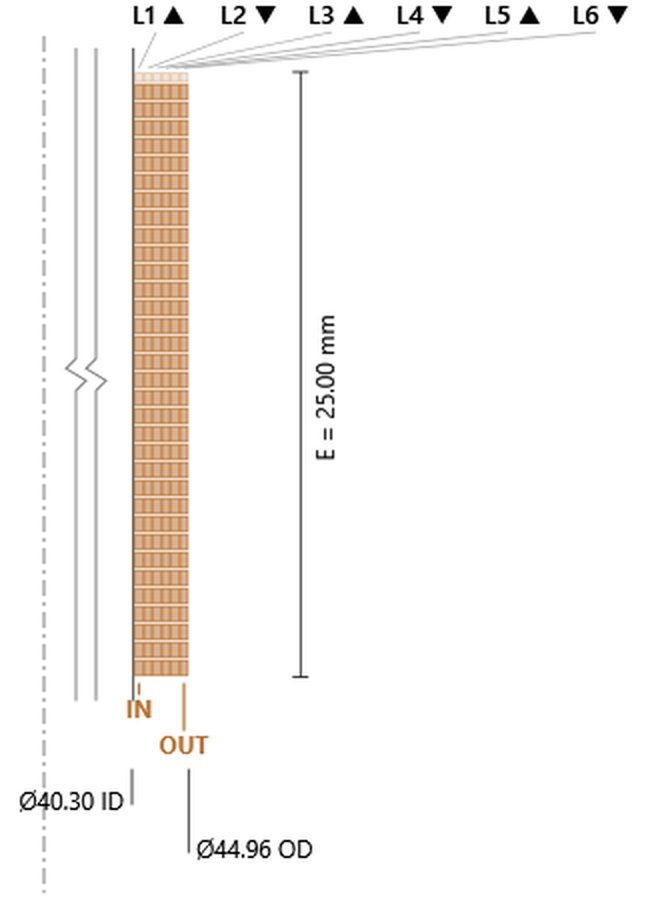
Ribbon 0.372 × 0.744, 33.6 turns in each of six layers, 201.6 in total, OD 44.96 mm. A single winding, so nothing to mismatch; the ribbon has grown wide enough that only 33.6 turns fit the 25 mm height.
6 Flat SVC: 201.6 turns, OD 44.96 mm. Click the image to open it full size.
6 Flat BFtwo ribbons interleaved, six flat layers
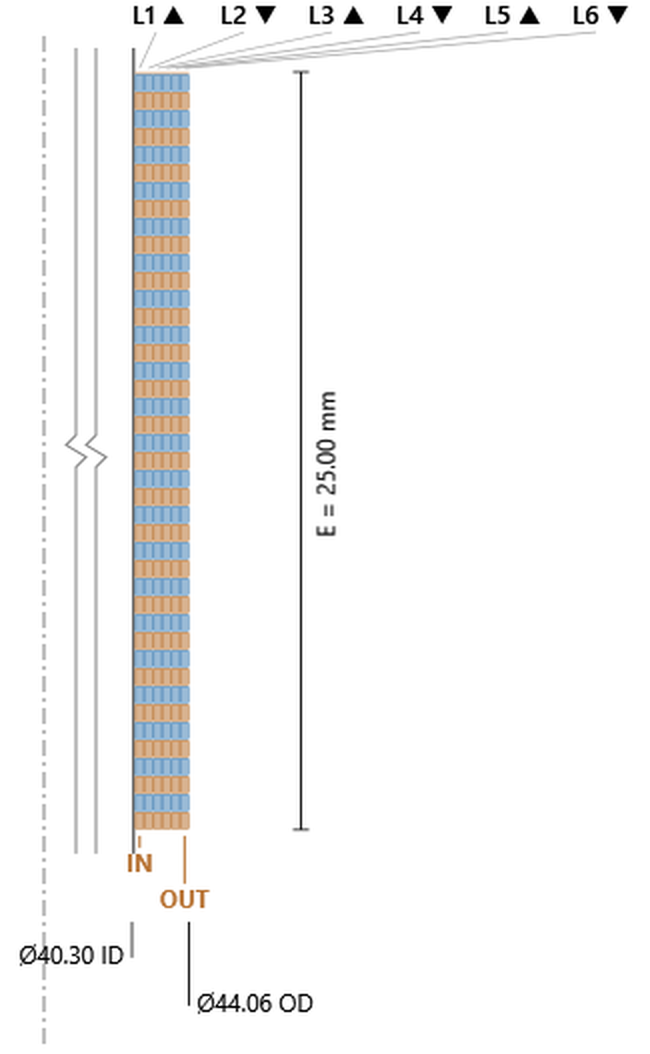
Ribbon 0.297 × 0.594, both conductors in all six layers, 42.1 turns per layer, 252.6 in total, OD 44.06 mm. Two matched conductors at 126.3 turns each, and no mismatch to report for the same reason as the 4 Flat BF.
6 Flat BF: 252.6 turns total, 126.3 per conductor, OD 44.06 mm. Click the image to open it full size.
6 Flat TVCthree windings, two flat layers each
Ribbon 0.261 × 0.522, Winding 1 on layers 1–2, Winding 2 on 3–4, Winding 3 on 5–6, 47.9 turns everywhere, 287.6 in total, OD 43.63 mm.
The mismatch that showed up on the 4 Flat DVC scales with the number of stacked windings and grows again on the 8 Flat DVC and 8 Flat QVC below. The three windings sit at mean-diameter sums of 82.04, 84.13 and 86.22 mm, so Winding 3 runs 5.1% longer than Winding 1 — against the round 6 TVC’s 0.1%. There is no three-conductor interleaved flat type to escape into, so if a flat coil needs three matched windings, the mismatch has to be designed around rather than wound out.
6 Flat TVC: three windings stacked two layers each. 287.6 turns, OD 43.63 mm; outermost winding 5.1% longer than innermost. Click the image to open it full size.
8 Flat SVCribbon laid flat, eight layers
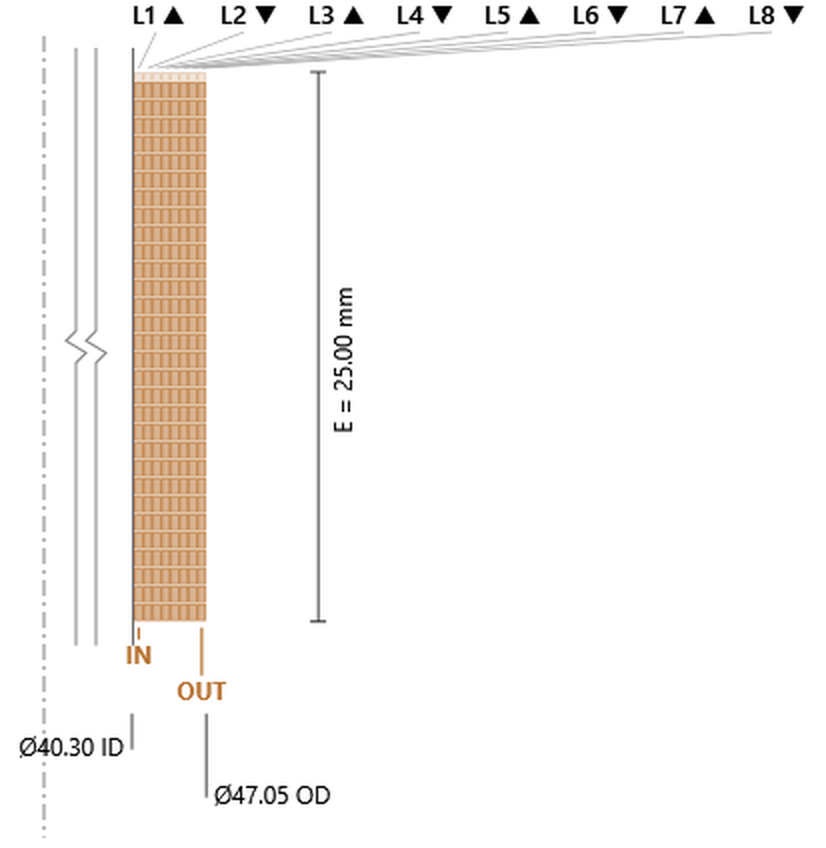
Ribbon 0.409 × 0.819, eight layers, 30.5 turns each, 244.2 in total, OD 47.05 mm. Worth setting beside the round 8 SVC at the head of the gallery, which reaches 275.9 turns but needs 50.11 mm to do it. Ribbon leaves no gaps between turns or against the former, so eight flat layers build three millimetres less than eight round ones — the fill-factor argument, in one comparison.
8 Flat SVC: 244.2 turns, OD 47.05 mm — against the round 8 SVC's 275.9 turns at 50.11 mm. Click the image to open it full size.
8 Flat DVCtwo windings, four flat layers each
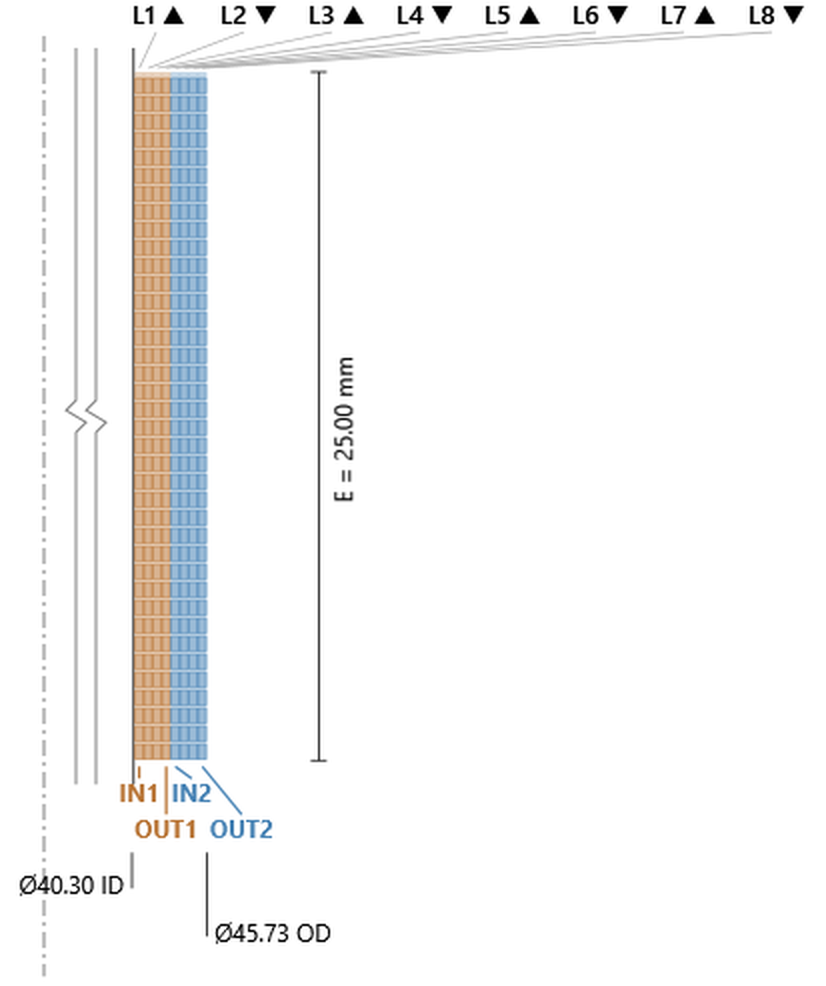
Ribbon 0.327 × 0.654, Winding 1 on layers 1–4 and Winding 2 on 5–8, 38.2 turns everywhere, 306.0 in total, OD 45.73 mm.
Four layers per winding puts the two centroids further apart than the 4 Flat DVC managed with two, and the mismatch widens accordingly: mean-diameter sums of 167.23 and 177.68 mm leave the windings 6.3% apart on conductor length, against 2.5% on the shallower build. Depth per winding costs as much here as winding count does.
8 Flat DVC: two windings stacked four layers each. 306.0 turns, OD 45.73 mm; the two windings 6.3% apart. Click the image to open it full size.
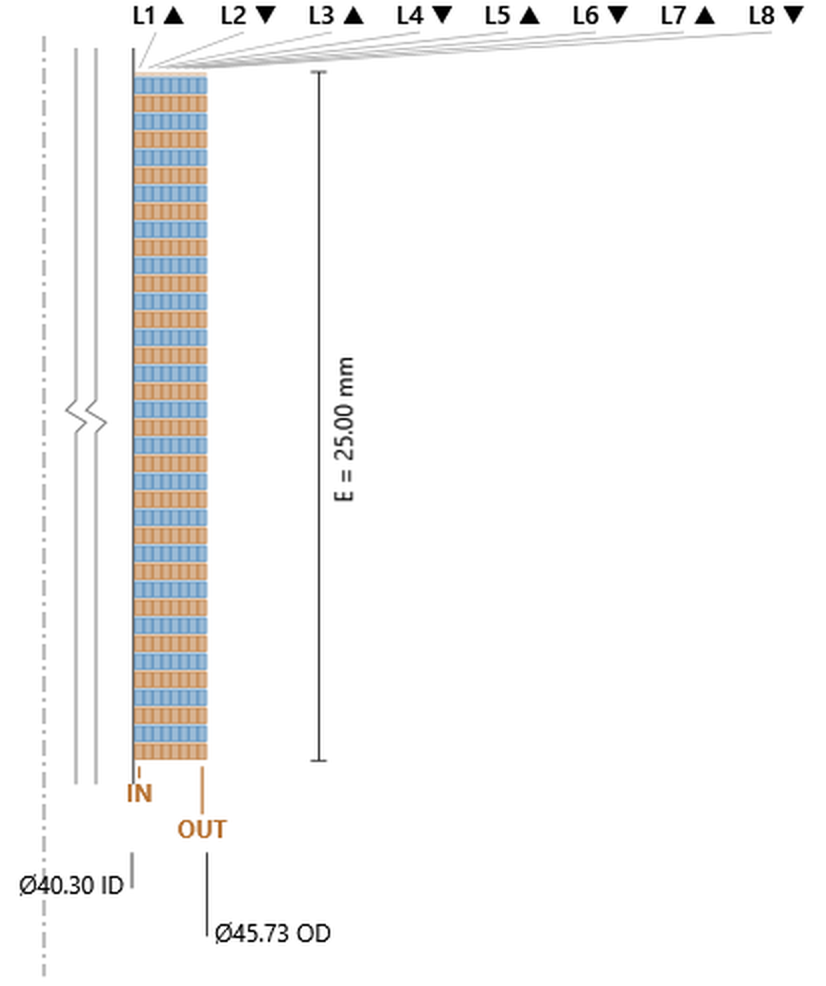
Identical ribbon, identical layer table, identical 306.0 turns and 45.73 mm outside diameter to the 8 Flat DVC above — and the two conductors are exactly equal, because both run through all eight layers. The 6.3% gap closes to nothing for no change in copper or envelope at all.
8 Flat BF: two ribbons sharing all eight layers. The 8 Flat DVC coil exactly, with the mismatch removed. Click the image to open it full size.
8 Flat QVCfour windings, two flat layers each
Ribbon 0.261 × 0.522, four windings of two layers, 47.9 turns everywhere, 383.4 in total, OD 44.67 mm. The deepest stacked flat build, and the widest spread in the gallery: mean-diameter sums of 82.04, 84.13, 86.22 and 88.30 mm put Winding 4 7.6% longer than Winding 1.
Note that the ribbon is the same one the 6 Flat TVC solved to, and the first three windings sit at exactly the same mean diameters. Adding a winding to a stacked flat coil does not rearrange what is already there; it wraps another shell around the outside and widens the spread by another step.
8 Flat QVC: four windings stacked two layers each. 383.4 turns, OD 44.67 mm; outermost winding 7.6% longer than innermost. Click the image to open it full size.
Two things carry away from the rectangular-wire families.
The first is that an edge-wound coil of L layers and a flat coil of 2L layers built from the same ribbon are the same coil. Every pair the catalog offers confirms it: 1 Edge against 2 Flat SVC (96.6 turns / 41.53 mm against 96.4 / 41.54), 1 Edge BF against 2 Flat BF (120.6 / 41.33 against 120.2 / 41.33), 2 Edge I/O against 4 Flat SVC (154.3 / 43.09 against 153.7 / 43.10), and 2 Edge BF I/O against 4 Flat BF (192.7 / 42.58 against 192.2 / 42.58). Rotating a rectangle does not change its area, and the coil has to reach the same resistance either way, so the choice between edge and flat is a winding-shop question rather than an electrical one. The pairing stops at four flat layers, because the catalog’s edge-wound types stop at two.
The second is the one to watch. Because ribbon does not nest, the flat and edge types pay no one-turn-per-layer setback — every layer in every drawing above carries identical turns. On a single-winding coil that changes nothing, and the tighter packing is pure gain: the 8 Flat SVC reaches 47.05 mm where the round 8 SVC needs 50.11. But on a stacked multi-winding flat coil the missing setback removes the mechanism that kept the round types matched, and the windings separate by a margin that grows with both the number of windings and the depth of each:
Two windings, two layers each — 4 Flat DVC, 2.5% apart.
Three windings, two layers each — 6 Flat TVC, 5.1%.
Four windings, two layers each — 8 Flat QVC, 7.6%.
Two windings, four layers each — 8 Flat DVC, 6.3%.
The round counterparts run at 0.1% to 0.6%. Interleaving fixes it completely and costs nothing — the 4 Flat BF and 4 Flat DVC are the same 192.2 turns in the same 42.58 mm, and the 8 Flat BF and 8 Flat DVC the same 306.0 turns in the same 45.73 mm — but the catalog only offers interleaved flat types in bifilar form. Three and four matched flat windings cannot be wound this way, so on those the spread has to be designed around.
The stepped types are the last group, and the only ones that vary the winding along its height rather than across its thickness. The name reads ends / centre / ends as layer counts: a Stepped 4/2/4 carries four layers over the two end sections and two through the middle. The first layers run the full 25 mm; the ones above the centre count stop short, covering only the ends, and the section drawing shows the resulting shoulders.
The layer table records that in a way worth knowing how to read. On a full-height layer the turn count falls by one from the layer below, the usual nesting setback. On a layer that covers only the ends it falls by two — one for each of the two end bands, since the Turns column sums both. Spotting where the drop changes from one to two tells you where the step is without measuring anything: on the 8/4/8 below it happens between layers 4 and 5, which is exactly the 4 of its name.
Stepped 4/2/4four layers at the ends, two through the centre
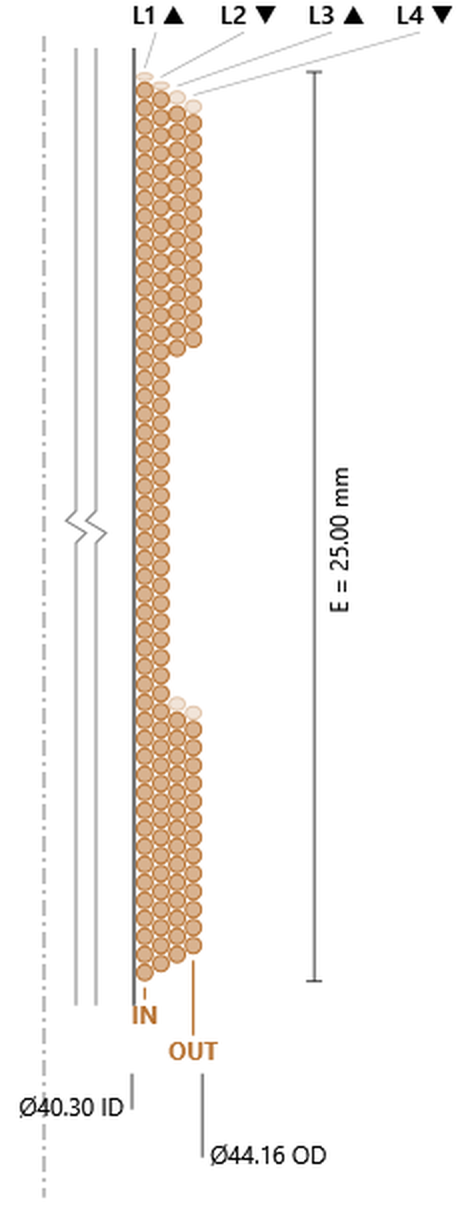
Wire Ø0.495, 157.4 turns, OD 44.16 mm. Layers 1 and 2 run the full height at 50.5 and 49.5 turns — 25.00 ÷ 0.495 is 50.5, so layer 1 fills the winding height exactly. Layers 3 and 4 sit only over the ends, 29.7 and 27.7 turns, dropping by two apiece. Each end band works out around 7.3 mm tall, leaving roughly 10 mm of two-layer centre between them.
Stepped 4/2/4: two full-height layers with two more over the ends only. 157.4 turns, OD 44.16 mm. Click the image to open it full size.
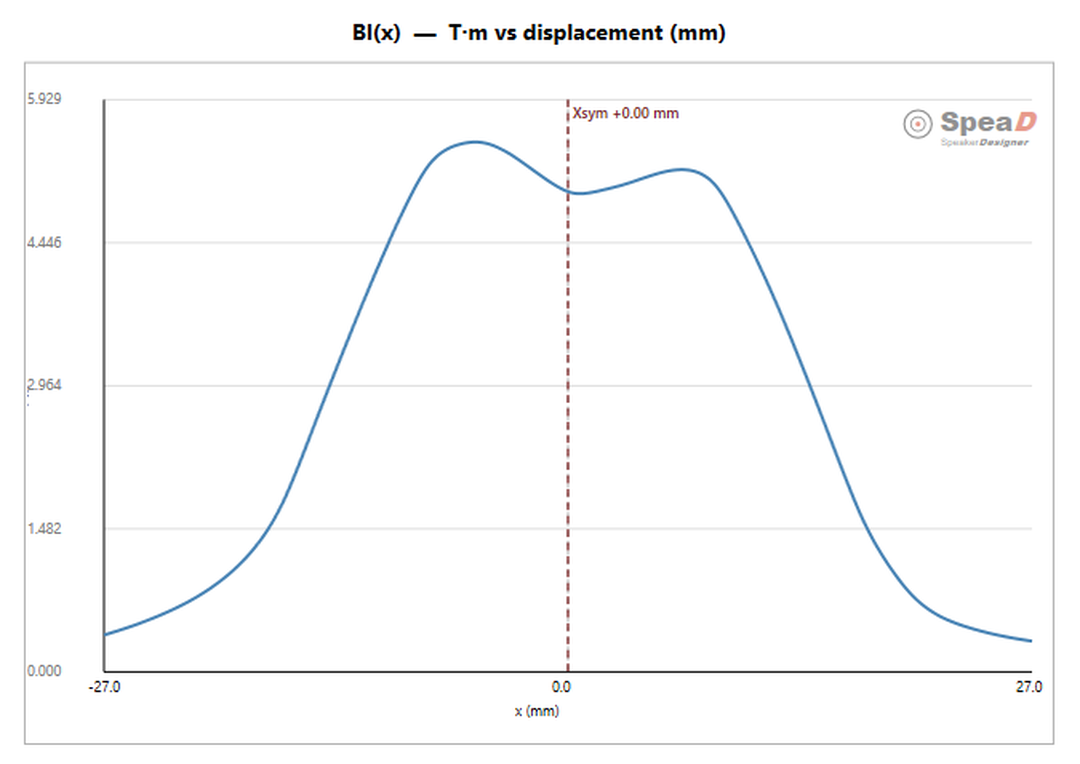
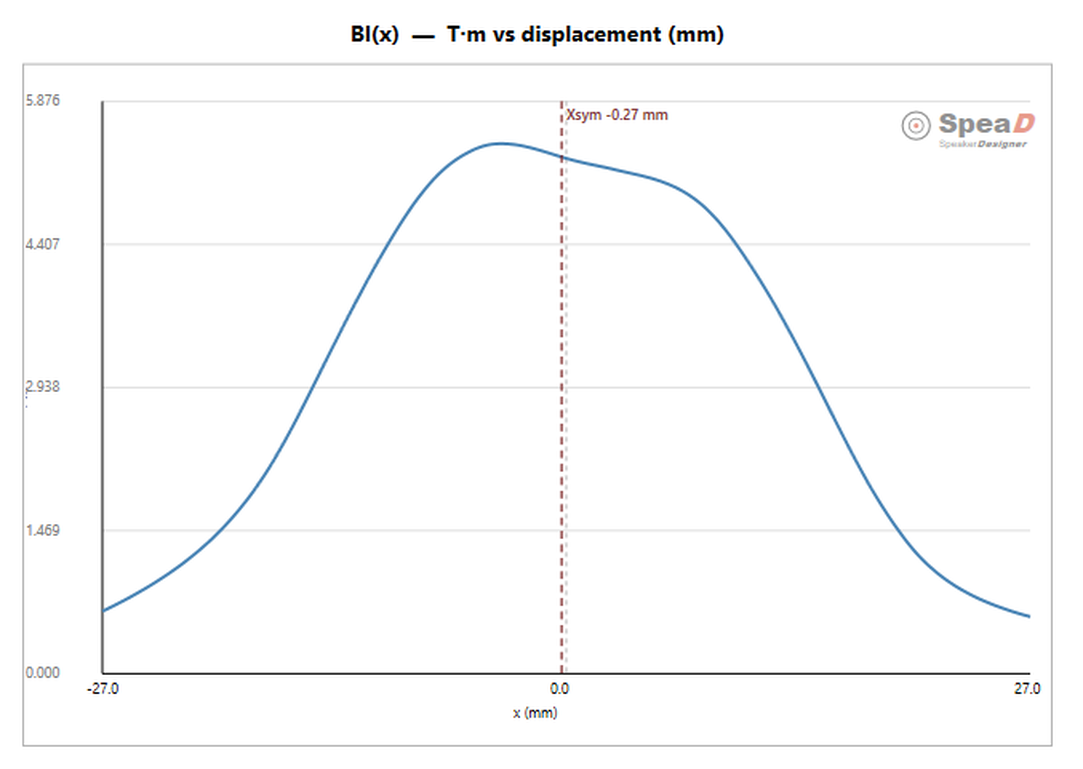
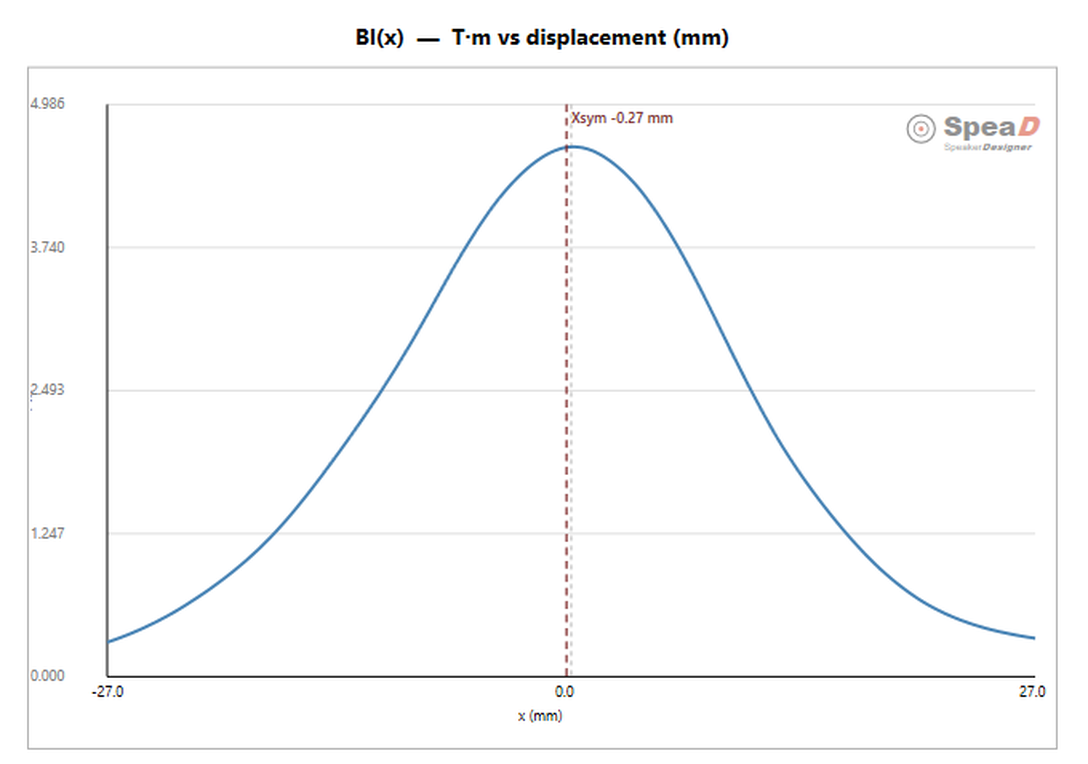
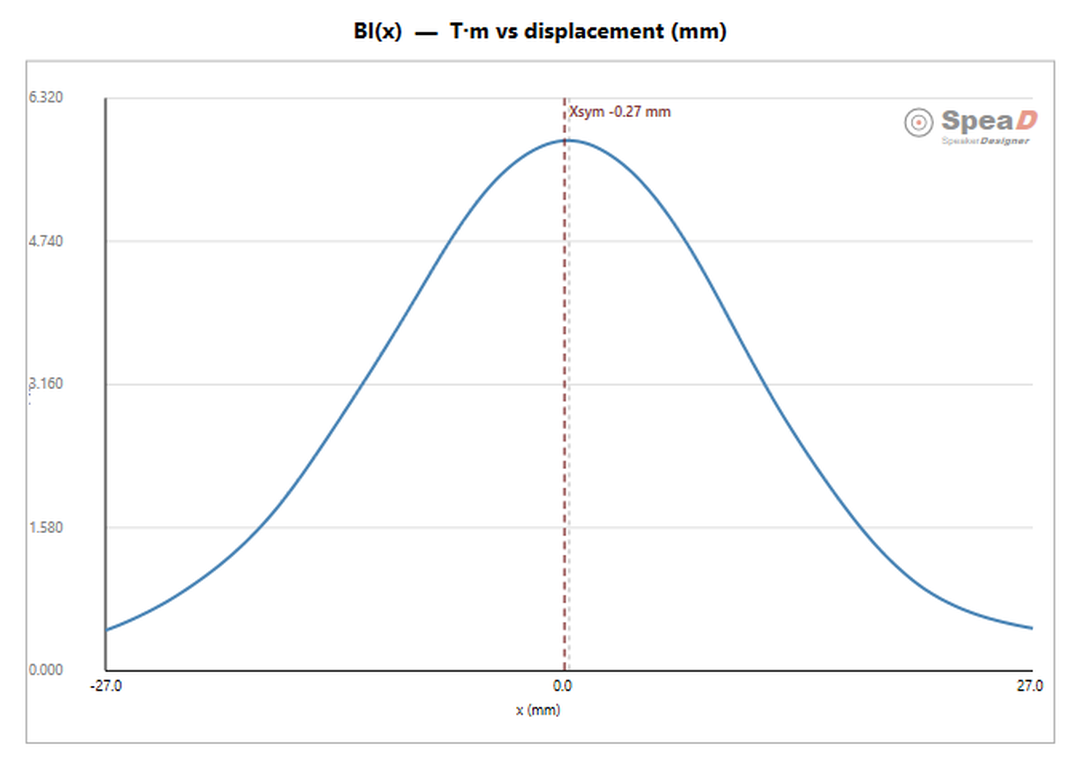
And this is what it is for. The Bl(x) curve leaves the single rounded peak a uniform coil gives and comes back with two crests and a shallow trough across rest — the extra conductor at the ends holding force up where a uniform coil would already be falling away.
Bl(x) for the Stepped 4/2/4, with the Xsym marker. Click the image to open it full size.
Stepped 6/2/6six layers at the ends, two through the centre
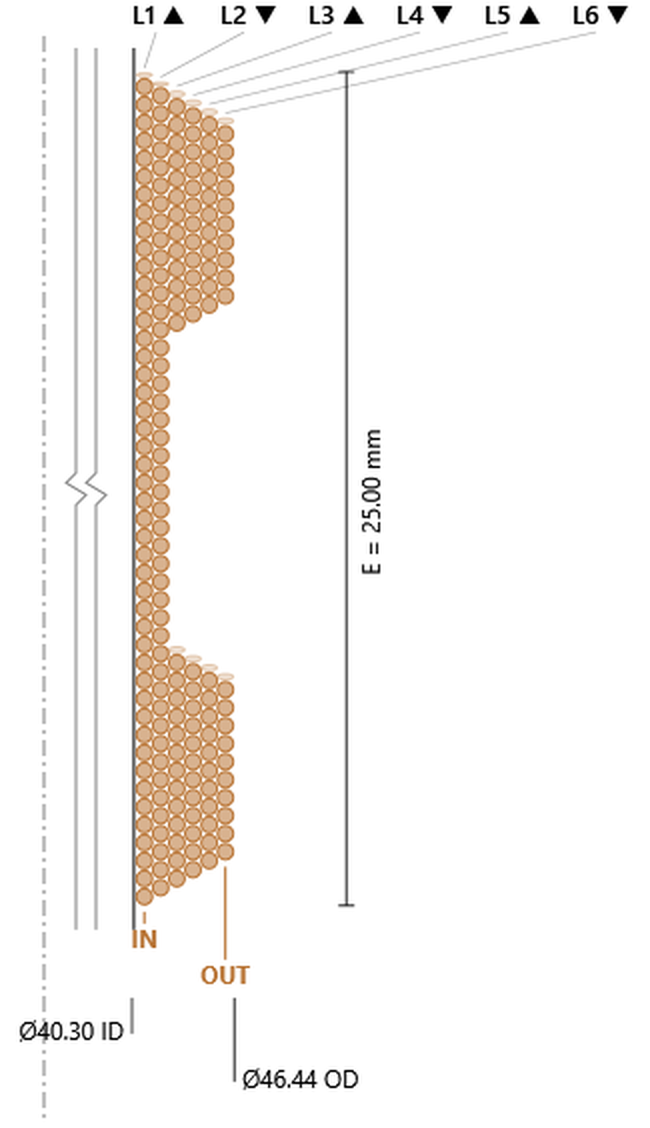
Wire Ø0.540, 187.1 turns, OD 46.44 mm. The same two full-height layers — 46.3 and 45.3, and 25.00 ÷ 0.540 is 46.3 — with four end-only layers above them running 26.9, 24.9, 22.9, 20.9, every one of them two turns down on the last. The deepest step in the catalog relative to its centre: six layers at the ends against two in the middle.
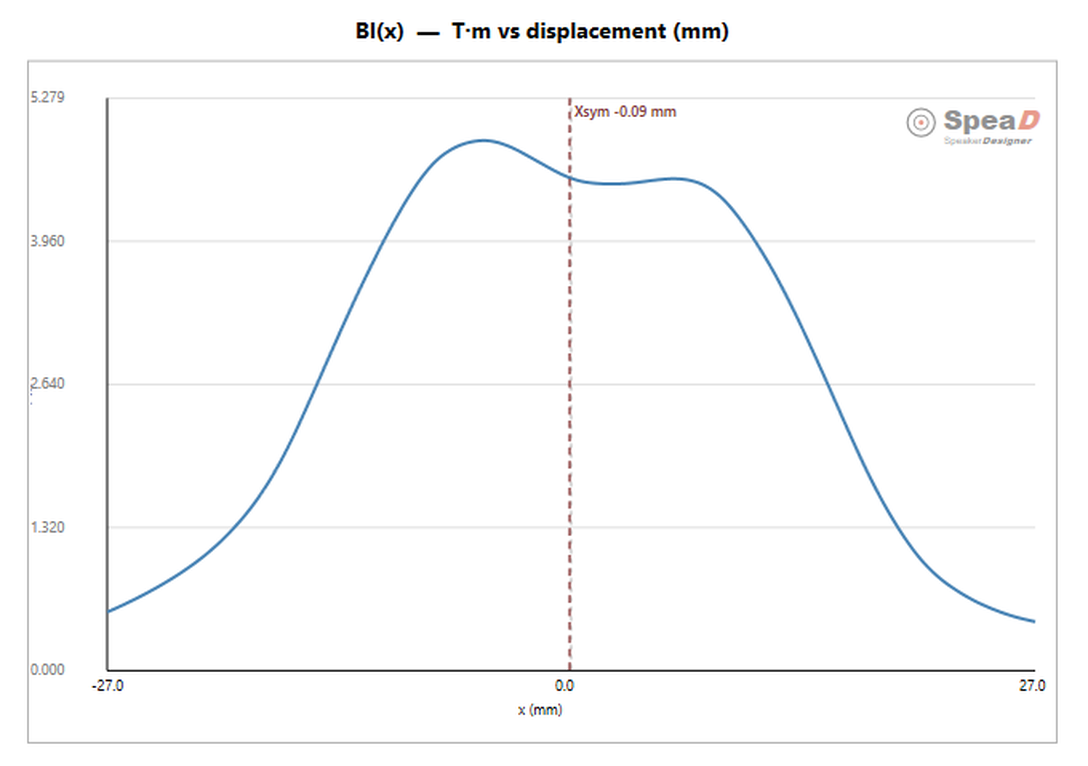
Stepped 6/2/6: two full-height layers, four more over the ends. 187.1 turns, OD 46.44 mm. Click the image to open it full size.Bl(x) for the Stepped 6/2/6. Click the image to open it full size.
Stepped 8/4/8eight layers at the ends, four through the centre
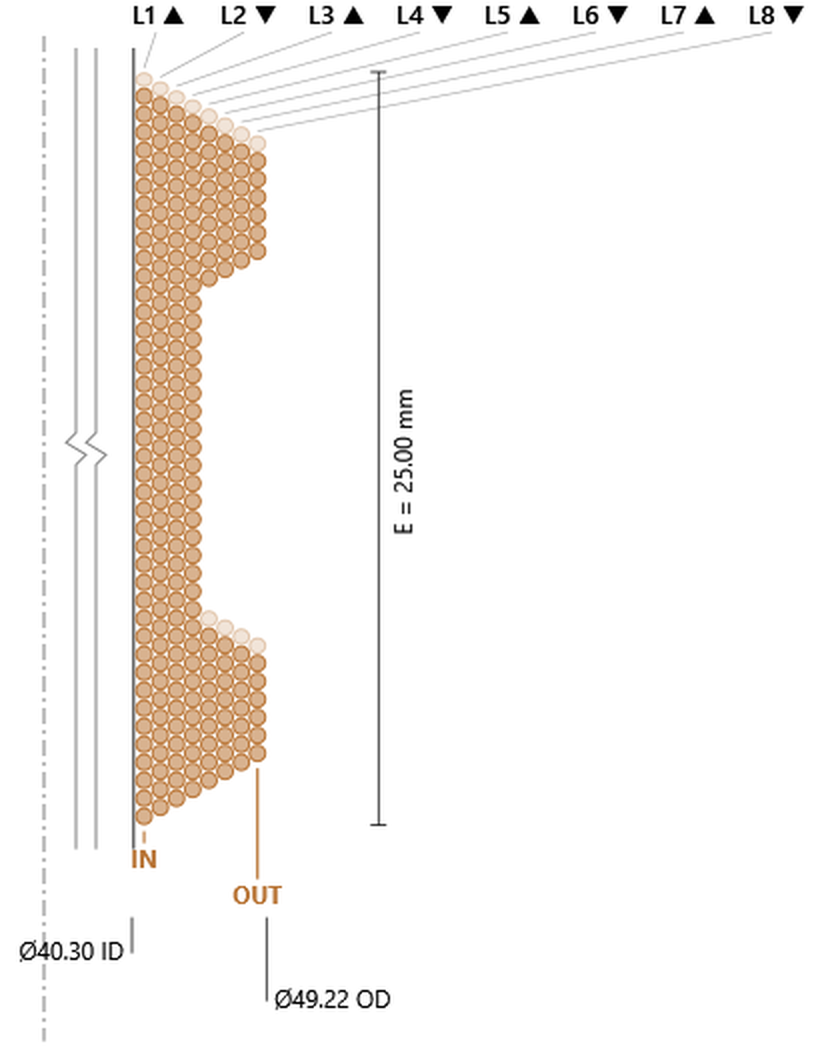
Wire Ø0.597, 229.0 turns, OD 49.22 mm — the largest stepped coil in the gallery. Four full-height layers at 41.8, 40.8, 39.8, 38.8, each one turn down; then four end-only layers at 19.9, 17.9, 15.9, 13.9, each two turns down. The change in that step size between layers 4 and 5 is the shoulder, and the end bands here are shorter than on the 4/2/4 — around 5.9 mm apiece — so the coil is closer to uniform over more of its height.
Stepped 8/4/8: four full-height layers, four more over the ends. 229.0 turns, OD 49.22 mm. Click the image to open it full size.Bl(x) for the Stepped 8/4/8. Click the image to open it full size.
Read the Bl(x) plots as illustrations of the mechanism rather than as a comparison between profiles. They are not a controlled experiment: each coil solved to a different wire and to a different outside diameter, so the step profile is not the only thing changing between them. Judging how much trough or peak one profile gives against another needs the curves compared at a fixed envelope, not read off separate windows.
Stepped 2/4/2two layers at the ends, four through the centre
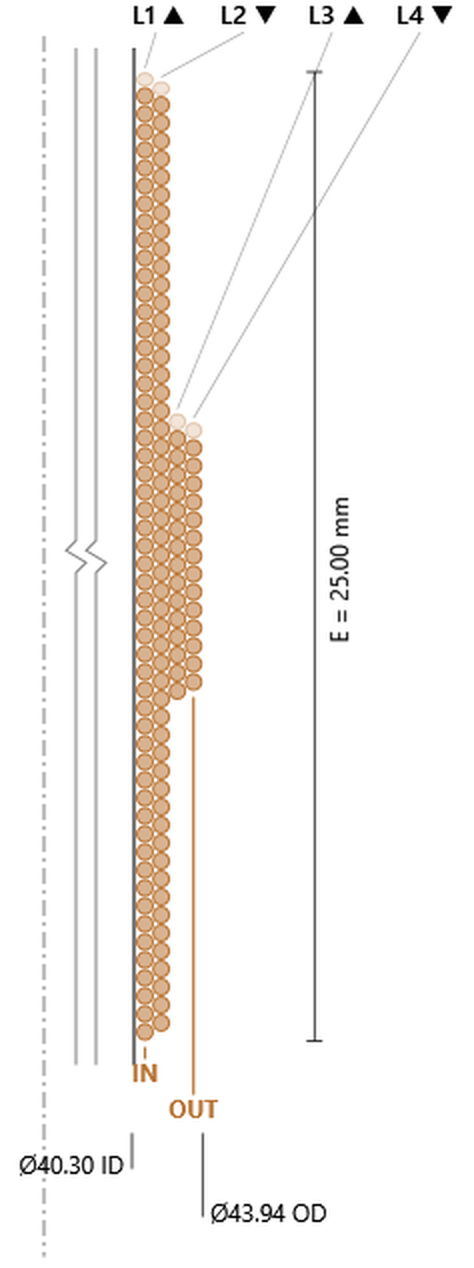
The step inverted: the extra layers go over the middle instead of the ends. Wire Ø0.464, 137.5 turns, OD 43.94 mm. Layers 1 and 2 run the full height at 53.8 and 52.8 turns; layers 3 and 4 cover the centre only, at 15.9 and 14.9.
Notice that those two fall by one turn, not two. The rule still holds — the drop is one per band, and a centre-loaded type has a single band where an end-loaded type has two. So on these the step cannot be spotted from the size of the drop; it shows instead as the sudden fall in absolute count, 52.8 straight to 15.9, which puts the centre band at about 7.4 mm of the 25.
Stepped 2/4/2: two full-height layers with two more over the centre only. 137.5 turns, OD 43.94 mm. Click the image to open it full size.
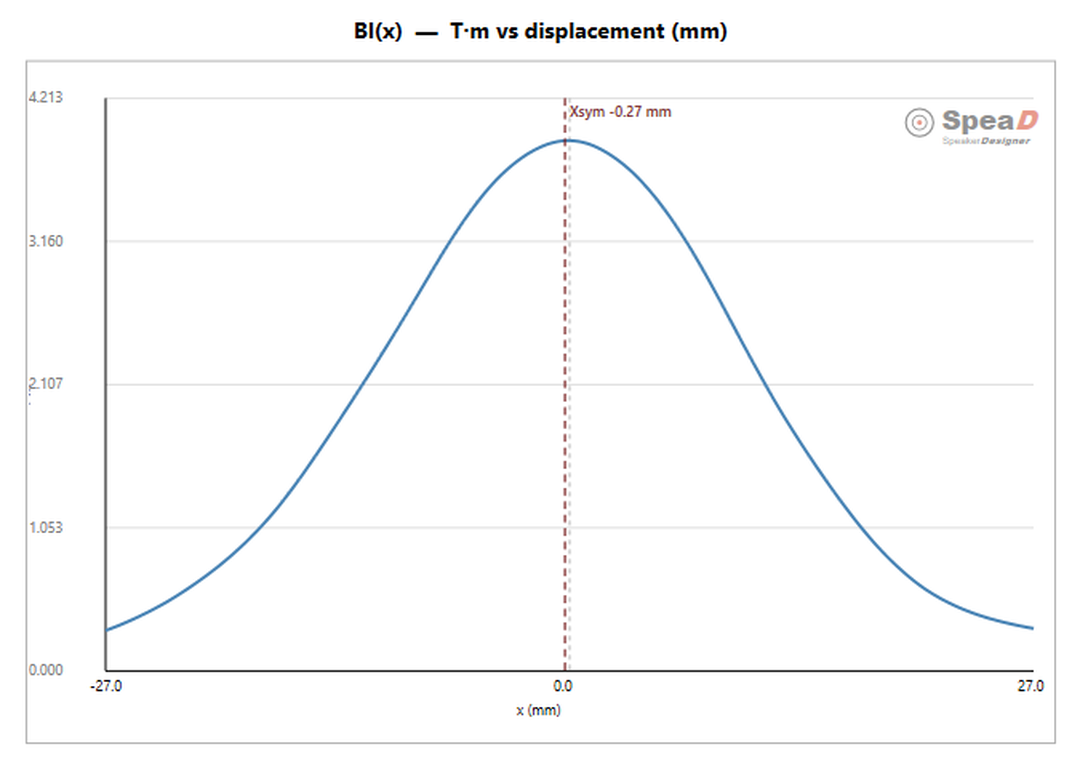
The curve inverts with the winding. Where the end-loaded types gave two crests and a trough across rest, this returns a single smooth peak — force concentrated at rest and falling away sooner, because the extra conductor is all in the middle where the coil already sits.
Bl(x) for the Stepped 2/4/2 — a single peak, against the twin crests of the 4/2/4. Click the image to open it full size.
Stepped 2/6/2two layers at the ends, six through the centre
Wire Ø0.492, 154.5 turns, OD 45.91 mm. Two full-height layers at 50.8 and 49.8, then four centre-only layers running 14.9, 13.9, 12.9, 11.9 — one turn down each, again the single-band signature. The centre band is about 7.3 mm, much the same as the 2/4/2; what changed is how much winding is piled on it.
Stepped 2/6/2: two full-height layers, four more over the centre. 154.5 turns, OD 45.91 mm. Click the image to open it full size.Bl(x) for the Stepped 2/6/2 — the same single-peak shape as the 2/4/2. Click the image to open it full size.
Stepped 4/8/4four layers at the ends, eight through the centre
The deepest centre-loaded build, and the last drawing in the gallery. Wire Ø0.568, 206.7 turns, OD 48.79 mm. Four full-height layers at 44.0, 43.0, 42.0, 41.0 — 25.00 ÷ 0.568 is 44.0 — then four centre-only layers at 10.7, 9.7, 8.7, 7.7, every one down by a single turn, the centre-loaded signature again.
What sets it apart from the other two centre-loaded types is how narrow the loaded band is: 10.7 turns of Ø0.568 puts it at roughly 6.1 mm against the 7.3–7.4 mm of the 2/4/2 and 2/6/2. Four layers piled on six millimetres of height, which is the most concentrated winding the catalog will build.
Stepped 4/8/4: four full-height layers with four more over a narrow centre band. 206.7 turns, OD 48.79 mm. Click the image to open it full size.Bl(x) for the Stepped 4/8/4 — the single-peak centre-loaded shape. Click the image to open it full size.
The two halves of the stepped family do opposite things, and the Bl(x) figures show it without needing a number put on it. End-loaded profiles — 4/2/4, 6/2/6, 8/4/8 — move conductor out to where the coil travels, and the curve answers with two crests and a shallow trough across rest: less force at the middle, more of it held out at excursion. Centre-loaded profiles — 2/4/2, 2/6/2, 4/8/4 — do the reverse, piling turns where the coil already sits, and the curve comes back a single peak that is taller at rest and falls away sooner.
That is the whole design choice. End-loading trades peak force for a flatter Bl over travel, which is what a long-throw driver wants. Centre-loading trades travel for force at rest. Everything else about the coil — the wire, the turns, the outside diameter — falls out of the solve as usual.
The Solve for Wire Size (hold one) block has three rows — Wind Height (mm), DCR (Ω), and Wire Size (mm). On multi-coil layer types (DVC, TVC, QVC, Bifilar, Trifilar, Quadfilar, BF) the DCR row reads DCR/coil (Ω): the value is one winding on its own, and Re Series and Re Parallel in the Parameters column give the totals. Wire Size is always the computed output; it is read-only and has no radio. You hold exactly one of the other two with its radio, and SpeaD solves for the rest. The hold choice belongs to each design tab — changing it on one tab does not affect the others — and it is saved with the design. A new tab, or a design saved before this version, starts with Wind Height held.
Hold Wind Height. You fix the coil height, and the solver finds the wire diameter that hits your target DCR at that exact height. The winding height stays as typed. With Step set to Fine or Standard the solved diameter is then snapped to the nearest standard size, and the DCR moves to whatever that wire gives — with the height fixed, DCR is the value that gives way.
Hold DCR. You fix the target DCR, and the solver finds the wire diameter and re-solves winding height together to land on that DCR. Winding height becomes a computed output and is written back, bounded above by the former height. The value you type into Wind Height acts as the starting fill target. The wire is snapped to the Step series first and the height is then solved for the snapped wire, so the DCR is held in every step mode.
The label of the held row is shown in bold blue; the computed field updates in place. In both modes the DCR box then shows the DCR the coil actually achieves, which can differ slightly from the figure you typed because the solved diameter is snapped to a real wire size. The diameter search runs the real coil math directly, then snaps the result to a size per the Step mode.
Wire Size is the bare conductor diameter, not the enameled outside diameter — the IEC series it snaps to are likewise bare-conductor nominals. The enamel thickness per the Build grade is added for calculations, and DCR is computed on the bare conductor.
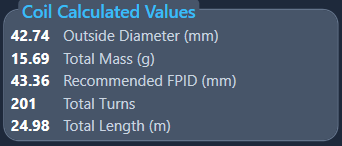
The Coil Calculated Values panel, directly below the Voice Coil panel on the Initial Design page. Five rows, updating as the solve completes.
Coil Calculated Values for the same start-design coil — 201 turns feeding BL in the motor. Click the image to open it full size.
Outside Diameter
Output
Finished outside diameter of the wound coil — former and winding; a collar sits above the winding and does not add to it. This is the number that has to clear the gap, so read it against Gap Width in the Motor Calculated Values panel.
Total Mass
Output
Mass of the complete coil assembly — wire, former and collar summed. It lands directly in the driver's moving mass, so it sets sensitivity and resonance as much as the motor does.
Recommended FPID
Output
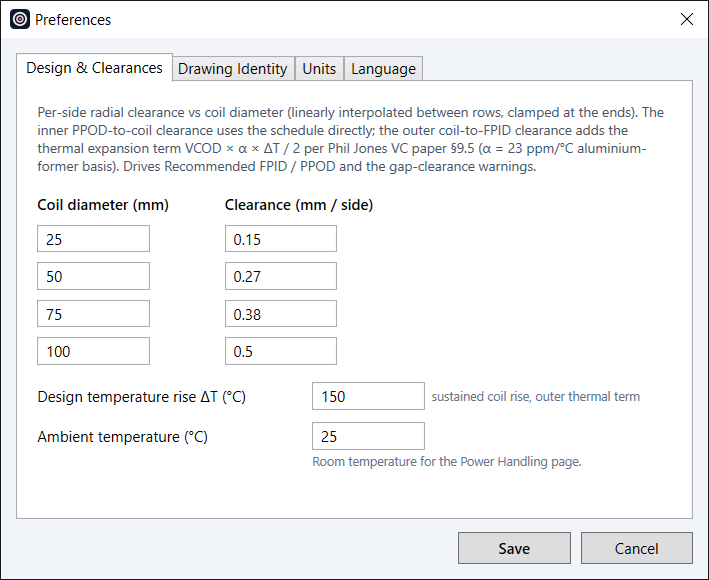
The front-plate inside diameter this coil wants: the coil OD plus, per side, the recommended outer clearance from the Preferences clearance schedule at that OD, plus a thermal-growth allowance for the hot coil (ΔT is its own Preference, default 150 °C). The same schedule drives the orange under-clearance warnings on the Pole Dia. and frontplate Inside Dia. labels (on a CYoke, Cyoke ID or Washer ID), whose tooltips show actual against recommended clearance. Use it as the starting point for the frontplate ID in Motor Parts.
Total Turns
Output
Total turns in the winding. This is what drives BL in the motor calculation, so any coil change propagates straight to the motor result.
Total Length
Output
Total conductor length in the coil.
Three things people expect here are not on this panel. There is no per-layer breakdown of DCR or wire length — only the totals. Re Series and Re Parallel are in the Parameters column, not here. And there is no recommended pole row: hover over Pole Dia. in Motor Parts (Outside Dia. of the top disk on a CYoke) and its tooltip gives the recommended value — the coil ID minus twice the Preferences clearance at that ID, with no thermal allowance, since the pole-side clearance opens up as the coil heats.
Turn count cascades onward to the motor, where it drives BL, so a change to the coil updates the motor result too.
A first coil, from the start design. A new design tab opens with 4 SVC, VCID 38.55, former Aluminum 0.10 at height 40, collar None, Aluminium 1350 wire with PU-155 enamel at Grade 2 (heavy), nesting Standard (0.90), elongation 0% and step Fine (IEC R40). Change any of these to suit your coil.
Wind Height is held (the default). Type the winding height you want — the start design uses 28 mm — and the target DCR, 3.68 Ω at the start design.
When you press Enter or Tab, leave a field, or pick from a list, the solver runs: it finds the wire diameter that reaches the target DCR at that height, then snaps it to the Fine series. Wire Size resolves — at the start design to 0.500 mm. With the height fixed, the DCR box shows what that wire actually gives.
Coil Calculated Values and the Voice Coil tab fill in: OD, mass, Recommended FPID, turn count and wire length; Re Series / Re Parallel appear in the Parameters column. Turn count flows to the Motor tab and sets BL.
To design to a resistance instead, click the DCR radio and type the DCR. Now the winding height is solved as well and written back, and the DCR is held.
Section
Motor Parts
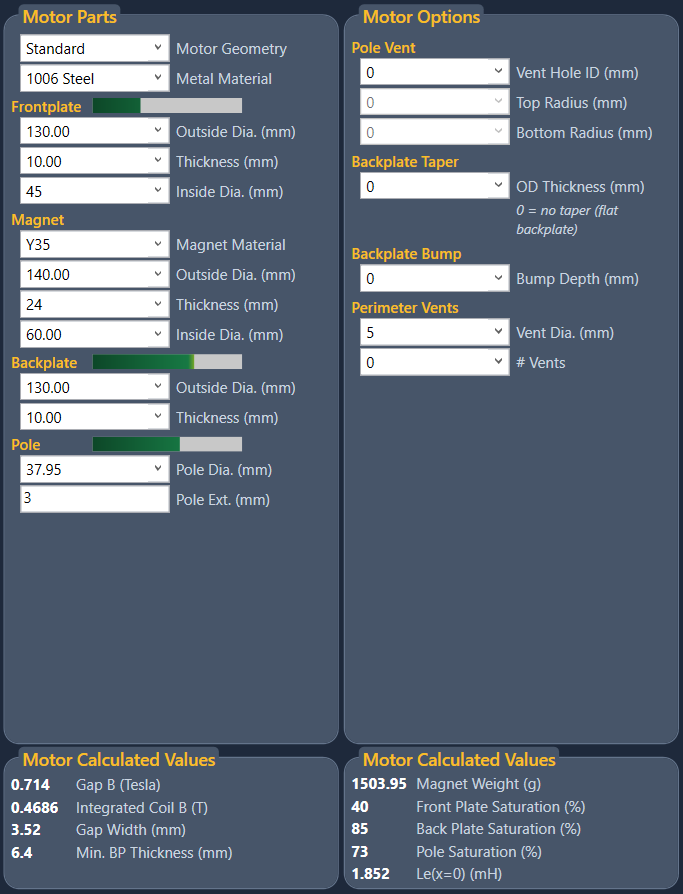
The Motor Parts and Motor Options panels on the Initial Design page — where the magnetic motor is dimensioned. Topology, geometry, materials, the optional parts, and the saturation each part is running at.
The motor is typed into two panels that sit side by side on the Initial Design page. Motor Parts holds the main parts: the topology, the steel and magnet dimensions, and the materials. Motor Options, to its right, holds the parts a motor may or may not have — vents and their edge radii, a tapered or bumped backplate, and on a CYoke the cup features, core disc, bucking magnet and return plate. Everything the magnetic calculation needs comes from these two panels.
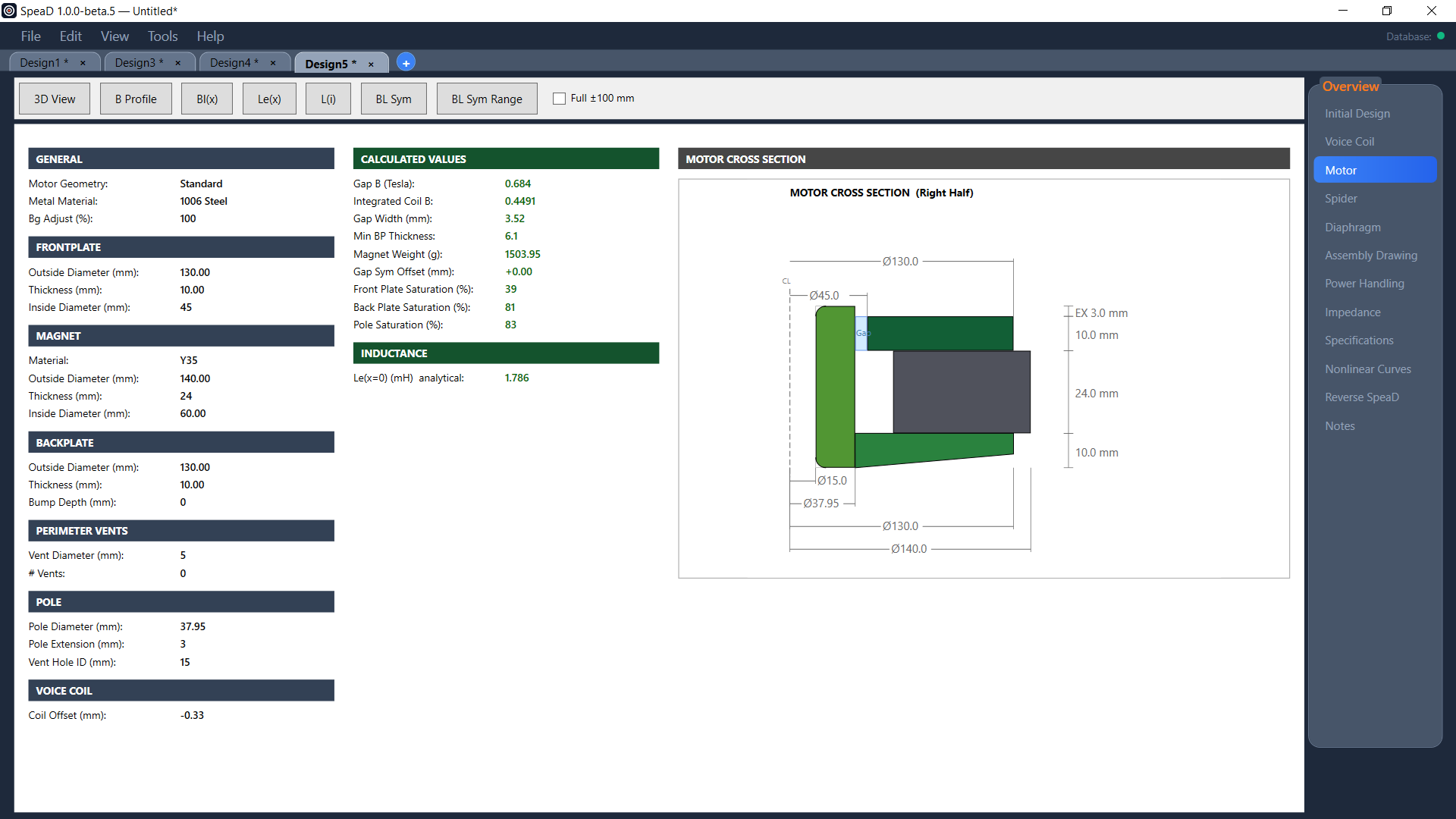
Results appear in two places. Two Motor Calculated Values panels sit directly below the two input panels and report gap flux, gap width, the minimum backplate (or wall) thickness, magnet weight, the saturation of each steel part and the inductance at rest, each time you press Tab or Enter. The separate Motor tab shows the same read-out beside a scale cross-section, with buttons for the 3D view and the curve windows.
Both panels are live. Editing any dimension or material re-runs the motor calculation as soon as you press Tab or Enter — there is no Recalculate button. Tab moves on to the next field; Enter stays in the field you are editing.
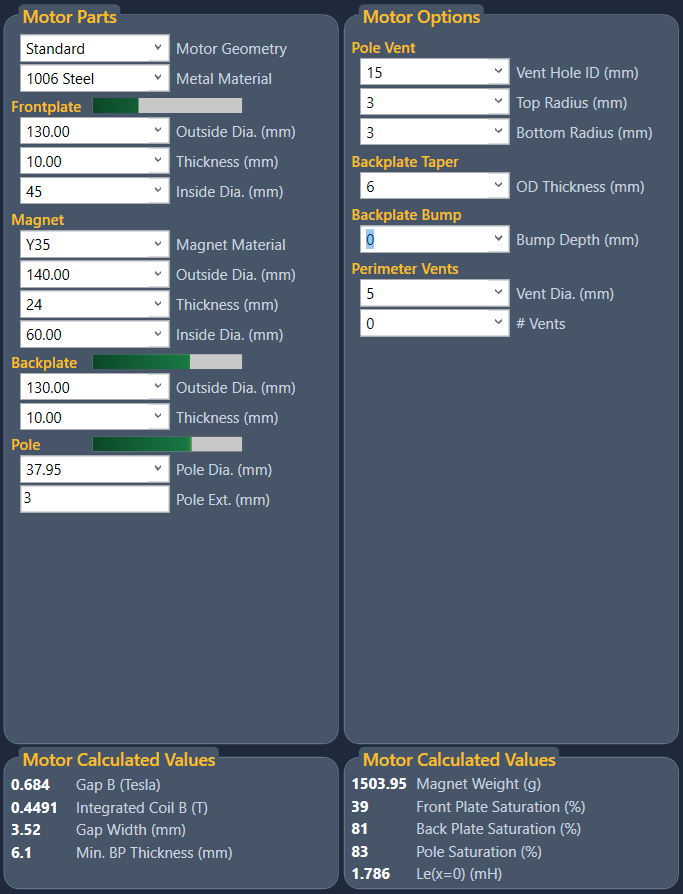
Motor Parts (left) and Motor Options (right) for the Standard start design, with the two Motor Calculated Values panels beneath them. Click the image to open it full size.
Motor Parts follows the physical motor from the front backwards: Frontplate (Top Disk on a CYoke), Magnet, Backplate (Cup), Pole. Saturation for the steel parts shows as a coloured bar built into each of those section headers (on a CYoke the wall and floor bars sit inside the Cup group), so you can see the motor’s state while you are still typing.
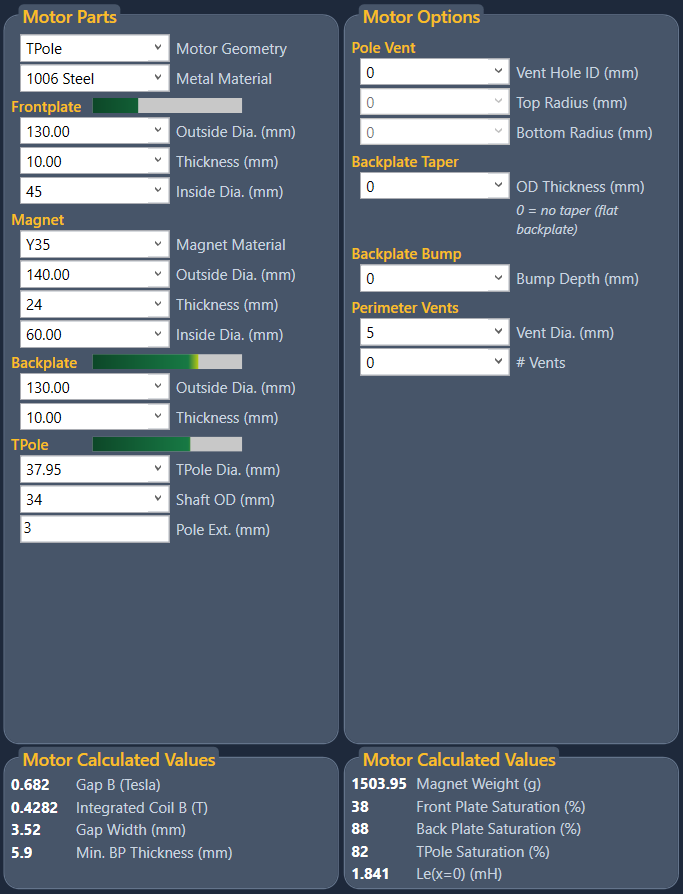
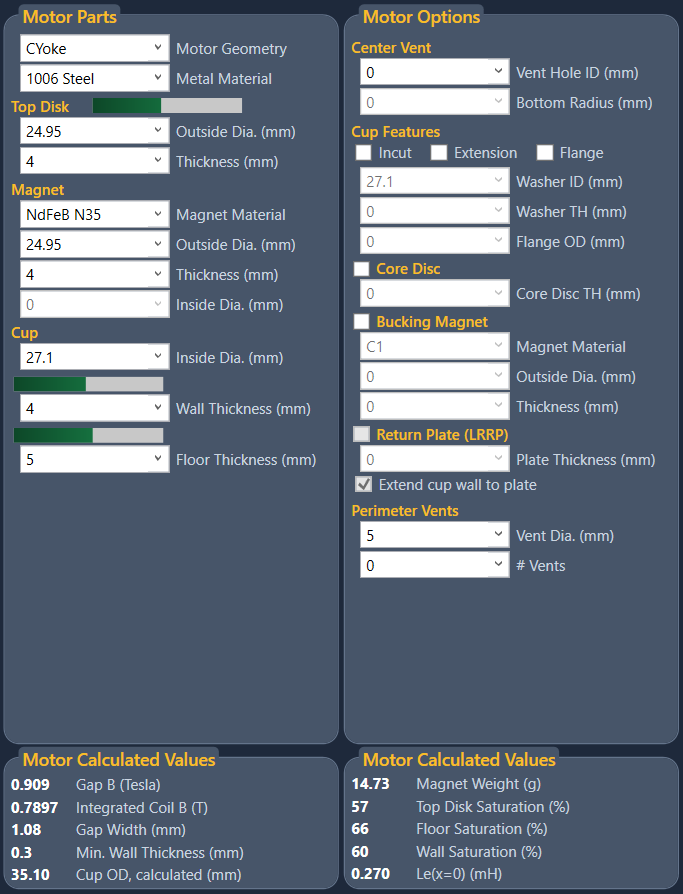
SpeaD builds three motor topologies, chosen with the Motor Geometry dropdown at the top of the Motor Parts panel. The choice is structural: it changes which dimension fields exist, which saturation paths are computed, and how the flux circuit is solved.
Standard
Default
The classic ferrite pancake: a ring magnet sandwiched between a flat frontplate and a backplate, with the pole piece rising from the backplate through the magnet’s bore. The magnet sits outside the gap and the flux crosses radially from pole to frontplate.
TPole
T-shaped pole
A pancake whose pole piece is turned as a T — a narrower shaft below with a full-diameter head at the gap. Reducing the shaft diameter below the gap lowers the steel cross-section carrying flux, so the shaft is the part most likely to saturate first. The Pole group is labelled TPole, Pole Dia. becomes TPole Dia., and one extra field, Shaft OD, is added.
CYoke
Cup / yoke
A cup motor with the magnet inside: the magnet sits on the cup floor, a steel top disk sits on the magnet, and the gap is between the top disk and the cup wall. Flux returns through the wall and floor rather than through a flat backplate. CYoke uses its own field set — Top Disk and Cup replace the Frontplate, Backplate and Pole groups — and its own options: cup features, core disc, bucking magnet and return plate. This is the usual layout for a neodymium motor.
TPole start design. The Pole group becomes TPole, with TPole Dia. and Shaft OD. Click the image to open it full size.CYoke start design: Top Disk, Magnet and Cup on the left; Center Vent, Cup Features, Core Disc, Bucking Magnet and Return Plate on the right. Click the image to open it full size.
When you pick a different Motor Geometry on a design you have edited, SpeaD opens the Change Motor Type dialog and asks what should happen to the dimensions you already have. On a design you have not edited, the new topology’s start design loads straight away. Nothing changes until you press OK; Cancel puts the dropdown back where it was.
The Change Motor Type dialog, Standard to CYoke. Click the image to open it full size.
Values
Use … default dimensions
Option
Loads the new topology’s start design. Your motor dimensions are replaced.
Keep my dimensions, translated to …
Option
Carries the design across. The coil, soft parts, perimeter vents, steel, Bg Adjust and Offset come over unchanged, and the gap is kept: going from a pancake to a CYoke, the pole diameter becomes the top disk OD, the frontplate ID becomes the cup ID and the frontplate thickness becomes the top disk thickness (and the reverse on the way back). The remaining motor fields are filled from the new topology’s start design, scaled to the size of your gap. On a pancake to CYoke change, a core disc is added under the magnet so that the coil keeps the same rearward clearance it had before.
Every field that was scaled or filled in this way has its label shown in amber. The amber clears on the first edit of that field. Treat amber fields as a starting point to check, not as part of your design. Between Standard and TPole every shared field carries over as it is, with no amber; going into TPole, Shaft OD starts at 34.
Destination
Change this design
Option
The current design tab changes topology.
Open as a new design
Option
The current design stays as it is, and the result opens in a new design tab — the easy way to compare the same driver on two topologies side by side.
Save the current design first
Tick box
Saves the project — every open design, with Save As if it has no name yet — before the change. If the save is cancelled, the motor type is not changed.
The Standard start design translated to a CYoke. The top disk takes the pole diameter and the cup ID takes the frontplate ID, so the gap is unchanged; the amber labels mark the fields SpeaD filled in for you. Click the image to open it full size.
The controls in the Motor Parts panel, in panel order. All dimensions are in millimetres. Fields marked Standard / TPole or CYoke appear only in those topologies. The starting values quoted are those of a new design tab.
The steel used for every steel part in the motor. Drawn from the B-H steel library; see Magnet & Steel Materials. Starts at 1006 Steel.
Frontplate (Top Disk in CYoke)
Outside Dia.
Editable dropdown
Frontplate OD; on a CYoke, the top disk OD, which also sets the inner side of the gap. Presets come from the parts library; you can type any value. Starts at 130.00 (Standard / TPole) and 24.95 (CYoke). On a CYoke its tooltip gives the Recommended Top Disk OD: the coil ID minus twice the Preferences clearance at that ID, with no thermal allowance.
Thickness
Numeric
Frontplate or top disk thickness — the axial height of the gap, and one of the two numbers that set gap flux. Starts at 10.00 (Standard / TPole) and 4 (CYoke).
Inside Dia.
Numeric · Standard / TPole
Frontplate bore. Together with the pole diameter this sets the gap width. Starts at 45.
Magnet
Magnet Material
Dropdown
The magnet grade, from the B-H magnet library; see Magnet & Steel Materials. Starts at Y35 (Standard / TPole) and NdFeB N35 (CYoke).
Outside Dia.
Editable dropdown
Magnet OD. Starts at 140.00 (Standard / TPole) and 24.95 (CYoke).
Thickness
Numeric
Magnet thickness along the magnetic axis — the length of the magnet in the flux circuit, and the main lever on total available flux. Starts at 24 (Standard / TPole) and 4 (CYoke).
Inside Dia.
Numeric
Magnet bore. Starts at 60.00 on Standard / TPole. On a CYoke it is locked to the Vent Hole ID of the center vent in Motor Options: 0 is a solid disc magnet, and any value above 0 bores the floor, core disc, magnet and top disk together.
Backplate (Cup in CYoke)
Outside Dia.
Editable dropdown · Standard / TPole
Backplate OD. Pick a stocked part — Thickness, Bump Depth and Pole Dia. then filter to match — or type any value. Starts at 130.00.
Thickness
Numeric · Standard / TPole
Backplate thickness at the pole. Starts at 10.00. A taper toward the OD and a bump under the pole are set in Motor Options.
Inside Dia.
Numeric · CYoke
Cup bore — the outer side of the gap. Starts at 27.1.
Wall Thickness
Numeric · CYoke
Thickness of the cup wall, the steel that carries the return flux. The cup OD is the cup ID plus twice the wall thickness, and is reported as Cup OD, calculated. Starts at 4.
Floor Thickness
Numeric · CYoke
Thickness of the cup floor under the magnet. Starts at 5.
Pole (TPole in TPole)
Pole Dia.
Numeric · Standard / TPole (TPole Dia. on a TPole)
Pole piece diameter at the gap (on a TPole, the head of the T). With the frontplate ID this sets the gap width. Starts at 37.95. Its tooltip gives the Recommended Pole Dia.: the coil ID minus twice the Preferences clearance at that ID, with no thermal allowance, since the pole-side clearance opens up as the coil heats. Before the coil has been solved it reads “shown after a valid coil calculation”.
Shaft OD
Numeric · TPole only
Diameter of the reduced pole shaft below the head. It must be smaller than TPole Dia. and larger than the Vent Hole ID; otherwise the labels turn red and the calculation stops. Starts at 34.
Pole Ext.
Numeric · Standard / TPole · typed only
On a Standard motor, how far the pole top projects above the frontplate face; on a TPole, how far the head extends both above and below the frontplate. On a TPole it must stay at least 0.5 mm less than the magnet Thickness, or the head reaches the backplate and both labels turn red. Extending the pole pushes the flux field upward and makes BL more symmetric about rest. Manual entry only — there is no preset list. Starts at 3.
Editing any of the geometry or material fields re-runs the motor calculation. The coil inside diameter also takes part, because it sets where in the gap the winding actually sits. The coil Offset is set in the Misc. panel.
Red and orange labels. A label that turns red marks parts that overlap or cannot be built — for example a frontplate ID smaller than the pole, a magnet bore inside the pole, or a coil that does not fit the gap — and the motor calculation waits until it is fixed. A label that turns orange is advisory: the coil-to-steel clearance is below the Preferences clearance schedule (on a CYoke the outer warning shows on Cyoke ID, or on Washer ID with an incut). Hover over it to see the actual and recommended clearance.
The Motor Options panel holds the parts and shapes a motor may have. Its contents follow the topology: Standard and TPole show Pole Vent, Backplate Taper, Backplate Bump and Perimeter Vents; CYoke shows Center Vent, Cup Features, Core Disc, Bucking Magnet, Return Plate and Perimeter Vents. Fields that do not apply to the current choices are greyed out.
Pole Vent · Standard / TPole
Vent Hole ID
Numeric
An axial hole down the centre of the motor that vents the space under the dust cap, bored down the pole and through the backplate. It removes steel from the pole, so the pole saturation bar moves with it. 0 = no vent.
Top Radius
Numeric
Radius on the edge where the vent meets the pole top face. A rounded entry eases the air flow out of the dust-cap space. 0 = sharp edge. Editable only when there is a vent.
Bottom Radius
Numeric
Radius on the edge where the vent exits the back face of the backplate. 0 = sharp edge. Editable only when there is a vent.
Backplate Taper · Standard / TPole
OD Thickness
Numeric
Backplate thickness at its outside diameter. The backplate tapers in a straight line from its full Thickness near the pole (on a TPole, from the shaft; on a bumped plate, from the end of the bump) down to this value at the OD. The magnet face stays flat; only the back face slopes. 0 = no taper (the panel shows the note “0 = no taper (flat backplate)”). It cannot be greater than the backplate Thickness: a larger value is set back to the Thickness and the status bar says so.
A taper takes weight out of the outer part of the plate, where the flux density is lowest. The calculation uses it for the leakage at the plate edge; magnet area and backplate saturation still use the full Thickness.
Backplate Bump · Standard / TPole
Bump Depth
Numeric
Depth of a drawn bump in the backplate under the pole. 0 = flat plate.
Center Vent · CYoke
Vent Hole ID
Numeric
The center vent through the top disk, magnet, core disc and cup floor. The magnet Inside Dia. is locked to this value, and a bucking magnet and return plate are bored to the same diameter. 0 = no vent.
Bottom Radius
Numeric
Radius where the vent exits the cup floor. 0 = sharp edge. It must stay below the Floor Thickness. A CYoke has no top radius.
Cup Features · CYoke
Incut
Tick box
The washer bore is smaller than the cup ID, so the washer steps in over the gap. Enables Washer ID. Ticking it keeps the gap where it is: Washer ID takes the current Cup ID and the Cup ID grows by 1.0 mm (Wall Thickness unchanged, so the Cup OD grows too). Unticking puts the Cup ID back to the Washer ID. With Incut ticked, Washer ID must be above 0, below the Cup ID, and larger than both the top disk OD and the coil OD; otherwise the labels turn red and the calculation stops.
Extension
Tick box
The washer stands above the cup wall top. Enables Washer TH.
Flange
Tick box
The washer is wider than the cup OD, forming a mounting flange. Enables Washer TH and Flange OD; Flange OD must be larger than the Cup OD and Washer TH above 0. A flange flush with the wall top (Flange without Extension) does not change the gap calculation, and the flange OD itself is not part of the magnetic calculation.
Washer ID / Washer TH / Flange OD
Numeric
The washer dimensions. Each is editable only when a ticked feature uses it; otherwise it is greyed and follows the cup (Washer ID = Cup ID, Washer TH 0, Flange OD 0). When a feature is ticked and its field holds no usable value, it starts at Washer ID = Cup ID − 1.00, Washer TH = 2.00 and Flange OD = Cup OD + 5.00. The three features combine freely, giving the eight cup shapes from a bare cup to incut + extension + flange. With a return plate fitted, Incut and Extension are greyed (the return-plate tick boxes set the wall); Flange stays free.
Core Disc · CYoke
Core Disc / Core Disc TH
Tick box · numeric
A steel disc between the cup floor and the base of the magnet — the magnet’s seat. It lifts the magnet and top disk by its thickness, moving the gap up and adding that much rearward voice-coil clearance. Its diameter is not entered: it always equals the Magnet OD. Ticking the box starts the thickness at the current top disk thickness; unticking returns it to 0.
Bucking Magnet · CYoke
Bucking Magnet
Tick box
A second magnet on top of the top disk, polarised against the main magnet, to push more flux into the gap and reduce stray field. Tick to fit it; Magnet Material, Outside Dia. and Thickness start at the main magnet’s values, and you can change them. It is a solid disc; with a center vent it is bored to the vent diameter. Its outside diameter can be anything up to the top disk OD (larger turns red), so you can try sizes smaller than the top disk; with a center vent it must clear the vent by 0.5 mm on the radius.
If the main magnet drives the bucking magnet past its coercivity, a warning appears under the fields: “Bucking magnet driven past its coercivity … risk of permanent demagnetisation. Use a thicker bucking magnet or a higher-coercivity grade.” The calculation includes the bucking magnet in Gap B, BL, the Bl(x) curve, steel saturation, the inductance figures (Le(x=0), Le(x) and L(i)) and Magnet Weight. See Bucking Magnets & LRRP.
Return Plate (LRRP) · CYoke
Return Plate (LRRP)
Tick box · needs a bucking magnet
Low Reluctance Return Path. A steel plate on top of the bucking magnet, the same OD as the top disk. It gives the bucking magnet its own low-reluctance return, so its flux is driven through the main gap instead of being wasted. Its box is greyed until Bucking Magnet is ticked. Ticking it starts Plate Thickness at the top disk thickness and, with Extend cup wall to plate ticked, turns on the cup Extension and sets Washer TH to bucking magnet thickness + plate thickness. Unticking it sets the plate to 0.
Plate Thickness
Numeric
Thickness of the return plate. It must be above 0.
Extend cup wall to plate
Tick box · ticked by default
Ticked: the cup wall is extended up to the top of the return plate — a true Low Reluctance Return Path. Washer TH is held at bucking magnet thickness + plate thickness. The plate and the extended wall form a second, opposed gap that repels the coil near the top of its travel.
Unticked: the cup Extension is turned off and the plate simply sits on the bucking magnet, with the wall at its normal height. This gives a small gain in gap flux, but part of the coil travel runs into the opposed bucking field, so Bl(x) becomes strongly asymmetric and harmonic distortion rises. The calculation models this, including the asymmetric Bl(x).
Perimeter Vents · all topologies
Vent Dia.
Numeric
Diameter of each vent hole around the backplate or cup floor. On Standard and TPole the holes start 0.5 mm outside the pole; on a CYoke they start at the magnet OD, and a hole that would break into the cup wall is not drawn and an orange note gives the largest diameter that fits. Starts at 5.
# Vents
Numeric
How many perimeter vents. Vents remove steel from the flux path, so a large enough count raises saturation in the remaining ring. Starts at 0.
Standard start design with a 15 mm pole vent, 3 mm top and bottom radii and the backplate tapered to 6 mm at the OD. Click the image to open it full size.The same design on the Motor tab: the cross-section draws the vent through pole and backplate, the radii, and the taper on the back face. Click the image to open it full size.
A design guide to the CYoke bucking magnet and the Low Reluctance Return Path (LRRP): what problem they solve, how to judge a design, and which arrangements work best. The worked numbers come from Patrick Turnmire’s 2007 application note Low Reluctance Return Path Motors, which used a 25 mm motor, 24 mm N37 magnets, a 25 mm top plate, a 1 mm gap, 1008 steel and an 8 Ω copper coil, aiming for 2 mm of physical Xmax.
The problem
Small coil diameters — 19 or 25 mm — keep inductance low and high-frequency response good. The difficulty is getting both high efficiency and high excursion from such a small motor, because the coil diameter limits how much magnet area fits behind the gap.
How to judge a design
Efficiency is force against moving mass. For comparing motors, divide BL by the coil mass in grams — the efficiency ratio. The real limit on BL is the steel around the gap: past the knee of its B-H curve, more magnet gives almost no more gap flux. The aim is to bring the top plate (the top disk in SpeaD) up to its knee and no further. In SpeaD, watch the Top Disk Saturation reading.
Why a thicker magnet does not help
With a 3 mm top plate, a 4 mm magnet brings the plate to its knee. Make the plate 4 mm and a 4 mm magnet no longer gets there — and even doubling the magnet to 8 mm does not. A small-diameter motor needs more magnet area, not more magnet volume.
The bucking magnet
Keep the main magnet and add a second magnet on top of the top plate, magnetised in the opposite direction. Its flux pushes into the same gap, so the motor gains magnet area without growing in diameter. In the note, a 3 mm bucking magnet brought a 4 mm top plate to its knee. The limit is that the bucking magnet’s flux has to return through air — a high-reluctance path — so it works low on its load line and much of its energy is wasted. A thicker top plate brings the earlier problem back.
The return plate (LRRP)
Put a steel return plate on top of the bucking magnet and extend the cup wall up to it. The bucking magnet now has a low-reluctance steel return path: its load line moves, its energy is used, and the extra flux is driven through the main gap. With this, a 5 mm top plate reaches its knee with two 4 mm magnets and a 2 mm plate. A thicker top plate also gives more usable Xmax once the fringe field is included, so the real gain is larger than the efficiency ratio shows.
LRRP is most effective underhung. A tall top plate becomes reachable at its knee in a small diameter, and a short, light coil in that tall gap keeps all of its wire in strong field.
Worked designs from the 2007 note
1. Overhung, single magnet
3 mm plate · 4 mm magnet
7 mm coil. The baseline.
2. Overhung, bucking magnet
4 mm plate · 4 + 3 mm magnets
8 mm coil. A higher efficiency ratio than Design 1 — about the overhung limit for a plain bucking design at these goals.
3. Overhung, LRRP
5 mm plate · 4 + 4 mm magnets · 2 mm return plate
A higher efficiency ratio than Design 2.
4. Underhung, LRRP
8 mm plate · 8 + 8 mm magnets · 4 mm return plate
4 mm coil. By far the highest efficiency ratio of the four for these goals.
Retrofit
4-inch underhung neodymium driver
25 mm coil diameter, 10 mm plate, 5 mm coil height, 2.5 mm Xmax. Adding a return plate and extending the yoke walls raises BL for the cost of a little extra steel.
The magnetic brake
The gap between the return plate and the extended wall — Gap 2 — is magnetised opposite to the main gap. As the coil moves up toward it, the coil sees reversed field and is pushed back. Bl(x) falls through zero on that side only, and the red part of the curve shows where the force has reversed. With careful design this works as a magnetic brake that limits large excursions toward the return plate.
Bl(x) of the CYoke start design with a 24.95 × 4 mm N35 bucking magnet, a 4 mm return plate and the wall extended. Positive x is toward the return plate; the curve turns red where Bl reverses. Click the image to open it full size.
Setting it up in SpeaD
Set Motor Geometry to CYoke. The top disk is the note’s top plate.
Size the top disk thickness (the gap height) for the coil and the Xmax you need.
Tick Bucking Magnet; it starts at the main magnet’s material, OD and thickness. Change them as you need.
Tick Return Plate (LRRP); the plate starts at the top disk thickness. Leave Extend cup wall to plate ticked; Washer TH follows the bucking magnet and plate for you, and Incut and Extension are greyed.
Read Top Disk Saturation and aim it at the steel’s knee.
Open Bl(x) on the Motor tab and check the side toward the return plate for the braking effect.
The CYoke start design with bucking magnet and return plate fitted. Extension is ticked (and greyed) and Washer TH is held at bucking magnet + plate; Magnet Weight counts both magnets. Click the image to open it full size.The same design on the Motor tab. The cross-section shows the return plate (RP) and bucking magnet (BK) above the top disk and magnet, with the wall extended to the plate. Click the image to open it full size.
Best practice
Size the top plate (gap height) for the coil and Xmax first.
Push the top plate to its knee with magnet area — a bucking magnet — not with a thicker main magnet.
Add a return plate and extend the wall (LRRP) so the bucking magnet’s energy is used.
For the highest efficiency, go underhung with a tall top plate and a short coil.
Use the opposed gap as a brake if you want a magnetic excursion limit.
Both material dropdowns are served from SpeaD's B-H library — a database of real measured magnetisation curves, not single-number approximations. That is what lets the analytical engine iterate to a saturated solution instead of assuming steel behaves linearly.
Metal Material offers fourteen steels, spanning four families. The low-carbon steels are the workhorses of loudspeaker motors: 1006 Steel, 1008 Steel, 1010 Steel, 1018 Steel and 1020 Steel. Above them sit the higher-saturation specialty alloys — Hiperco-50 and Vanadium Permedur (cobalt-iron), Carpenter Electrical Iron and Carpenter Silicon Core Iron, and two grades of US Steel Type 2-S. Three stainless grades — 416, 430 and 455 — are included for parts that need corrosion resistance, at a real cost in saturation flux.
Every steel is listed twice: plain, and again with Black after its name. A Black entry is the same steel with a black oxide or painted finish. Its B-H curve is identical, so the magnetic results do not change; only the surface emissivity that the thermal model uses is higher.
For almost all ferrite motor work, a low-carbon steel is the right answer. The cobalt-iron alloys buy you roughly 10 % more saturation flux at many times the material cost, and are worth it mainly in compression drivers and other flux-limited designs.
Magnet Material offers thirty-five grades. The list is dominated by ferrite, since that is what most loudspeaker motors use: the Y series from Y8T and Y10T up through Y30, Y35 and Y40, and the C series — C1, C5, C8, C8B, C9, C12 — along with Ceramic 6 and Ceramic 8H. Two neodymium grades are exposed, NdFeB N35 and NdFeB 32 MGOe.
The remanence spread across the ferrite grades is narrower than the grade numbers suggest — roughly 0.21 to 0.44 tesla from the weakest to the strongest. Neodymium sits near 1.2 tesla, which is why a neodymium motor can be a fraction of the size of the ferrite motor it replaces.
The library holds many more grades than the dropdowns show, including further neodymium, samarium-cobalt and alnico entries. Each material is flagged for whether it appears in the design dropdowns, so the list you see is a curated subset rather than the whole library. The full set is managed in the SpeaD Data Manager.
Two Motor Calculated Values panels sit along the bottom of the Initial Design page, one under Motor Parts and one under Motor Options. They update when you press Tab or Enter.
First panel · under Motor Parts
Gap B (Tesla)
Output
Flux density in the air gap — the headline number of the whole motor. This is the field the coil moves in.
Integrated Coil B (T)
Output
Flux density averaged over the winding as it actually sits in the gap, rather than at a single point. This is the figure BL is built from, because a coil taller or shorter than the gap does not see the peak field along its whole height.
Gap Width (mm)
Output
The radial air gap: frontplate ID against pole diameter on Standard and TPole, cup ID (or washer ID with an incut) against top disk OD on a CYoke. This is the space the coil and former must fit inside, with room to move.
Min. BP Thickness (mm)
Output · Min. Wall Thickness in CYoke
The thinnest the backplate can be before it becomes the flux bottleneck; on a CYoke, the same figure for the cup wall. Treat it as a floor: going below it drives saturation up with no gain in flux.
Cup OD, calculated (mm)
Output · CYoke only
Cup ID plus twice the wall thickness.
Second panel · under Motor Options
Magnet Weight (g)
Output
Mass of the magnet as dimensioned — the dominant cost and shipping-weight term in a ferrite motor. On a CYoke with a bucking magnet it is both magnets together, and the tooltip gives each. Hover over it to see the weight in ounces.
Saturation (%)
Output · three rows
How hard each steel part is working: Front Plate, Back Plate and Pole on a Standard motor (TPole on a TPole); Top Disk, Floor and Wall on a CYoke. See Saturation.
Le(x=0) (mH)
Output
Voice-coil inductance at rest, from the analytical model. How it changes with excursion and current is shown in the Le(x) and L(i) windows.
Gap Sym Offset — the coil offset that would make Bl(x) symmetric — is reported in the Parameters column and on the Motor tab.
Saturation is the limit that shapes every motor design. Steel carries flux happily up to a point; past it, adding magnet buys you almost nothing because the steel cannot pass the extra flux. SpeaD reports saturation as a percentage for each steel part.
On the Initial Design page it appears twice: as a coloured bar in the Frontplate, Backplate and Pole section headers (on a CYoke, in the Top Disk header and as two bars in the Cup group, for the wall and the floor), and as percentages in the second Motor Calculated Values panel. The Motor tab repeats the percentages in its Calculated Values column.
Reading the numbers: a part running comfortably below its limit has flux headroom, and thickening it further mostly adds weight. A part near its limit is the bottleneck — and it is the part to thicken if you want more gap flux. Look at all of them together. A motor where one part is heavily loaded and the others are barely working is unbalanced: there is steel to be moved from where it is idle to where it is needed.
Saturation percentages are the fastest read on whether a motor is well proportioned. Chasing gap flux by adding magnet, while the frontplate or pole is already the constraint, adds cost without adding output.
The motor calculation that runs when you press Tab or Enter is an analytical B-H iteration, fast enough to keep up as you work.
A first pass at a ferrite pancake motor, starting from a new design tab. Everything you type is on the Initial Design page; the results are in the Motor Calculated Values panels below, and on the Motor tab.
1. Choose the topology
Motor Geometry
Leave it on Standard. Choose the topology before dimensioning; if you change it later, use Keep my dimensions, translated to … in the Change Motor Type dialog to carry your work across.
2. Choose materials
Metal Material, Magnet Material
A new tab starts with 1006 Steel and Y35 ferrite. Keep them for this first pass.
3. Dimension the frontplate
FPOD, FPTH, FPID
Outside diameter 130, thickness 10, inside diameter 45. The thickness is the gap height; the inside diameter with the pole diameter sets the gap width.
4. Dimension the magnet
MGOD, MGTH, MGID
Outside diameter 140, thickness 24, inside diameter 60. Thickness is your main lever on total flux; watch Magnet Weight as you change it.
5. Dimension the backplate
BPOD, BPTH
Outside diameter 130, thickness 10. Compare the thickness you chose with the Min. BP Thickness reading below the panel.
6. Dimension the pole
PPOD, PPEX
Pole diameter 37.95, pole extension 3. With the frontplate ID at 45, the gap comes out at 3.52 mm on each side.
7. Leave the options alone
Motor Options
No pole vent, no taper, no bump, no perimeter vents. Add them later, one at a time, and watch what each does to saturation and weight.
8. Read the motor
Motor Calculated Values, Motor tab
Read Gap B and Integrated Coil B, then check the three saturation percentages against each other. Open the Motor tab and confirm in the cross-section that the geometry is what you intended.
The Motor tab for the Standard start design. Click the image to open it full size.
Now iterate, one change at a time. If gap flux is lower than you want, look first at which part is closest to saturation — that is the constraint, and thickening it will do more than adding magnet. If nothing is near its limit, more magnet thickness will raise flux. If the saturation readings are wildly uneven, there is steel sitting idle in one part that would do more work in another.
When the flux looks right, open Bl(x) to see how far the coil can travel before force falls away, and BL Sym to check how balanced the motor is about rest. If BL is lopsided, Gap Sym Offset tells you the coil offset that would centre it.
The coil matters as much as the steel. Turn count feeds straight into BL, so a motor that looks weak may only need a different coil — and a coil taller or shorter than the gap changes Integrated Coil B, which is the flux figure BL is actually built from.
Section
Motor tab
The read-only motor display — full calculated read-out, scale cross-section, 3D view, and the nonlinear curve windows.
The Motor tab is a reading surface, not an editing one. You do not type on it. Every input value on it is a read-only mirror of a control in the Motor Parts or Motor Options panel on Initial Design. To change a dimension, edit it there; the tab updates when you press Tab or Enter.
There is no Refresh button. Editing an input or switching topology redraws the read-out, the cross-section and any open curve windows automatically.
The tab reads left to right. On the left, the mirrored geometry and material selections grouped by part (on a CYoke, the Cup and Core Disc groups continue in the second column). Next, the calculated values and the inductance at rest. On the right, a scale cross-section of the motor as currently dimensioned, including vents, radii, taper, bucking magnet and return plate. Above them all sits the toolbar that opens the 3D view and the curve windows.
The Motor tab for the Standard start design. Click the image to open it full size.The TPole start design. The cross-section shows the reduced shaft (Ø34.0) below the pole head. Click the image to open it full size.
SpeaD models the coil’s inductance and how it varies with excursion and current.
The Calculated Values group repeats the figures from the two Motor Calculated Values panels on Initial Design and adds Gap Sym Offset. The Inductance group below it gives Le(x=0) (mH) analytical.
Gap B (Tesla)
Also on Initial Design
Flux density in the air gap.
Integrated Coil B
Also on Initial Design
Flux density averaged over the winding as it sits in the gap — the figure BL is built from.
Gap Width (mm)
Also on Initial Design
The radial air gap.
Min BP Thickness
Min Wall Thickness in CYoke
The thinnest the backplate (or cup wall) can be before it becomes the flux bottleneck. Treat it as a floor.
Magnet Weight (g)
Also on Initial Design
Mass of the magnet as dimensioned. On a CYoke with a bucking magnet it is both magnets together; the tooltip gives each.
Gap Sym Offset (mm)
Also in Parameters
Where the magnetic centre of the gap actually sits. This is the coil offset that would make Bl(x) symmetric, so it doubles as a target for the Offset control in the Misc. panel.
Saturation (%)
Three rows
Front Plate, Back Plate and Pole (TPole on a TPole); Top Disk, Floor and Wall on a CYoke. See Saturation.
Le(x=0) (mH) analytical
Inductance
Voice-coil inductance from the analytical model — the small-signal figure at rest. How inductance varies with excursion and with current is covered by the Le(x) and L(i) windows.
The row of buttons across the top of the Motor tab. Each opens its own window, and those windows stay live — edit a dimension on Initial Design and any open curve redraws itself. Every curve window has a range slider and box under the plot; the range you set is kept for that design when you reopen the window (it is not saved with the design). Every curve window also has a Keep open tick box in a bar at the top: unticked, the window hides when you switch to another design tab and comes back when you return; ticked, it stays on screen.
3D View
Opens a window
A 270° cutaway rendering of the motor as dimensioned. Drag to rotate, scroll to zoom. It draws the vents and their radii, the backplate taper and, on a CYoke, the bucking magnet and return plate. Useful for catching geometry mistakes that a cross-section hides, and for showing a design to someone who does not read section views.
B Profile
Opens a window
Flux density plotted along the gap axis, so you can see the shape of the field the coil moves through — not just its average. The profile’s shape is what determines how BL falls off with excursion. Where the field reverses (on a CYoke with a bucking magnet), the curve is drawn red. The range row reads Position range ±.
Bl(x)
Opens a window
The force factor as a function of coil displacement. The single most important nonlinearity in a loudspeaker motor: how much BL falls off as the coil moves out of the gap sets the driver’s large-signal distortion and its usable excursion. A dashed line marks Xsym, the symmetry point; where Bl goes negative the curve is drawn red.
Le(x)
Opens a window
Voice-coil inductance as a function of displacement — from a coupled-circuit model on Standard and TPole, and from a fringe-profile model on a CYoke, which includes the bucking magnet, return plate and extended wall. Inductance changes as the coil moves over the pole, which modulates the driver’s impedance with excursion and is a distortion mechanism in its own right.
L(i)
Opens a window
Inductance at rest as a function of coil current — how the coil’s own field pushes the steel toward saturation as drive rises. Presented in the format Klippel measurements report, so measured and predicted curves can be compared directly. A note under the plot says when the design lies outside the range the model covers. Its range row is in amperes (Current range ±, 0.5 to 100 A, starting at 20 A) and is shared with the L(i) tile on Nonlinear Curves.
BL Sym
Opens a window
Bl(x) overlaid with its mirror image Bl(−x), showing how balanced the motor is about rest. Asymmetry in BL produces even-order harmonic distortion.
BL Sym Range
Opens a window · titled BL Symmetry Range; Bl(x) Symmetry Range on the Assembly Drawing and Nonlinear Curves pages
The symmetry point plotted against amplitude, with the band where asymmetry stays under 5 %, so you can see how the symmetry itself changes with excursion rather than reading it at one operating point. It uses the positive part of Bl(x) only, the amplitude axis stops at Xmax70 (the nearer side), and the offset axis scales to the data.
Full ±100 mm
Tick box · off by default
Shows the full ±100 mm range on the B Profile, Bl(x), BL Symmetry and Le(x) windows and on the Nonlinear Curves and Specifications pages. Unticked, the axes end where Bl(x) has fallen to 2 % of its peak, rounded up to 5 mm. A window whose own range you have moved keeps that range.
B Profile, Standard start design. Click the image to open it full size.Bl(x), Standard start design. Click the image to open it full size.BL Sym: Bl(x) against its mirror. Click the image to open it full size.BL Sym Range. Click the image to open it full size.Le(x). Click the image to open it full size.L(i). Click the image to open it full size.3D View, Standard start design. Click the image to open it full size.
The nonlinear motor curves are also shown together as tiles on the Nonlinear Curves tab.
Section
Voice Coil tab
The read-only coil display, plus the document and drawing inputs that turn the designed coil into an RFQ-format manufacturing drawing.
The Voice Coil tab is where a designed coil becomes a manufacturing document. Its left column is a reading surface — a read-only mirror of the Voice Coil panel on Initial Design plus the coil's calculated values — and its right column is where you type: the Document Info that fills the sheet's title block, and the Drawing Inputs that specify everything the RFQ drawing shows beyond the coil the solver produced — vent holes, lead-outs, reinforcement, marking and tolerances.
Nothing you enter here changes the coil. Every field on this tab is documentation: the coil's electrical and mechanical design lives entirely on Initial Design, and the solver never reads this tab. That split is deliberate — you can hand the same coil to two customers with different part numbers, lead dressings and tolerances without touching the design.
The Voice Coil tab at the Standard start design — mirrored Design Inputs and Calculated Values on the left, Document Info and Drawing Inputs on the right. Click the image to open it full size.
Every input on this tab carries a tooltip, in English, Chinese, or both, following Preferences → Language. Fields greyed out by the current Lead Wire Type keep their tooltips, which explain why they are disabled.
The toolbar carries the three output buttons and the two options that shape the generated sheet.
Create Drawing
Button
Opens the drawing window with the RFQ-format specification sheet and lettered assembly drawing. Export PDF, Print and Copy to Clipboard live there, not on the tab. See Producing the Drawing.
Winding Layout
Button
Opens the turn-by-turn winding cross-section — wire-true turns, per-layer turns table, print and clipboard. Covered in Winding Layouts.
3D View
Button
A rotatable 3D render of the coil.
Bilingual sheet (EN + 中文)
Checkbox
Prints the specification table’s row labels in English and Chinese, matching the Chinese manufacturer RFQ convention. The default follows the specification-sheet language set in Preferences → Language; the checkbox overrides it per design.
Include Winding Detail
Checkbox
Adds the winding-detail section — end turns with break marks plus the exact per-layer turns table — to the sheet, printing as a second page.
Design Inputs mirrors the coil as designed: Layer Type, VCID, Former Material and Height, Collar Material, Wire Type and Size, Winding Height, Nesting Factor, Oval Ratio, Elongation % and DCR/Coil. It is read-only — to change any of them, edit the Voice Coil panel on Initial Design; this tab updates when you press Tab or Enter. While the spider is linked, Former Height is driven: the cone neck position plus Former above neck on the Assembly Drawing page.
Calculated Values repeats the coil outputs — Outside Diameter, Total Mass, Recommended FPID, Total Turns and Total Length — and adds one that does not appear on the Voice Coil panel:
Le(x=0) (mH)
Not on the Voice Coil panel
The coil’s small-signal inductance at rest, from the analytical motor calculation — the same figure the Motor tab shows. How inductance varies with excursion and current belongs to the Le(x) and L(i) curve windows on the Motor tab.
At the Standard start design the column reads 42.74 mm outside diameter, 201 turns and 24.98 m of wire. The recommended pole diameter is not a row here: it is in the tooltip of Pole Dia. in Motor Parts (the top disk Outside Dia. on a CYoke).
Five free-text fields that fill the sheet’s title block. None of them affects the coil.
Customer
Text
Who the coil is quoted to. Left blank, the sheet simply omits it.
Contact Info
Text · pre-filled
Your contact block, pre-filled from Preferences → Drawing Identity. Editing it here changes this design only — the preference itself is untouched.
Project
Text
Project name for the title block.
Part Number
Text
Part number printed on the sheet and drawing.
Date
Text
Printed exactly as entered; defaults to today’s date when the design tab is created.
Everything the drawing and specification sheet state about the finished part beyond the wound coil itself. Dimension letters below refer to the lettered assembly drawing, following the Chinese manufacturer RFQ convention the sheet is built on.
Former Bottom
Dropdown
How the former’s bottom edge is finished: Plain cut or Fold over (Aluminum only). An edge treatment, not a dimension — the winding start height is Winding Position below.
Vent Hole Position / Number / Diameter
Numeric ×3
Vent holes spaced around the former: centreline distance from the top of the former, count, and diameter, all in mm. With the count at zero no vent holes are drawn or tabled.
Lead Wire Position
Dropdown
Where the two lead-outs leave the coil: 180° apart, or Pairs together. Printed with the lead-out style in the sheet’s Position and Solder Lead Wires row (接线方式 on the bilingual sheet).
Lead Wire Type
Dropdown
The lead-out style, matching the RFQ catalog: Enamel lead-out (the coil wire itself continues out), Flat/Ribbon, Tinsel (pre-soldered) — the supplier attaches tinsel at the former — or Welded, which marks the weld point on the drawing. The choice enables or greys Lead Wire Width (Flat/Ribbon), Lead Wire Mat. & Size (Flat/Ribbon, Tinsel, Welded) and Insulation Length (Tinsel, Welded). Leads are specification-only throughout SpeaD: they contribute no mass and no DCR, and the modelled coil terminates at the former.
Lead Wire Length
Numeric · letter L
Lead length beyond the coil, in mm; starts at 50. Drawn and tabled only when above zero.
Lead Wire Width
Text · letter M
Ribbon lead width, printed exactly as typed — include the units. Enabled for Flat/Ribbon only.
Lead Wire Mat. & Size
Dropdown + free text · letter N
Lead material and size, from the Lead Wire Materials table in Data Manager or typed freely. Disabled for Enamel lead-out, where the sheet fills the row from the coil wire itself.
Insulation Length
Text · letter K
Insulated length of an attached lead, printed as typed — include the units. Enabled for Tinsel and Welded.
Marking Colour
Text
Marking colour printed on the sheet; blank omits the row.
Lower Reinf. Mat. / Height
Dropdown + numeric · letter F
The lower reinforcement (下补强) at the former bottom: material from the collar materials list, height in mm. None or zero height leaves it off the drawing and sheet. The upper reinforcement (上补强) is the Collar chosen on the Initial Design panel — its height prints as letter G.
Winding Position
Numeric · letter D
Free end: the winding start height above the former bottom, in mm — 下余白 on the bilingual sheet. The free length above the winding prints as letter H.
DCR Tolerance
Text
The manufacturing tolerance on DCR, printed exactly as typed. Enter a percentage — the DCR Range line beneath it computes the acceptance band from the coil’s solved DCR and updates as either changes.
Dimensional Tolerance
Text
The overall dimensional tolerance printed on the sheet, applying to the drawing’s dimensions.
The working order, start to finish:
Design the coil on Initial Design — this tab mirrors it as you go.
Fill in Document Info, then work down the Drawing Inputs. Fields the current Lead Wire Type does not use stay greyed.
Tick Bilingual sheet and Include Winding Detail as the recipient needs.
Press Create Drawing. The drawing window opens with the specification sheet and the lettered assembly drawing — hatched winding, reinforcement bands, vent holes, lead wires, and dimension letters keyed to the table.
Export PDF, Print, or Copy to Clipboard from the drawing window’s own toolbar.
The sheet, the drawing window and the print path all render from the same specification, so what you preview is what prints — there is no separate print formatting to check.
The specification table translates its row labels when the bilingual sheet is on; the drawing itself stays dimension-lettered, so a winding house reads it the same way in either language.
Section
Soft Parts
The Soft Parts panel on the Initial Design page — diaphragm, spider, added mass and Q, and the compliances and masses they give.
Soft Parts describes everything that moves apart from the coil: the diaphragm, the spider, any extra mass, and the mechanical Q. You can type these values from a measured part or a data sheet, or link the panel to the Diaphragm and Spider designers so they fill it in. Diaphragm Fo, Moving Mass, Sd, the spider deflection pair and Qms must all be above zero; a missing one turns its label red and the calculation waits.
General
Device Type
Dropdown
Cone is the only choice.
Diaphragm
Diaphragm Material
Paper, Polymer, Metal, Composite, Cloth
The material class, for the specification sheet. No calculation reads it.
Surround Material
Rubber, Foam, Cloth
Feeds only the Qms Estimate. It never changes the Qms input or Qts.
Nominal Size
Dropdown
The nominal driver size. The list shows the sizes ticked Show in Data Manager → Cone Sizes; any other size, including drivers under 4″, can be added there with its Sd and appears here when the Data Manager closes — the tutorial Adding Cone Sizes walks through it. Selecting a size sets Sd from the table. If Sd is changed to a value that matches no size, the box shows Custom Sd; choosing a size while Custom Sd is shown asks before replacing your Sd.
Sd
cm² or m²
Effective piston area. Filled from the size table when a size is selected; type your own value to override it. The unit follows Preferences → Units.
Diaphragm Fo (Hz)
Numeric
Free-air resonance of the diaphragm assembly before the spider is added. With Moving Mass it gives Cone Cms.
Moving Mass (g)
Numeric
Moving diaphragm mass: the cone, the inner surround lip and half the surround roll. It excludes the clamped outer lip, the dust cap and the voice coil, which are entered separately.
Dust Cap Mass (g), Dust Cap Material
Numeric · dropdown
The dust cap on its own, because Moving Mass leaves it out. The material is for the specification sheet only.
Link Design
Display only
Ticked when the Diaphragm page drives these fields. It is switched on the Diaphragm page; while it is on, Moving Mass, Diaphragm Fo, Dust Cap Mass, Sd and the three materials are greyed.
Spider
Deflection (mm), Deflection mass (g)
Numeric
A spider test: the deflection measured with the given mass placed on the spider. Deflection over mass gives Spider Cms.
Link Design
Display only
Mirrors Link to Initial Design on the Spider page. While it is on, the deflection pair is filled from the spider design and greyed, and so is Former Height in the Voice Coil panel.
Additional Mass
Mass (g)
Numeric
Extra moving mass not covered above — adhesive, lead-out wires and the like. With a spider linked, the spider’s moving mass is added here and the label reads Mass + spider (g).
Q Factor
Qms
Numeric
Mechanical Q of the suspension. This is the value that drives Qts and the rest of the parameter set — set it from a measured driver or a similar design. The Qms Estimate in the Misc. panel is advisory only.
Cone Cms (uM/N)
Output
Compliance of the diaphragm assembly on its own: Cone Cms = 1 / ((2π·Fo)² × (Moving Mass + 2·Ma1·Sd²)), from the Diaphragm Fo you entered with the free-air air load.
Ma Free Air (g)
Output
The air the diaphragm drags along with it in free air, with no baffle, counted on one face. It is exactly Mms FA minus Mmd in the Parameters column.
Ma Infinite Baffle (g)
Output
The air load in an infinite baffle, where the diaphragm works against air on both faces — the classical low-frequency radiation mass of a rigid piston, counted twice. Shown as Mms IB minus Mmd.
Spider Cms (uM/N)
Output
Compliance of the spider on its own, from the deflection test: Deflection / (9.8 × Deflection mass).
Non-Coil mass (g)
Output
Moving Mass + Dust Cap Mass + Additional Mass. Add the coil mass and you have Mmd — the figure to watch when comparing coils on one diaphragm.
Cone Cms and Spider Cms act as springs in parallel, so the total Cms in the Parameters column is stiffer — lower — than either.
Section
Parameters
The Parameters column on the Initial Design page — the Thiele-Small set and limits the whole design resolves to.
Every row updates when you press Tab or Enter. Hover over a row for its full explanation. Rows marked (S) and (P) give the figure with the windings in series and in parallel; on a single-coil design the two are the same.
Electrical
Re Series, Re Parallel (Ω)
Output
DC resistance with every winding in series — the total the amplifier sees on a series-wired driver — and with every winding in parallel, the series total divided by the square of the winding count.
Le(x=0) (mH)
Output
Voice-coil inductance with the coil at rest, on the same basis a Klippel system or an LCR bridge measures.
Resonance and Q
Fo (Hz), Fi (Hz)
Output
Fo is the resonance of the moving assembly with no enclosure. Its air load follows Preferences → Units → Air load: infinite baffle (the default, the Klippel convention) or free air. Fi always uses the infinite-baffle air load, so the two are equal at the default setting.
Qts, Qes, Qms
Output
Total, electrical and mechanical Q at Fo. Qts combines the other two in parallel and is the single number that most decides which enclosure suits the driver. Qms is the value you entered in Soft Parts.
Fo / Qts (Hz)
Output
Fo divided by Qts, for comparing designs at a glance. (The EBP figure used for enclosure suitability is Fo / Qes.)
Vas (l), Vas (ft^3)
Output
The volume of air whose stiffness equals the suspension’s. It scales with the square of Sd.
Force and mass
BL (T·m) (S), (P)
Output
Force factor: newtons per ampere, the product of gap flux density and the length of wire in the gap. Parallel wiring lowers BL and Re together.
Mmd, Mms FA, Mms IB (g)
Output
Moving mass without air load; with the free-air air load; and with the infinite-baffle air load. Which Mms sets Fo follows the air-load preference.
Cms uM/N
Output
Total suspension compliance — diaphragm and spider in parallel, so 1/Cms = 1/Cone Cms + 1/Spider Cms. Its reciprocal is the stiffness Kms.
Clearance from the coil to the steel below it at rest. Red: the coil already interferes with steel at rest. Amber: the coil hits steel before it can fully leave the gap. With the spider linked, the spider and cone are placed so the spider reaches the top of the front plate 1 mm before the coil reaches the back plate, and Former Height is that neck position plus Former above neck on the Assembly Drawing page.
Xmax10 82% BL, Xmax20 70% BL (mm)
Output
Klippel XBl: the displacement at which Bl(x) has fallen to 82 % and 70 % of Bl(0) — about 10 % and 20 % distortion. A ▼ after either value means Xmax20 is larger than Xcrash — the coil reaches the steel first; ▲ means the coil left the computed field window first, so the figure is optimistic.
Gap Sym Offset (mm)
Output
Klippel Xsym: where the magnetic centre of the gap sits relative to the coil’s rest position. It is the coil Offset in the Misc. panel that would make Bl(x) symmetric.
Sensitivity and motor strength
SPL @ 1W/1M Re, SPL @ 1W/1M Nom (dB)
Output
Sensitivity for one watt into the driver’s actual Re — the honest efficiency figure — and for one watt into the nominal impedance, the number most often quoted on a data sheet.
SPL @2.83V/1M S, P (dB)
Output
Sensitivity at a fixed 2.83 V drive with the windings in series and in parallel.
Rme BL^2/Re S (kg/s), Fme ( BL / Sqrt(Re) )
Output
Rme is the electrical damping seen as a mechanical resistance — the brake the motor applies through the amplifier. Fme divides out the winding choice, so it compares the strength of two motors on equal terms.
The same parameters, and many more, can be laid out as a data sheet on the Specifications page.
Section
Spider
The spider designer — profile, rolls and material, and the stiffness and excursion they give.
The Spider page designs the corrugated spider: its dimensions, profile, number of rolls, material and thickness. From these SpeaD predicts the stiffness at rest (Kms), how the stiffness changes with excursion (Kms(x)), and the excursion limits the spider allows.
The Spider page: inputs on the left, the static and moving cross-sections in the middle, the displacement slider and mass table on the right, and the results along the bottom. Click the image to open it full size.
Dimensions
Inner Dia. (ID)
mm
The neck diameter, where the spider is glued to the former. Locked while the spider is linked to Initial Design — it then follows the voice coil: VCID + 2 × (former thickness + collar thickness).
Outer Roll Dia.
mm
The outside diameter of the spider.
Lip Width
mm
Width of the flat outer lip that is clamped to the frame.
Profile & material
Profile
Dropdown
The roll shape: Sinusoidal, Circular Arc, Arc + Lines (the default) or Sine + Lines.
Material, Thickness
Dropdown · mm
The spider cloth from the database, and its thickness.
Corrugation
Total rolls (N)
Count
The number of rolls between neck and lip.
Conn angle
Degrees · slider and box
The angle of the connecting flank between rolls, 0 = vertical. The slider runs from 10 to 65° for Sinusoidal and 10 to 90° for the other profiles; the angle can also be typed in the Conn. angle (0=vert) box. Double-click the slider for 45°.
Straight length
mm · Arc + Lines, Sine + Lines
Length of the straight section in each flank.
Taper (ID/OD)
%
Makes the rolls lower toward the neck than at the lip. At 0 % every roll has the same height; the readout gives the inner height.
Variable pitch / Pitch taper
Tick box · %
Lets the roll pitch change across the spider. Taper is switched off while variable pitch is on.
Topology
First roll
Up / Down
Direction of the first roll at the neck. It is greyed and set for you when Lip position is Above or Below lip, or Neck type is Up + Trough.
Lip position
Centred at lip / Below lip / Above lip
Where the rolls sit relative to the lip plane. Above lip adds Cup height and Cup angle.
Neck type
Neck Up / Neck Down / Up + Trough
The shape of the neck where it meets the former. Up + Trough adds Trough width.
Neck angle
Degrees, 60–85
Angle of the neck.
Top bar
Link to Initial Design
Tick box
Connects the spider to the design. The neck ID follows the voice coil; the OD is seeded once from Sd; the spider’s stiffness is sent to the Spider Deflection / Deflection mass pair on Initial Design and locked there; its moving mass is added to the additional mass (twice over with Dual spider; the label becomes Mass + spider (g)); and the spider and cone are placed so the spider reaches the top of the front plate 1 mm before the coil reaches the back plate. Former Height on Initial Design is then driven, and greyed, to that neck position plus Former above neck on the Assembly Drawing page. Unticking unlocks everything and leaves the values in place.
Reset to defaults
Button · needs Link
Restores the starting neck ID and outside diameter computed from the voice coil and Sd, discarding hand edits to those two fields. The roll count is never changed.
Dual spider / Inverted
Tick boxes
Two identical spiders on the same former. They act as springs in parallel, so the stiffness doubles and Cms halves. Inverted, available once Dual spider is ticked, mirrors the second spider: the stiffness at rest is unchanged, but the push / pull asymmetry of a single spider cancels away from rest. With Dual and Inverted both ticked, Xmax(10) and Xmax(20) are read from the combined curve of the two spiders.
Min. lip separation
Read-only · dual only
The smallest spacer between the two outer lips that keeps at least 4 mm between the two spiders across the rolls. Set the spacer you will use on the Assembly Drawing page.
Kms (N/mm), Cms (mm/N)
Results strip
Stiffness and compliance at rest.
Xmax(10), Xmax(20)
mm
The excursion at which the spider’s compliance has fallen to 75 % and 50 % of its rest value (about 10 % and 20 % THD). A ≥ sign means the value is a cap, not a crossing: the compliance never falls that far inside the solved range, or the spider’s marked edge comes first.
Pitch, Pitch Angle
mm · degrees
Roll pitch and the flank angle.
x@1N
mm
Deflection under a 1 N force.
Height P-P
mm
Outside peak-to-peak height of the rolls including the cloth thickness, so it matches a caliper across a real part.
GOOD / CAUTION / BAD
Badge
A verdict from the nearest spider in SpeaD’s reference set. BAD also appears when Xmax(20) runs past the spider’s marked edge. Click the badge for the details.
Mass / Defl.
Table
How far the spider sags under 50 to 500 g, from the rest stiffness.
Spider mass · Moving
g
The share of the spider’s weight the driver actually moves: one third of the spider inside the outer lip, from geometry, thickness and material density. To check it on a real part, cut off the outer lip, weigh the rest and divide by three. With Dual spider ticked the figure is for both spiders. E-frac beside it is the energy-weighted fraction worked out from this spider’s own per-roll compliance, shown for comparison with the fixed 1/3; it does not change the mass.
Show F(x), Show Kms(x) and Show 3D open their own windows. In Kms(x), the green band between the dashed lines is the range out to Xmax(20) in each direction, red beyond it; the dashed horizontal line is Kms at rest. F(x) adds a hysteresis loop and a linear reference. The 3D window can colour the spider by stress and cut it to a 3/4 or 1/2 section. The F(x) and Kms(x) windows each have a Keep open tick box: ticked, the window stays on screen when you switch design tabs. If the inputs cannot be computed, a grey NOT COMPUTED badge appears with the reason drawn on the cross-sections; outside the data the results show a dash.
Spider Kms(x) for the default spider. Click the image to open it full size.
The slider on the right moves the spider through its travel and animates it; the dynamic cross-section is coloured by stress, with the clamped lip hatched and the ±Xmax band in green.
Files
The File menu saves and opens a spider on its own (.spd), and saves or opens it as a SpeaD component file (.SpeaDSpider) for the parts library. Save Supplier Template… writes a blank workbook to send to a supplier, and Import Supplier Workbook… reads a filled one back into the library. Export CSV… writes the results. Lead Wires and Drawing open the lead-wire set-up and the spider drawing.
Section
Diaphragm
The moving diaphragm — surround, cone and dust cap — and the stiffness, mass and resonance they give.
The Diaphragm page has two views, switched with the buttons at the top left: Surround designs the surround and predicts its stiffness against excursion; Cone Assembly designs the cone and dust cap that sit inside it and adds up the moving mass.
With Link Design ticked the page is connected to Initial Design: the cone size and voice-coil diameter come in from the design, and the moving mass, dust-cap mass, diaphragm Fo, Sd and the materials go back to it. Those fields on Initial Design are then greyed, with a tooltip saying they are driven by the Diaphragm page. Unticking unlocks them and leaves the values in place.
The Surround view: geometry on the left, the neutral and displaced sections in the middle, the slider and mass on the right, results along the bottom. Click the image to open it full size.
Geometry
Type
Dropdown
Half Roll, Inverted Roll, M-Roll, Accordion, Flat / Cloth or Tri-Radius. Changing the type keeps the dimensions, material and height setting. M-Roll adds the number of rolls and a centre flat; Accordion adds the pleat count, first-pleat direction and pleat profile; Tri-Radius has its own block for the height, the middle radius R2 and its centre, with the solved R1 and R3.
Cone Size
Dropdown
The same size list as Nominal Size on Initial Design. Picking a size sets the outside diameter from the size’s effective diameter plus the active width. Locked under Link Design, where it follows Initial Design (the OD box is locked too); when Initial Design shows Custom Sd, the OD follows that Sd and Cone Size is left blank. To add a size to the list, see Adding Cone Sizes.
Outer Dia. (OD), Active Width
mm
The outside diameter and the width of the roll itself, lips not included. The inside diameter follows: Inner Dia. (ID) = OD − 2 × Active Width, and is shown, not typed. Under Link Design the active width is seeded once from the motor’s Xmax20 (not on Flat / Cloth), and the OD is then worked out again from the cone size so Sd keeps its table value.
Inner Lip, Outer Lip
mm
The flat tabs outside the roll — on the cone side and on the basket side. Under Link Design the outer lip is seeded once from the driver size.
% of max, Height P-P
%, mm
The roll height, set from 1 to 100 % of the Geometric max shown above the box; 100 % is the Geometric max for the type (for a Half Roll, height = half the active width). A larger value is pulled back to 100. Taller shapes are made with Tri-Radius. Aspect H/W is the height over the width.
Material
Preset, Thickness (T)
Dropdown · mm
Surround materials from the database, grouped as Rubber, Foam and Cloth. A preset with no reference data for the current type is greyed. Thickness is entered separately; under Link Design it is seeded once from the driver size.
Results
The strip along the bottom gives Kms and Cms at rest; Xmax(10) and Xmax(20), where the compliance has fallen to 75 % and 50 % of its rest value (the smaller of push and pull) — a > sign means the limit is beyond the reach of the reference data and the value shown is where the data ends; the break points X_brk+ and X_brk− where the roll leaves its linear range; and the surround mass. The M edge box on the right gives the mass and half of it — half the roll moves with the cone.
The stiffness comes from SpeaD’s store of finite-element (FEA) solutions of real surround shapes, scaled to your design and its material. The line at the bottom left reports how the result was obtained: DATA (green) when it is drawn from that store, or DATA-EXTRAP (amber) when the design lies beyond the stored values and the result is extended past them; then the ring proportions R/W (mean radius over active width), marked corrected when a correction has been applied and (caution) when it is outside the correction table. The badge judges the shape of the design’s own Kms(x) curve in each direction and shows the worse: GOOD when the stiffness turns up at the end of travel, CAUTION when it stays flat, BAD when it humps or is still falling at the end of the data. A type and material with no stored FEA curves shows BAD; ANALYTIC appears only when the store cannot be used, and ERR when the geometry is not valid.
The displaced section is coloured green in the linear range, amber in transition and red beyond the break points; where a stored FEA section matches the design it is drawn with its real deformed shape, coloured by stress. Show F(x), Show Kms(x) and Show 3D open their own windows; F(x) and Kms(x) have a Keep open tick box, and the 3D window can colour the surround by stress.
The Cone Assembly view: a straight cone, convex dust cap and half-roll surround at rest, with the main dimensions drawn on. Click the image to open it full size.
Cone
Profile, Curve
Straight / Simple radius / Curvilinear
The cone shape. Curve bends a simple-radius cone concave (−) or convex (+), or sets the flare of a curvilinear cone.
Cone OD (= edge ID)
mm · shown
Always the surround’s inside diameter.
VC Dia. (cone ID)
mm
The neck bore that fits the former. Under Link Design it follows the voice coil.
Cone Depth, Neck Height, Thickness, Material
mm · dropdown
Depth starts at a quarter of the cone OD and the neck height scales with driver size. Sd beneath is the piston area from the mean of the cone OD and surround OD.
Dust cap
Profile
Concave / Convex / Flat
The cap shape. Convex adds a lip width; Flat can be a two-material sandwich.
Diameter, Height, Thickness, Material
mm · dropdown
The diameter starts at twice the voice-coil diameter.
The strip gives the surround, cone and dust-cap masses, the Moving Diaphragm Mass — cone, inner surround lip and half the surround roll, without the dust cap and coil, which are added on Initial Design — the Cone Fo, and the surround’s Xmax(10) and Xmax(20).
The cone and dust-cap fields start from values computed from the surround and voice coil, and follow them until you edit one. Reset to defaults returns to the computed starting values.
Link Spider
With Link Design on and the spider’s neck type set to Up + Trough, Link Spider seats the cone neck in the spider trough.
The File menu saves and opens parts as SpeaD component files for the parts library — a surround (.SpeaDSurround), cone (.SpeaDCone), dust cap (.SpeaDDustCap), or the whole diaphragm assembly (.SpeaDDiaphragm). Opening a single part replaces only that part. Save Supplier Template… writes a blank workbook to send to a supplier, and Import Supplier Workbook… reads a filled one back as component files.
The Drawing menu opens a Surround drawing or a Cone assembly drawing — a dimensioned radial section with a title block — with buttons to print it, export it to PDF, or copy it to the clipboard.
Section
Assembly Drawing
The cross-section that ties the whole driver together — motor, coil, suspension and basket — and the excursion limits read from it.
The Assembly Drawing is a half section of the driver: the right half only, with the axis as a dashed centre line on the left. The motor stays fixed on the page while the coil and the suspension move. It is drawn from the current design every time you open the page; there is nothing to refresh.
The Assembly Drawing for the Standard start design, motor parts only. Spider, diaphragm, dust cap and basket appear once the Spider and Diaphragm designs are linked. Click the image to open it full size.
Steel parts are coloured by saturation, the same way as on the Motor tab; the air gap is light blue; the magnet colour follows its material. The spider and surround, when shown, are coloured by stress.
Parts
Voice Coil, Front Plate, Magnet, Back Plate
Tick boxes · on
Show or hide each part. On a TPole, Back Plate is the plate, shaft and head as one piece. On a CYoke, Back Plate is the cup with its vents and core disc, Magnet includes the bucking magnet, and Front Plate is the top disk with the return plate.
Spider, Diaphragm, Dust Cap, Basket
Tick boxes · need linking
Greyed until their source is available. Spider needs Link to Initial Design ticked on the Spider page; Diaphragm and Dust Cap need Link Design on the Diaphragm page; Basket needs both. Each ticks itself when it becomes available. A note on the card says: “Spider, Diaphragm, Dust Cap and Basket appear once their pages are linked.”
View
Former above neck
Numeric, mm
How far the former stands above the cone neck; it cannot be below 0. It starts at a value that scales with driver size; once you type a value it stays, and is saved with the design. While the spider is linked this is the one former input: Former Height on Initial Design is driven to the neck position plus this value, and the Former Ht line below shows the result. Unlinked, the line reads “Link the spider to drive the former height.” and Former Height is typed on Initial Design.
Spider spacer
Numeric, mm · dual spider only
Height of the ring between the two spider lips on a dual-spider design; greyed unless Dual spider is ticked. Leave it blank to use the minimum computed on the Spider tab — 4 mm of axial clearance between the two cloths across the rolls; the line under the box shows the minimum and the value in use. A typed value below the minimum is drawn as typed and shown in red. It is not a stiffness input.
Basket
Material, Thickness
Dropdown · numeric, mm
A simulated basket, outline only, built around the surround, spider and motor you have designed. The materials are the basket materials shown in the Data Manager. Volume, Surface and Mass are reported beneath; mass comes from volume and the material density.
Curves
F(x), Kms(x)
Full assembly
Force and stiffness against excursion for the spider and surround acting together. They need at least one of the two to be linked.
B Profile, Bl(x), Bl(x) Symmetry Range, Le(x), L(i)
The slider on the right moves the coil and suspension through their travel, up to the coil-crash limit; the readout above it gives the current position, positive outward. Double-click the slider to return to rest. The buttons below it animate the excursion, pause, and stop; Spd sets the animation speed.
A CYoke with bucking magnet, return plate and the wall extended to the plate. Click the image to open it full size.The Standard start design with a pole vent, vent radii and a tapered backplate. Click the image to open it full size.
The strip along the bottom of the page collects the excursion limits of the whole driver, following the Klippel definitions (AN5 / IEC 62458). A dash means the value is not available — usually because a part it needs is not linked.
Xmax physical
Overhang
(winding height − front plate thickness) / 2. A geometric figure — no Bl, compliance, inductance or Doppler criterion is applied.
Xmax10 82% BL
Klippel XBl
Displacement at which Bl(x) has fallen to 82 % of Bl(0) — about 10 % total modulation distortion.
Xmax20 70% BL
Klippel XBl
Displacement at which Bl(x) has fallen to 70 % of Bl(0) — about 20 % total harmonic distortion.
XC50 50% Cms
Klippel XC · needs spider and diaphragm linked
Displacement at which the compliance Cms(x) has fallen to 50 % of Cms(0) — where Kms(x) reaches twice Kms(0) — from the combined spider + surround curve.
XL 10% Zmax
Klippel XL
Displacement at which the blocked impedance at 8.5 × fs moves 10 % from its rest value, from the inductance variation.
Xd 10% d2
Klippel XD
The Doppler limit, XD = 90.5 × d / fs with d = 10 %. A function of fs alone.
While the spider is linked, the spider and cone are placed so that the spider reaches the top of the front plate 1 mm before the coil reaches the back plate, and the former height is that neck position plus Former above neck.
Section
Power Handling
How hot the driver gets under a test signal, what the heat costs, and the highest level it survives under the published power tests.
The Power Handling page predicts how hot the voice coil, magnet and steel parts of your driver get when it plays a test signal, and the highest drive level it survives under the published power tests. It runs a 2-D axisymmetric thermal model of the whole motor, cone, dust cap and basket, driven by the real electrical heat your signal puts into the coil and the pole tips.
Every run answers four questions at once:
How hot does it get? Coil hot spot, coil mean, magnet, front plate, pole, back plate, former, gap air, cone and basket temperatures.
What does the heat cost? Hot voice-coil resistance, power compression and the loss of force factor as the magnet warms.
How far does the cone move? Peak excursion against Xmax10, Xmax20 and Xcrash from the Motor page.
Is the magnet safe? A demagnetisation check (FBR) against the magnet grade's coercivity, cold and hot.
The examples in this chapter use an example 8-inch woofer design (Re 6.16 Ω, rated 8 Ω) so every screen shows a complete speaker.
The Power Handling page after a steady pink-noise run at 6.32 Vrms (5 W into 8 Ω). Inputs on the left, results and the thermal cross-section on the right. Click the image to open it full size.
Read this first. Use the results to compare designs and test conditions, and confirm a final rating with a power test on samples. See What the model includes and leaves out.
The left panel holds every input, from top to bottom in the order you set them. The right panel holds the results, the rating line, any warnings and the main view. Nothing runs until you press Run; the green bar shows progress and Cancel stops a long run.
The first choice is Test. Custom shows every control on the page. The nine standard and proposed tests show only the items the standard leaves to you (usually Drive and Mounting, plus one test-specific box) and a grey line under the Test box that states what the standard fixes: signal, crest factor, filters and timing.
The Test list: Custom plus nine standard and proposed tests. Click the image to open it full size.
Custom
Every setting on the page is yours
IEC 60268-5 rated noise
IEC 60268-1 programme noise, peak/rms 2, continuous for the hours you set (default 100 h)
IEC 60268-5 short-term
Programme noise, 60 × (1 s ON / 60 s OFF)
IEC 60268-5 long-term
Programme noise, 10 × (1 min ON / 2 min OFF)
IEC 60268-21 accel. life
Programme noise, 10 × (60 s ON / 120 s OFF), the Klippel KET timing
CTA-426-B accel. life
CTA life noise (A.4.1 spectrum, 6 dB soft clip) 3 dB below Drive, 8 h
AES2-2012
Pink noise, peak/rms 4, one decade from fL, 24 dB/oct, 2 h
Klippel stepped +1 dB
Programme noise, +1 dB every step time until the first limit
Keele short-term peak
6.5-cycle tone bursts in 34 third-octave bands (proposed AES test, not a standard)
CTA-426-B compression
Variable-rate swept sine at the test voltage for 1 min; third-octave compression against 6 dB
The Show buttons above the results switch the main view:
Cross-section — the motor, cone, dust cap and basket in true Assembly geometry, coloured by temperature, with a label on each part. After a time run it shows the moment of the peak coil hot spot.
Temperature vs time — coil hot spot, coil mean and magnet temperatures through a time or stepped run, with the coil limit, Xmax lines and the excursion trace.
vs frequency — one point per third-octave band for the Keele and CTA compression tests.
The status line under Run reports the run time and any notes, such as which emissivities were used.
Drive is the voltage at the speaker terminals, as the rms of the signal after the filters. It is the one number every test asks for. Its meaning shifts slightly by test:
Custom and the IEC / AES2 tests — the rms voltage of the test signal.
CTA-426-B accelerated life — the test voltage (the calibration tone); the life noise itself plays 3 dB lower, half the power.
CTA-426-B compression — the rms of the swept sine.
Klippel stepped — the starting level.
Find max rating — the first level tried.
Keele short-term peak — each band searches up to +40 dB above √2 × Drive.
Mounting / box sets what the cone works into. It changes the motional impedance, so it changes the current, the heat at low frequencies and, above all, the excursion.
Free air
What you enter: Nothing
What SpeaD fills in: —
Sealed box
What you enter: Vb (litres)
What SpeaD fills in: Qtc and fc, from Qts, Vas and fs
Sealed (Qtc)
What you enter: Qtc
What SpeaD fills in: Vb and fc
Vented B3, C4, BB4, SBB4
What you enter: Nothing
What SpeaD fills in: Vb, fb and F3 for that alignment
Vented (Vb, fb)
What you enter: Vb and fb
What SpeaD fills in: —
Qts, Vas and fs come from the Parameters panel; a box needs the cone area Sd from Initial Design. Vented boxes use a port loss QL of 7.
Sealed (Qtc) with Qtc 0.707: SpeaD sets the box volume and reports the box resonance in the run line. Click the image to open it full size.
A named vented alignment exists only for a range of driver Qts. When the driver falls outside it, an orange warning names the range and the Run button refuses to start, so no result is ever computed in a box that cannot be built. Choose another alignment, or Vented (Vb, fb) with your own box.
A vented alignment that cannot be built for this driver: the warning names the Qts range the alignment needs. Click the image to open it full size.
Coil wiring appears only for designs with more than one voice coil. Series uses Re = coils × DCR per coil; Parallel connects the coils side by side. Choose the wiring you will test with.
In Custom, Signal chooses what plays. The signal sets two separate things: its long-term spectrum decides where the heat goes (coil or pole tips) and how much; its waveform decides the peak voltage, current and excursion.
The Signal list in Custom. Click the image to open it full size.
Pink noise
What it is: Gaussian noise, equal power per octave; a 1.49 s loop with a fixed seed, so a run always repeats
Clipping: At the source, to Crest factor, before the filters
White noise
What it is: Gaussian noise, equal power per hertz
Clipping: At the source, before the filters
Sine
What it is: One frequency (Sine frequency)
Clipping: None
IEC 60268-1 programme
What it is: Pink noise shaped to IEC 60268-1 Table 2
Clipping: After the shaping, to Crest factor (the amplifier clip of IEC 60268-5)
CTA-426-B life noise
What it is: The EIA/CTA-426-B A.4.1 spectrum
Clipping: Its own diode-style soft clip to 6 dB
WAV / MP3 file
What it is: Your own recording or test file
Clipping: None: the crest factor is the file's own
Multitone (not verified)
What it is: 120 equal-level tones 1/12 octave apart, 20 Hz – 19.3 kHz, fixed phases
Clipping: None
High-pass and Low-pass are Butterworth filters, order 1 to 8 (6 to 48 dB/oct), or Off. A manufacturer's band-limiting network counts as part of the loudspeaker for the test (IEC 60268-5 17.1.2.1 Note 2) and should be stated with any rating. Drive is the level after the filters.
Crest factor is peak / rms. For pink and white noise the source is clipped at this value before the filters, so the value at the terminals comes out higher; the results show both ("4.45 (source 4.00)"). The box is greyed for sine, file and multitone, which are never clipped.
WAV and MP3 files
Choose WAV / MP3 file, click Browse… and pick the file. A grey line describes it (length, sample rate, format, channels). Channel picks Left, Right or Mono = (L + R) / 2. WAV files may be PCM 8, 16, 24 or 32-bit, or 32 / 64-bit float, at any sample rate. MP3 files are decoded inside SpeaD, so no Windows codec is needed. The first 10 minutes are used.
The file's long-term spectrum (averaged over the whole file) sets the heat. Its waveform, filtered and scaled to Drive, sets the peak voltage, current and excursion, including any decay after the last sample.
A 40-second MP3 at 6.32 Vrms. The file line shows 0:40, 44.1 kHz, MP3, 2 ch (left); the run line gives the crest factor at the terminals beside the file's own. Click the image to open it full size.
Multitone
The multitone places one tone on an exact bin every 1/12 octave from 20 Hz upward, all at the same level, with fixed random phases. Equal level per tone at constant spacing in octaves gives a pink spectrum. It is not clipped; its crest factor at the terminals is about 4.3 (12.6 dB) with the default 20 Hz high-pass.
Multitone at 6.32 Vrms: crest factor 4.26, kurtosis 3.03 — thermally very close to pink noise. Click the image to open it full size.
Kurtosis
Every run reports the kurtosis of the voltage at the terminals: mean(v⁴) / mean(v²)². Raising the voltage to the fourth power makes rare large peaks dominate, and dividing by the squared mean square removes the level. Crest factor reports the single highest peak; kurtosis reports how often large peaks happen across the whole signal.
Sine
1.50
Pink noise, multitone, 40 s of music
3.0
IEC programme noise clipped to peak/rms 2
2.38
Keele tone bursts, one per second
4.5 at 10 Hz; hundreds at high frequencies
Kurtosis does not change the temperatures: heating follows the rms. It is shown so you can judge how realistic a test signal is against programme material. It is not used in any limit.
Sine at 100 Hz: crest factor 1.41, kurtosis 1.50. Click the image to open it full size.
Run type (Custom only) decides how time enters the run. Every standard test is a time run with the standard's own timing.
Steady state
What it solves: Straight to thermal equilibrium at Drive; also fits the Klippel LTN values
Typical run time: Seconds
Time run
What it solves: Steps through time with the ON / OFF timing; peak temperatures and the moment they occur
Typical run time: Seconds to minutes
Stepped
What it solves: One continuous run that raises the level each step until the first limit
Typical run time: Minutes
Time run
ON / OFF sets the length of each ON phase and each OFF phase, in minutes or seconds. OFF 0 means continuous. Cycles sets how many ON / OFF cycles run.
OFF level sets what plays during each OFF phase: Silence, or the same signal at -20 dB (0.1 × the ON voltage, 1 % of the power). The -20 dB setting matches the low OFF level of Klippel's power tests, which keeps the amplifier and the measurement running between bursts. The run line then reads "… s OFF at -20 dB".
Time run: pink noise at 10 Vrms, 10 × (1 min ON / 2 min OFF at -20 dB). The chart shows the coil hot spot rising through the run; during each OFF phase the excursion trace drops to a tenth of its ON value. Click the image to open it full size.
The chart shows the coil hot spot (red), coil mean (orange) and magnet (blue) against time, the coil limit as a dashed red line, and the excursion (green, right axis) with Xmax10 and Xmax20 dotted. When the magnet limit is far above the data it is named above the chart rather than drawn. The cross-section view then shows the whole driver at the moment of the peak coil hot spot.
The same run in Cross-section view, at the moment of peak coil temperature: each part coloured by its temperature. Click the image to open it full size.
Stepped
A stepped run starts at Drive and raises the level by Step size (0.5, 1, 2 or 3 dB, or a value you type from 0.1 to 10 dB) every step. Each step plays for ON, then rests for OFF (OFF 0 = steps back to back). It runs until the first limit — coil temperature, magnet temperature, demagnetisation or excursion — and never beyond +40 dB above Drive; the grey line under Step size shows that ceiling in volts. Find max rating is hidden: a stepped run finds its own limit.
A thermal limit stops the run at the moment it is reached. An excursion or demagnetisation limit is known before the step plays (both scale with the level), so the run ends before the step that would reach it.
Custom stepped, 3 dB steps, 1 min ON / 1 min OFF at -20 dB, from 10 Vrms. When the next step would pass the excursion limit, the run ends and the rating line names the last full step passed. Click the image to open it full size.
Design values collapses to one summary line under Rating; click it to open the five values every run uses. Most come from elsewhere in the design and need no attention.
Ambient
Preferences (Design & Clearances); default 25 °C
Cold DCR
The voice-coil DCR on Initial Design (per coil on multi-coil designs)
Alpha
The temperature coefficient of the wire conductor chosen in the Voice Coil panel on Initial Design (copper about 0.00393, aluminium about 0.00403 /K), always taken from the wire
Magnet Max
The magnet grade's maximum operating temperature from the materials database, always taken from the grade
Coil Max
The lowest rating among the coil parts SpeaD knows; Auto or Manual
Design values open, with the Coil Max tooltip. Click the image to open it full size.
Alpha sets how Re rises with temperature: Re(T) = Re cold × (1 + α × (T − ambient)). It sets the hot DCR, the power compression and, under voltage drive, how much input power falls as the coil warms.
Magnet Max depends on the magnet class. For NdFeB, SmCo and Alnico it is the temperature above which flux is lost for good, and the page warns when the magnet hot spot comes within 10 °C of it, giving the distance in °C. For ferrite it is only an operating ceiling (250 °C), and the warning names the ceiling and adds “(no hot demagnetisation risk for ferrite)”: hot ferrite resists demagnetisation better than cold, so its real risk is low temperature plus high current, which the Demag FBR check covers (Reading the results).
Coil Max, the enamel and the bond coat
In Auto, Coil Max is the lowest rating among the wire enamel's temperature class (Enamel in the Voice Coil panel on Initial Design — for example PU-155 = 155 °C), the former material and the collar material. SpeaD assumes the self-bonding coat (the "B-stage" bond layer) and any adhesive are matched to that value — rated at least as high. A grey line under Coil Max says so whenever it is in Auto. A well-specified voice coil is built that way, but not every coil is.
Coil Max in Auto with the grey note: "Bond coat / adhesive assumed matched (not in the database)." Click the image to open it full size.
Switch Coil Max to Manual and type your own limit when the coil's real weakest part is lower than the enamel class — most often the bond coat or an adhesive. The page warns when the coil hot spot comes within 10 °C of Coil Max (the warning line gives the distance below the limit and what sets the limit); Find max rating, the stepped tests and the Keele test stop at it.
Why the bond coat can be the weak link. Self-bonding wire carries a second layer over the enamel. Heat or solvent softens it during winding so the turns bond to each other and to the former. If the coil later runs above the temperature where that layer softens again (its re-softening temperature), the turns can move. The coil loses its shape for good — it can come back looking like a stretched spring — and may rub or buzz even after cooling.
Polyvinyl butyral (PVB)
Typical bonding temperature: 110–140 °C
Re-softening temperature (as wound): about 100–105 °C
Epoxy (thermoplastic grades)
Typical bonding temperature: 150–200 °C
Re-softening temperature (as wound): about 130 °C
Polyester bond
Typical bonding temperature: 190–210 °C
Re-softening temperature (as wound): about 130 °C
Polyamide (grades vary)
Typical bonding temperature: 150–230 °C
Re-softening temperature (as wound): about 105–190 °C
Values are from wire makers' published data; grades differ, so always use your coil maker's figure. A coil wound with 155 °C polyurethane enamel and a PVB bond coat can lose its bond near 100 °C, long before the enamel limit.
Thermoplastic bond coats (PVB, standard polyamide) soften again every time they reach their re-softening temperature; their limit does not change with use.
Thermosetting bond coats (some epoxy and polyamide grades) keep curing when held hot. After a post-bake the bond holds to a higher temperature — one maker states at least 200 °C after 1–4 h at 180 °C. A thermosetting coil that was not post-cured can fail below its post-cured rating; one that has run hot without failing may have cured further, which is why some coils seem to handle more heat after use.
What to ask your coil maker:
The enamel and its temperature class.
The bond coat chemistry, and whether it is thermoplastic or thermosetting.
Its re-softening temperature — as wound, and after post-cure if thermosetting.
The post-cure condition used in production, if any.
The adhesive used for the coil-to-former and collar bonds, and its temperature class.
Enter the lowest of these as Coil Max (Manual). Typical former limits (all included in Auto): Kraft about 120–150 °C, glass fibre about 150 °C, Kapton about 200 °C, Nomex about 220 °C, aluminium high. Typical adhesives (not used by Coil Max in Auto — use Manual): two-part epoxy about 155 °C, high-Tg epoxy above 180 °C, ceramic-loaded above 220 °C.
Advanced holds three settings most runs leave alone. Its summary line shows them closed: "eddy α 0.5 · Z auto (Rated Z) · X limit Xcrash".
Advanced open. Click the image to open it full size.
Eddy share α — the voice coil's inductance has a lossy part: eddy currents in the pole, plates and any shorting ring. That loss is heat (P_eddy). α is the share of it that heats the coil; the rest heats the pole tips (Klippel's alpha). The default is 0.5. Raise it for a coil on a conductive former close to the steel; lower it when most eddy loss is in the steel.
Rated Z / basis — the rated impedance R and the power basis for the rating. Leave R blank for the largest standard value with |Z|min ≥ 0.8 · R (IEC 60268-5 16.1). The basis converts a voltage into watts: Rated Z (U²/R — IEC, AES2 and CTA), Re, Zmin, or P real (the real power into the terminals, as Klippel reports). All four always appear in the rating tooltip (Find max rating).
Excursion limit — the excursion that counts as a limit for Find max rating and the stepped tests: Xcrash (mechanical damage, the default), Xmax20 (Bl 70 %), Xmax10 (Bl 82 %), or None. Xmax values come from the Motor page B-H result; without one, excursion is not used as a limit and the notes say so.
The results sit in three columns above the main view. Every run first blanks them to "--", so a run in progress is never read as finished. Where two values are shown (cold / hot), the first is cold (Re at ambient) and the second hot (Re at the run's coil temperature).
Electrical (cold / hot)
Hot DCR Re
Re at the coil-mean temperature (time runs: at its peak)
Power compression
10 · log10(Re hot / Re cold), Klippel's definition
Bl loss (magnet)
Force-factor loss as the magnet's remanence falls with temperature, 20 · log10(Br(T) / Br(ambient)), at the magnet mean temperature; shown separately from power compression
P_Re (W)
Heat in the winding, Σ |I|² · Re
P_eddy (W), α
Eddy-current heat from the lossy inductance; the label shows the coil share α
P_real (W)
All real power into the terminals: copper, eddy and motional
I rms (A)
Current
Temperatures
Coil hot spot
The hottest winding cell; a time run gives its peak and when it occurred
Coil limit margin
Coil Max minus the coil hot spot, in °C; ✓ or a warning sign
Magnet hot spot / Magnet margin
The hottest magnet cell, and Magnet Max minus it, in °C
Demag FBR
The demagnetisation check (below)
Cone neck, Cone mean, Dust cap
The cone at its glue joint, the cone averaged by area, the dust cap averaged by area
Excursion and signal
Peak excursion
Peak cone excursion from the filtered waveform at Re cold (the worst case), and the frequency of the largest component
Xmax10, Xmax20, Xcrash
Each limit from the Motor page with ✓ or EXCEEDED (the Keele test also shows AT LIMIT)
Steady runs: the two-node thermal model, values in the tooltip
Demag FBR (Phil Jones §6.2) compares the coil's peak magnetising force with the magnet's coercivity: FBR = N · I_peak · k / (Hci(T) · l_m), with N the coil turns, I_peak the peak current, k = 0.5 coupling and l_m the magnet thickness. It is checked cold (ferrite's worst case) and at the magnet hot spot (NdFeB's worst case), and the larger is shown. 0.25 or more warns; 0.5 is a limit. Where a grade has no Hci stored, its normal coercivity Hc is used, which errs on the safe side; the notes say so.
Klippel LTN. A steady run also fits Klippel's two-node thermal model to the grid's step response at an internal 10 W. Hover the value to read the voice-coil and magnet resistances and capacities and the two time constants. These are the numbers to compare with a Klippel LSI or PWT measurement.
The Klippel LTN tooltip: voice-coil and magnet thermal resistances and capacities (Rtv, Ctv, Rtm, Ctm), the two time constants and R0. Click the image to open it full size.
Under the results, the rating line states the result in one sentence. Red lines below it flag anything to act on: a coil within 10 °C of Coil Max or above it, a magnet within 10 °C of Magnet Max or above it, a demagnetisation warning, or excursion beyond Xmax20 or at Xcrash.
A steady pink-noise run: coil hot spot, hot DCR, power compression and Bl loss, with a red warning line where a limit is passed. Click the image to open it full size.
Tick Find max rating and SpeaD searches for the highest drive at which the whole test runs without reaching a limit, then names the limit that stops it. Off, it runs once at Drive.
The limits are the coil hot spot above Coil Max, the magnet above Magnet Max, demagnetisation (FBR 0.5) and peak excursion at the excursion limit chosen in Advanced. For a CTA-426-B compression run, a third-octave band above 6 dB is a limit too.
How the search works:
Excursion and demagnetisation scale directly with the level, so SpeaD first works out the level that just reaches them. The search never goes above it.
It runs the whole test at Drive (or at that bound, if lower).
Temperature rise grows roughly with the square of the voltage, so it aims the next try at the nearest thermal limit.
Once one level passes and one fails, it narrows the gap (by a thermal estimate or the midpoint) until the two are 0.2 dB apart, at most 16 tries. The rating is the last level that passed.
Each try is a complete run of the test, so a rating takes several times as long as one run — about 15 minutes for the IEC long-term test below. Cancel stops the search.
IEC 60268-5 long-term with Find max rating: the rating line gives the rated voltage and power into the rated impedance, what limited it, the number of levels tried and the run time. Click the image to open it full size.
The rating line gives the voltage, the power on the basis chosen in Advanced, and the limiter. Hover it for the other three power bases and every level tried.
The rating tooltip: the rated voltage converted to watts on each basis — rated Z, Re, Zmin (with its frequency) and P real (hot) — and the levels tried, pass or fail. Click the image to open it full size.
The four bases answer different questions. Rated Z is the number the IEC, AES2 and CTA standards print. Re and Zmin give the higher figures some datasheets use. P real is the power the driver actually absorbs at its hot impedance, closest to what a Klippel power test reports. Always quote the basis with the number.
Find max rating is hidden for the two stepped tests and the Keele test, which find their own limits.
A standard test applies the standard's signal and timing at run time and never writes them into the Custom boxes, so switching back to Custom finds your own settings as you left them. The user's High-pass and Low-pass are not used. The grey line under Test always states exactly what runs.
AES2-2012 selected: the grey line states "Pink noise, peak/rms 4, band-pass 20–200 Hz 24 dB/oct; 2 h continuous", and the only extra input is fL. Click the image to open it full size.
IEC 60268-5 rated noise, short-term and long-term
All three use IEC 60268-1 programme noise — pink noise shaped to the standard's Table 2 — clipped to peak/rms 2 after the shaping, as an amplifier would clip it (IEC 60268-5 17.1), with no other filters.
Rated noise — continuous for the Duration you set, in hours (the standard's default is 100 h).
Short-term — 60 × (1 s ON / 60 s OFF).
Long-term — 10 × (1 min ON / 2 min OFF).
Drive is the rms voltage of the noise. With Find max rating, the result is the rated voltage and its power into the rated impedance (Find max rating).
IEC 60268-21 accelerated life
IEC 60268-1 programme noise, peak/rms 2, 10 × (60 s ON / 120 s OFF) — the timing Klippel's KET uses.
CTA-426-B accelerated life
The EIA/CTA-426-B life noise: the A.4.1 spectrum, soft-clipped to a 6 dB crest factor by a diode-style clipper after its filters. Drive is the test voltage (the standard's calibration tone); the noise plays 3 dB below it, half the power, for 8 hours continuous.
AES2-2012
Pink noise, peak/rms 4 at the driver, band-limited to one decade from fL to 10 × fL with 24 dB/oct Butterworth filters, 2 hours continuous (AES2-2012 §6.1). Set fL to the lower limit of the driver's intended band.
Klippel stepped +1 dB
IEC 60268-1 programme noise, peak/rms 2. It starts at Drive and adds 1 dB every Step time (Klippel's KET default is 5 minutes) until the first limit, at most +40 dB. The rating line names the step that reached the limit and the last full step passed.
Klippel stepped from 6.32 Vrms, 5 min per step: the rating line names the step in which the coil reached its limit and the last full step passed. Click the image to open it full size.
CTA-426-B compression
The EIA/CTA-426-B §7.3 power-compression test. A variable-rate swept sine runs from 40 Hz to 10.25 kHz and back every half second, using Keele's rate law (log sweep to 1 kHz, faster above). It plays at the test voltage (Drive = its rms) for 1 minute. SpeaD then computes, for each third-octave band from 40 Hz to 10 kHz, how far the cone output has fallen between cold and hot: Re at the hot coil temperature, Bl at the hot magnet temperature. A band above 6 dB fails the test.
This is thermal compression only. Changes in Bl(x), Kms(x), port losses or box air are not included.
CTA-426-B compression at 8 Vrms: the compression in each third-octave band against the 6 dB limit. The view switches to vs frequency by itself. Click the image to open it full size.
Keele short-term peak (proposed AES test — not a standard)
D.B. Keele proposed rating a driver's short-term peak capability with 6.5-cycle Hann-windowed tone bursts, one per second, in each third-octave band (AES preprint 5451). SpeaD runs 34 bands from 10 Hz to 20 kHz, each for 30 seconds from ambient. For each band it finds the highest burst peak voltage before the first limit, up to +40 dB above √2 × Drive.
Excursion and demagnetisation scale with the level and are found directly. Excursion stands in for Keele's audible-distortion criterion, which the model cannot see; the rating line says so.
Temperature is found from the burst train's average heat plus half the rise of a single burst in the winding. Where temperature is the limit, it is refined by a full 30-second run.
The band with the lowest peak is then run in full for the results, cross-section and time chart. The rating line reports that lowest peak as volts and as peak power Vpk²/R.
Keele, vs frequency view: one point per band, coloured by what limits it. Green is excursion, purple is demagnetisation. Right axis: peak watts. Click the image to open it full size.
Hover the rating line for every band's peak voltage, peak power, limiter, excursion, FBR and coil temperature.
The Keele tooltip lists all 34 bands. Click the image to open it full size.
A Keele run is many bands at many levels, so it does not set the at-power impedance curve or the warm rows on Specifications. Those take the latest single-level run (Results on other pages).
SpeaD keeps the latest run of each test with the design: its level, power, limiter, peak coil temperature, hot-to-cold Re ratio and conditions. The record is saved in the design file, so it survives closing SpeaD. Two other pages read these records.
Specifications lists them in a Power Handling table: one row per test you have run, with the result, what limited it, the peak coil temperature and the exact conditions. It prints and exports with the rest of the sheet.
The Power Handling table on Specifications: the latest run of each test — here Custom, IEC 60268-5 long-term, Klippel stepped, Keele and CTA-426-B compression. Click the image to open it full size.
Impedance draws an at power curve beside each cold curve. SpeaD scales the series Re by the hot-to-cold ratio of the latest single-level run, and the note under the curve list names that run. A record made before a design change is marked "design changed since this run". Keele runs are skipped, because they cover many levels.
Impedance with LR-4 cold (green) and LR-4 at power (red). The note gives the series Re used, the hot / cold ratio and the Power Handling run it came from. Click the image to open it full size.
Run Power Handling again after changing the design, so both pages describe the driver as it now stands.
Use the Power Handling results to compare designs, materials and test conditions, and to find which limit comes first. Confirm a final rating with a power test on samples.
Included
A 2-D axisymmetric thermal grid of the motor, voice coil, former and collar, solved for steady state or step by step in time, in the true geometry the Assembly page draws (Standard, TPole and CYoke motors).
Conduction through every part, convection on exposed faces, and radiation with per-part emissivities, including across the gap and the magnet bore.
The cone, dust cap and basket as thin shells along their real profiles, with class material values from Initial Design.
Heat from the actual signal: winding heat Σ |I|² · Re, plus eddy-current heat split between coil and pole tips by α.
Re rising with coil temperature, so a voltage-driven coil takes less power as it heats. The model updates its losses as temperatures move.
Bl loss from the magnet's temperature, and the demagnetisation check cold and hot.
Excursion from the linear model at rest (Bl, Kms and Le at x = 0), in the chosen mounting.
Not included
Spider and surround as heat paths. They are drawn grey and do not conduct.
Ferrofluid in the gap.
Nonlinear excursion. Bl(x), Kms(x) and Le(x) are not applied to the excursion, and the coil's DC offset (rectification) is not modelled. Excursion is the small-signal prediction.
Eddy heat in shorting rings and copper caps as separate parts.
Distortion and audible failure. In the Keele test, excursion stands in for them.
Section
Impedance
The predicted electrical impedance of the driver at rest, from two voice-coil inductance models.
The Impedance page plots |Z| from 10 Hz to 20 kHz with the coil at rest, built from the design: Re, a voice-coil inductance model, and the motional branch from fs, Qms and BL. It is recomputed every time you open the page.
The Impedance page for the Standard start design, with the LR-2 (blue) and LR-4 (green) curves. Click the image to open it full size.
LR-2 (cold)
Curve · on
The classic two-inductor voice-coil model: series Re and Le, plus a second inductor L2 shunted by a resistor R2. The R2‖L2 branch stands for the eddy currents in the motor iron — as frequency rises, inductance falls and AC resistance rises, as measured impedance curves show. L2 and R2 are the parameters printed on Klippel-style data sheets.
LR-4 (cold)
Curve · on
A semi-inductance model. A voice coil on a solid iron pole behaves as a semi-inductor, its impedance rising roughly with the square root of frequency; this model follows that rise across the band. On Standard and TPole each element is a fixed multiple of the coil’s inductance at rest; on a CYoke the elements come from the CYoke inductance model.
LR-2 at power, LR-4 at power
Curves · need a Power Handling run
The same curves with the series Re raised by the hot / cold ratio from the latest Power Handling run, which lifts the curve and damps the resonance peak. Greyed until the design has a run; the note beneath gives the ratio used.
The Model parameters block lists the values behind the curves: Re cold and hot, the LR-2 set (Le, L2, R2), the LR-4 semi-inductance set (Leb, Le, Rss, Ke), and the motional values fs, Res, Lces and Cmes. A CYoke shows its own inductance set, with a note beneath it.
The buttons at the edges of the plot switch the vertical axis between linear and log, set the ohms per division, and set the low and high frequency limits. Hover over the plot to read the frequency and the |Z| of each visible curve.
Section
Specifications
The driver specification sheet — the parameters you choose, laid out the way a data sheet reads, ready to print, export or paste.
The Specifications page builds a Driver Specification sheet from the current design. The left rail lists every parameter SpeaD can report, in groups, each with a tick box; the sheet on the right shows the ticked rows with their value, unit and a comment.
The Specifications page with the Klippel LPM template selected. Click the image to open it full size.
The sheet header carries the logo and company name from Preferences → Drawing Identity, the Customer, Project, Part Number and Contact fields from the Voice Coil tab, the design name and the date. Below it come the parameter table, any graphs you ticked, the Power Handling results and the design notes.
The rail groups are Electrical, Mechanical, Loss factors, Efficiency / SPL, Displacement limits, Motor / magnetic, Voice coil build, Intermediate / build detail, Large-signal parameters, Graphs, Power handling, Parts descriptions, Parts drawings and Notes; the first five open expanded. The rail labels follow the Initial Design labels without their units. Hover over a row to read what it is; the same text appears in the sheet’s Comment column.
A greyed row is not available for this design. Where the tooltip says why, it is a row that does not apply to this motor type, a warm (large-signal) row or Power Handling table that needs a Power Handling run, or Notes when the design has none.
Templates
Klippel LPM
Built-in · default
The small-signal set of a Klippel LPM report, so a predicted sheet lines up with a measured one.
Klippel LSI
Built-in
A Klippel LSI-style set: the small-signal parameters plus the warm and cold large-signal rows (the cold rows are greyed).
Your templates
Save As… / Save / Delete
Tick the rows you want and use Save As… to keep the pattern as a named template. Templates belong to you, not to a design, so they are available in every design.
Custom
Automatic
Changing a tick while a built-in template is selected switches to Custom.
The Displacement limits group carries the Klippel excursion set — Xmax physical, XBl at 82 % and 70 %, XC, XL, Xd — with Xcrash, the excursion at which the coil reaches steel. They are explained under Excursion Limits.
Print…
Button
Choose a printer, check the preview, then print. The sheet is scaled to the page width and split across pages at the printer’s page height; the heading and the column header print on the first page only.
Export PDF…
Button
Writes the same sheet to a PDF through the Windows Microsoft Print to PDF printer; you choose the file name. If that printer is not installed, add it in Windows Settings or use Print… with any PDF printer.
Copy
Button
Puts the sheet on the clipboard both as a picture and as tab-separated text, so it pastes into a document or a spreadsheet. The text holds the table rows and the Power Handling table.
Graphs you tick in the Graphs group — Bl(x), Le(x), Kms(x), L(i) and Z(f) — are drawn on the sheet below the table. The Power Handling table lists the latest run of each test, with a note when the design has changed since that run.
Section
Nonlinear Curves
The large-signal curves that describe how the driver behaves away from rest, gathered on one page.
The Nonlinear Curves page shows the driver’s large-signal curves as tiles, in the same form Klippel LSI measurements present them, so predicted and measured drivers can be compared side by side. The page refreshes when you open it and follows your edits; double-click any tile to open it in its own window. The tiles fill the page width, four to a row; a tile with no curve is left out. Each curve window keeps the range you set for that design, and has a Keep open tick box like the Motor tab windows.
The motor tiles for the Standard start design. The suspension tiles appear once the Spider and Diaphragm designs are linked. Click the image to open it full size.
Motor · always shown
B Profile
T, gap profile · tile titled B(z)
Flux density along the gap axis at the gap radius: how the field is concentrated across the front plate and how it fringes above and below. Coil turns outside the concentrated region contribute less force, which is what shapes Bl(x).
Bl(x)
T·m
The force on the coil per ampere against coil displacement. It falls as the winding leaves the gap field; its asymmetry generates even-order distortion and a DC displacement, and its curvature sets Xmax10 and Xmax20.
Bl(x) Symmetry Range
mm
The coil offset that would make Bl(x) symmetric, against excursion amplitude. A constant offset is a plain coil-position error that can be corrected in manufacture; an offset that changes with amplitude is an asymmetry in the motor field itself. It uses the positive part of Bl(x) only and stops at Xmax70.
Le(x,i=0)
mH
Voice-coil inductance against displacement. Most drivers are strongly asymmetric here: moving toward the backplate the inductance rises, moving outward it falls. This produces even-order distortion and a DC component above resonance. The value at x = 0 is the Le quoted on Initial Design and the Voice Coil tab.
Le(x=0,i)
mH vs A
Inductance against coil current with the coil at rest. Positive current aids the magnet and pushes the iron toward saturation, reducing inductance. Open the window to change the current range.
Suspension · when linked
Driver Kms(x), Driver Cms(x)
Spider and Diaphragm linked
Total suspension stiffness and compliance against displacement, spider and surround combined. Their rise at the extremes is what limits excursion at the 10 % and 20 % distortion criteria.
Spider Kms(x), Surround Kms(x)
Each when its design is linked
Each part’s contribution alone, so you can see which dominates and where each hardens.
Kms(x) Symmetry Range
Spider and Diaphragm linked
The rest-position offset that would make the suspension stiffness symmetric, against amplitude.
fs(x), Qts(x)
Spider and Diaphragm linked
Resonance frequency and total Q against displacement, following the stiffness and Bl(x) at each position. Rms and Mms are held at their rest values.
To put curves on paper, tick them in the Graphs group on the Specifications page. The Full ±100 mm box on the Motor tab widens the displacement axis of these tiles too.
Section
Reverse SpeaD
Working backward — from the system you want to the driver parameters that deliver it.
Initial Design goes forward: you describe the parts and SpeaD tells you what the driver will be. Reverse SpeaD goes the other way. You describe the system you want — enclosure type, box volume, low-frequency corner, alignment — together with the constraints you already have on the driver, such as Re, cone size, moving mass and Xmax. SpeaD then works out the driver parameters needed to meet them: Fo, Qts, Qes, Vas, BL, Mms and Cms, the sensitivity, and the enclosure figures.
Use it at the start of a project to set targets, then build those targets on Initial Design. Every design tab has its own Reverse SpeaD page, and each page holds up to six designs side by side.
Reverse SpeaD with a sealed-box design: targets on the left, the solved parameters and enclosure figures beside them, and the six graphs on the right. Click the image to open it full size.
The page recalculates as you type. Enter moves to the next field; Shift+Enter recalculates without moving; Ctrl+N, Ctrl+O and Ctrl+S are New, Open Design and Save Design. When a required target is missing the outputs show — and the status bar at the bottom reads Incomplete; once everything needed is there it reads OK.
The dropdown at the top of the Targets panel chooses the enclosure: Infinite Baffle, Sealed (the default), Vented, Passive Radiator, Bandpass 1 Vent or Bandpass 2 Vents. The fields below change with it.
Re (Ohms)
All types
Target DC resistance. A new design starts at 6.
Cone Size (in)
All types
Picking a cone size fills in Sd for that size. The list is the same Data Manager cone-size table as Nominal Size on Initial Design (see Adding Cone Sizes). You can also type Sd directly.
Sealed, Vented, Passive Radiator · Total Volume for Bandpass
Enclosure volume. Hidden for Infinite Baffle.
Qtc
Sealed · Qts for Infinite Baffle · Ripple (dB) for Bandpass · hidden for Vented and Passive Radiator
The target system Q of the sealed box (0.707 to start). For an infinite baffle it becomes the target Qts, and for a bandpass box the allowed passband ripple.
Alignment
Vented, Passive Radiator
The vented alignment: B3, C4, BB4 or SBB4.
Mmd (g)
All types
Moving mass of the diaphragm assembly, without air load.
Xmax (mm)
All types
Maximum linear excursion. It sets the displacement-limited power handling.
F3 Low (Hz.)
All types
The −3 dB low-frequency corner you want.
F3 High (Hz.)
Bandpass
The −3 dB upper corner of the passband.
PR Sd
Passive Radiator
Passive radiator piston area, in the same unit as Sd; starts at 1.5× the driver Sd. The radiator’s mass and compliance are worked out for you.
Vent Dia (in)
Vented, Bandpass · Front / Rear for Bandpass 2 Vents
Vent diameter; the length is computed. Starts at 0.4× the driver diameter.
Drive and losses
Input Voltage (V) sets the drive for SPL, excursion and vent velocity; double-click the Drive header to put it back to 2.83 V.
The Losses block below it holds the enclosure losses, shared by all six designs on the page and saved with them: Ql (leakage) (all enclosures, starts at 7), Qb (absorption) (vented and bandpass, starts at 50), Qmc (fill) (sealed and bandpass, starts at 4.5), Fill (%) and the Auto losses tick box, ticked by default. With Auto losses on, a sealed box works out Qmc from its volume and fill, and vented and bandpass boxes apply no absorption loss; untick it to use the Qb and Qmc you type.
The Parameters column lists the driver that meets your targets: Re, Fo, Qts, Qes, Qms, Vas, BL, Xmax, BL²/Re, Mms, Cms and the sensitivity. The ↔ button beside Vas switches it between litres and cubic feet, and the sensitivity label is a button that switches between SPL 2.83V and SPL 1W·1M; the choice holds through recalculation.
The Enclosure rows below depend on the type: Pemax for an infinite baffle; Alpha (the compliance ratio Vas/Vb) and Pemax for a sealed box; Alpha, Fb, Pemax, ripple and the vent diameter × length for a vented box; Alpha, Fb, the radiator mass, its resonance Fp and Pemax for a passive radiator; front and rear volumes, tuning, Pemax and vent sizes for the bandpass boxes (Bandpass 1 Vent also gives the system SPL).
Six graphs sit on the right, all on screen at once: Frequency Response (dB), Phase (deg), Impedance Response (Ω), Displacement Limited Power Handling (W), Excursion (mm) and Vent Velocity (m/s), which marks a 17 m/s limit and shows “No vent” for sealed and infinite-baffle boxes. The frequency buttons under each graph set the low and high limits for all six together; the buttons on the Frequency Response, Impedance and Excursion vertical axes change the scale. A graph that carries more than one line shows a colour key. The green ON switch at the top right turns drawing off and on.
Double-click a graph to open it in its own window, larger; it redraws as you work, and double-clicking again brings it forward.
The chips at the top right are the designs on this page — up to six. Click a chip to work on that design, + to start another, ✕ to close one, and right-click a chip to rename it. A * after the name means unsaved changes.
New / Open Design… / Save Design / Save Design As…
File menu
Work with one design at a time, saved as a .ReverseSpeaD file. New opens the next free design slot, like +, and keeps the current design.
Save Set… / Load Set…
File menu
Save or load every open design together. You choose a folder; each design is written into it with a small file that records the set.
Delete Design File…
File menu
Deletes the saved file of the current design, after asking.
Print…
File menu
Choose a printer, check the preview, then print one page: the design name, enclosure and date, the Targets, Parameters, Enclosure and Losses tables, and the six graphs. An incomplete design cannot be printed.
When you save the SpeaD project, the Reverse SpeaD designs of each design tab are saved alongside it. They are also saved beside a design file when you use Save Design on the main File menu, and come back with Open Design….
Reverse SpeaD gives you targets. Nothing is copied to Initial Design automatically — build the driver there and compare its Parameters column with the targets you set here.
Section
Notes
Design notes and project notes — your own text, kept with the work.
SpeaD keeps two kinds of notes.
Design notes
Notes page · one per design
The Notes entry at the bottom of the Overview navigator opens a text editor for the current design. The notes are saved inside the design file, and can be printed on the Specifications sheet by ticking the Notes row. Tools → Create / Edit Design Notes jumps straight to them.
Project notes
Tools menu · one per project
Tools → Create / Edit Project Notes… opens a window for notes about the project as a whole. They are saved with the project when you save it.
Both editors have bold, italic and underline (Ctrl+B, Ctrl+I, Ctrl+U), bulleted and numbered lists, a font size for the selected text, and spell checking.
Notes exist only in your design and project files. Typing a note marks the work unsaved, and SpeaD warns you about unsaved notes before closing or opening another project — they cannot be recovered once discarded.
Section
Preferences
Settings that shape how SpeaD calculates and warns — clearances, defaults and behaviour that apply across every design.
Preferences hold the values SpeaD consults on every design rather than per design. Open them with Tools → Preferences…; Save keeps your changes and Cancel discards them. The window has four tabs: Design & Clearances (the clearance schedule, thermal rise and ambient temperature), Drawing Identity (who and what appears on drawing title blocks), Units (display units), and Language (where Simplified Chinese appears alongside English). Where a calculated value or warning depends on a preference, its topic in this manual links here.
The clearance schedule is SpeaD’s table of recommended per-side radial clearances by diameter. It drives three things: the Recommended FPID figure on the Initial Design page (Recommended Cyoke ID on a CYoke); the recommended pole diameter in the Pole Dia. tooltip (the top disk Outside Dia. on a CYoke); and the orange under-clearance warnings on the Pole Dia. and frontplate Inside Dia. labels (Cyoke ID or Washer ID on a CYoke), whose tooltips show the actual clearance against the recommended one.
The schedule is a table of per-side radial clearance against coil diameter, linearly interpolated between rows and clamped at the ends (standard rows: 0.15 mm at 25 mm diameter up to 0.5 mm at 100 mm). The inner pole-to-coil clearance uses the schedule value directly; the outer coil-to-FPID clearance adds a thermal-expansion term, VCOD × α × ΔT / 2 with α = 23 ppm/°C on an aluminium-former basis, because the coil OD grows when hot. Design temperature rise ΔT is its own preference on the same tab, default 150 °C.
Ambient temperature, default 25 °C, is the room temperature the Power Handling page starts from.
Design & Clearances: the clearance schedule, the design temperature rise and the ambient temperature. Click the image to open it full size.
Who and what appears on drawing paperwork: Designer name, Company name, Contact info and a Logo image. The contact info pre-fills the Contact Info field on new design tabs and can be overwritten per design.
Drawing Identity: name, company, contact and logo for drawing title blocks. Click the image to open it full size.
Sd display unit sets how Sd, the effective piston area, is shown — cm² by default. Calculations and design files always store m² internally; this setting only changes how Sd is shown and entered on Initial Design and in Reverse SpeaD target inputs, re-scaling the displayed value so the physical area stays identical.
Air load for Fo, Q and SPL chooses which moving mass sets Fo, Qes, Qts, Fo/Qts and the SPL rows: Infinite baffle (Klippel), the default, or Free air. Infinite baffle matches Klippel LPM / LSI, whose Mms is Mmd plus the infinite-baffle air load, so predicted and measured parameters compare directly. Fi always uses the infinite baffle. Open designs recalculate when you save.
Units: Sd display unit and the air load used for Fo, Q and SPL. Click the image to open it full size.
SpeaD’s interface is English. The Language tab controls where Simplified Chinese appears alongside or instead of English — it does not translate the application.
Show tooltips turns every tooltip in SpeaD on or off. Tooltip language sets what tooltips show: English, 中文, or Both / 双语. Both shows the English text with the Chinese beneath it, which is the setting to use when reviewing a translation. Both settings take effect as soon as you save — no restart and no new design tab.
Spec sheet default seeds the Bilingual sheet (EN + 中文) checkbox on new design tabs. It is only a starting value: every design can still override it from the Voice Coil tab toolbar, so one design can quote in English and the next bilingually.
Where a control has no Chinese text, its tooltip shows English in all three modes.
Language: show tooltips, tooltip language and the spec-sheet default. Click the image to open it full size.
Section
Data Manager
The companion application that owns SpeaD’s database — materials, sizes, and what appears in the dropdowns.
The SpeaD Data Manager is a separate application, installed alongside SpeaD, that owns the same database SpeaD reads. It is where the vocabulary of the whole program lives: every material, every preset size, every winding architecture SpeaD is able to offer you.
The tree on the left groups the tables the way the design pages are grouped — Voice Coil, Motor Parts, Soft Parts and Materials. Selecting a node opens that table on the right, where rows are edited in place; edits are kept when you press Save & Sort, and the Data Manager asks before closing or switching tables with unsaved changes (Layer Types saves each tick at once). The database path is shown in the status bar at the bottom of the window, so you always know which file you are editing.
Changes are written to the database, not to your designs. A design that already uses a material keeps it, whatever you do here afterwards.
The Data Manager: category tree on the left, the selected table on the right. Each table is described under Voice Coil Tables. Click the image to open it full size.
This is the single most useful thing to understand about SpeaD, because it explains every dropdown in the program at once.
Every pull-down in SpeaD is filled from a Data Manager table, and every one of those tables carries a Show column. A row exists in the database whether or not it is ticked; ticking it is what puts it in front of you. Untick it and the row stays — with all its data intact — but SpeaD stops offering it.
This applies across the whole application, not just to the Voice Coil panel. The spider materials on the Spider page, the surround and cone materials on the Diaphragm page, the steels and magnets on Motor Parts — all of them are the ticked rows of a table in here.
That is what makes the Data Manager useful rather than merely present. A factory can carve SpeaD down to what it can actually build: untick the conductors you do not stock, the formers you cannot buy, the layer types your winders do not wind, and the design pages stop offering them. An engineer working across several product lines can do the same per line. Nothing is deleted, so it can all be turned back on later.
One label difference: the Layer Types table calls its column Include rather than Show. It does the same job.
Changes reach SpeaD without a restart when you open the Data Manager from SpeaD’s Tools → Data Manager: SpeaD reloads its dropdowns when the Data Manager closes. The Layer Type list also refreshes whenever SpeaD regains focus. And hiding a row never alters a design: a design already using a material keeps it, and a saved design reopens correctly even if the material it uses is currently unticked.
Tutorial:Adding Cone Sizes walks through showing a size that is already in the Cone Sizes table and adding a custom one, step by step with screenshots.
Seven tables sit under the Voice Coil node, and between them they define everything the Voice Coil panel can offer. All of them follow the Show rule.
VCID Sizesfeeds the VCID pull-down
A short list of preset coil inside diameters in mm, with an optional description. VCID is a free-entry field on the design page — you can always type any diameter you like — so this table is a convenience list of the sizes you use often, not a restriction. To make one of your own dimensions available as a preset, add a row here and tick Show.
VCID Sizes. Click the image to open it full size.
Former Materialsfeeds Former Mat.
The widest table in the group, because a former is doing several jobs at once. Each row is a specific material at a specific wall thickness — Kapton 0.05, Kapton 0.10, Aluminum 0.10, and so on — carrying its thickness, density, thermal class, thermal conductivity, specific heat, expansion coefficient, maximum operating temperature, electrical conductivity and elastic properties.
Thickness does more work than the other columns: it sets the coil outside diameter and adds to moving mass. The former material does not change the Qms Estimate.
Former Materials: each row is a material at a specific wall thickness. Click the image to open it full size.
Collar Materialsfeeds Collar Mat.
The reinforcing wrap above the winding, again as material-plus-thickness rows — Kapton, Nomex, Kraft paper, fish paper and so on. Same physical columns as the formers. None on the design page means no collar; it is not a row in this table.
Collar Materials, with the Show column in use: two rows are unticked and will not appear in the dropdown. Click the image to open it full size.
Layer Typesfeeds Layer Type
All 47 winding architectures, with an Include checkbox each. To hide the types your line does not wind, see Hiding Layer Types — it is the most common reason to open the Data Manager at all.
Wire Conductorsfeeds Wire Type
The conductor materials SpeaD knows how to wind: the aluminium alloys, the copper grades, the copper-clad aluminium blends, and the precious metals. Each row carries its resistivity ρ in µΩ·cm, its density, and two draw coefficients.
Note what is not here: there is no wire size list. You choose a conductor, and SpeaD calculates the diameter that satisfies the design — from the DCR or winding height you hold, the turns the layer type implies, and the build the enamel adds. Wire size is an outcome of the solve, never something you pick from a table.
Wire Conductors, each with its resistivity and density. Click the image to open it full size.
Wire Insulationfeeds Enamel
The enamel classes, each with its chemistry, temperature class in °C, self-bonding behaviour and bond activation temperature. The notes column is worth reading — it records which classes are solder-strippable and which need aggressive chemical stripping, which is a production consideration as much as an electrical one.
Wire Insulation. One row is unticked — present in the database, kept out of the dropdown. Click the image to open it full size.
Lead Wire Materialsfeeds Lead Wire Mat. & Size
Braided tinsel lead wires by outside diameter, bare or PVC-jacketed, with jacket wall, conductor and core fills, and the conductor, core and jacket materials. These populate the lead-wire specification on the Voice Coil tab’s RFQ sheet. The field also accepts free text, so a material not in the table can still be specified on a drawing.
Lead Wire Materials: braided tinsel by diameter, bare and PVC-jacketed. Click the image to open it full size.
The Voice Coil → Layer Types node lists every winding architecture in the layer type catalog with an Include checkbox. Untick a type and it disappears from the Layer Type dropdown on every open design tab as soon as SpeaD regains focus — no restart. A design already using a type keeps it in its own list, so hiding a type never alters an open or saved design.
This is how a coil supplier’s or factory’s build can be carved out of the full 47-type catalog: hide what your production line doesn’t wind, and the dropdown shows only what you can actually buy.
Layer Types: all 47 winding architectures with an Include checkbox each. Click the image to open it full size.
One node in the tree is an exception to everything above, and it is worth knowing about so it does not puzzle you.
Materials → Magnet Materials is a legacy table. It no longer drives any dropdown in SpeaD — magnet selection is served by Magnet B-H Curves, which carries the actual curve data the motor calculation needs. The old table survives for one purpose: when a design from a legacy version of SpeaD is imported, the magnet names in that file have to resolve onto B-H curve values, and this table is the map that does it.
Leave it alone unless you are importing old designs. Every other table in the tree behaves as described above.